- Ergonomic
- In the Workplace
Compact Keyboards: What They Are, Why They’re Popular, and How to Pick the Best Layout

What Is a Compact Keyboard?
A compact keyboard is a streamlined, small form-factor keyboard designed to reduce desk space without sacrificing everyday usability. Unlike a full-size keyboard, a compact model removes certain key clusters—most commonly the numpad, function row, or navigation keys—to create a cleaner and more portable typing experience.
This makes compact keyboards popular among remote workers, minimalists, and users who want a more ergonomic setup with less arm movement. Despite their smaller footprint, many models retain the same key feel, mechanical switches, and build quality as larger keyboards.
Compact vs Full-Size, Tenkeyless and Mini Layouts
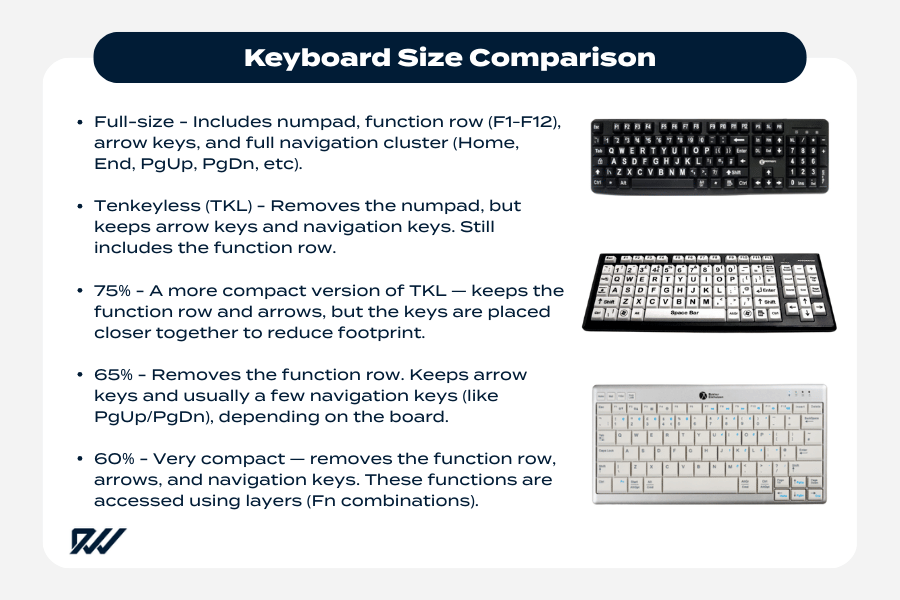
Keyboard size comparison showing the differences between full-size, TKL, 75%, 65% and 60% layouts.
When comparing compact keyboards to alternatives such as full-size, TKL (tenkeyless), and mini layouts, the biggest difference is how many keys are included and how they are arranged.
Full-size keyboards offer every dedicated key, but they take up the most space. Tenkeyless removes the numeric keypad, while mini keyboards—like the 60% and 65% layouts—remove even more dedicated clusters in favour of function layers and shortcut combinations.
Modern compact keyboards use intelligent layouts that allow users to access missing keys through combinations, helping to keep the device lightweight and travel-friendly while still providing full functionality.
Key differences between keyboard sizes
- Full-size keyboards include numpad, function row, arrows, and navigation keys.
- Tenkeyless (TKL) boards remove the numpad but keep arrows and navigation keys.
- 65% keyboards remove the function row but usually keep dedicated arrow keys, while 60% keyboards remove the function row, navigation cluster, and often the dedicated arrow keys.
- Mini keyboards (40%) use heavy layering and are designed for advanced typists or enthusiasts.
- Ergonomics and desk space improve as the layout gets smaller due to reduced shoulder reach.
Because of these variations, choosing the right layout comes down to how many dedicated keys you truly rely on during your daily workflow.
How Compact Keyboards Achieve a Smaller Size
Compact keyboards shrink their footprint by combining multiple keys into multi-function layers operated with an Fn key. Instead of spreading out across the desk, essential keys—like F1-F12, media controls, and navigation—are accessed through combinations that become second-nature after a short adjustment period.
Many compact models also shorten spacing between keys, use thinner bezels, and remove unused areas around the keybed to achieve a sleek, modern look.
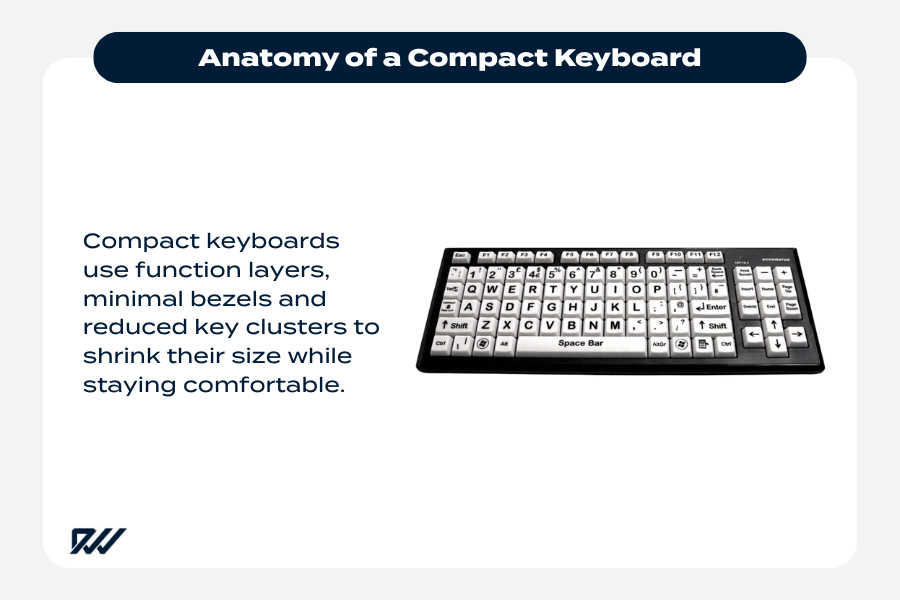
Anatomy of a compact keyboard, showing how reduced key clusters and function layers help minimise size.
The design elements that reduce keyboard size
- Function-layer shortcuts replace dedicated keys such as F-keys and media controls.
- Reduced key clusters like the numpad or navigation block shrink the footprint.
- Minimal bezels and slim casings create a cleaner, more compact profile.
- Optimised key spacing maintains typing comfort without wasting surface area.
- Wireless or low-profile designs enhance portability and convenience.
These design choices work together to provide a portable, lightweight keyboard that still feels comfortable and intuitive, even for long typing sessions.
Why People Choose Compact Keyboards (Benefits)
Compact keyboards are becoming increasingly popular because they offer a blend of ergonomics, portability, and space efficiency that traditional full-size keyboards simply can’t match.
For users working at smaller desks, setting up a minimalist workspace, or trying to reduce shoulder strain, a compact keyboard provides an immediate improvement in comfort and desk organisation.
They’re designed to bring the mouse closer, promote better desk posture, and create a more efficient typing experience—particularly in modern home offices and hybrid work environments.
Ergonomics & Reduced Strain
One of the most significant advantages of a compact keyboard is the ergonomic benefit that comes from keeping your hands closer to the centre of your body. By eliminating the numpad and extra key clusters, the keyboard becomes narrower, reducing the distance your arm needs to reach to your mouse.
This helps prevent shoulder tension and encourages a healthier typing posture—something especially important for people working long hours at a computer.
The ergonomic improvements don’t require specialised training or complicated setups; they’re simply a natural result of using a smaller device that promotes better alignment.
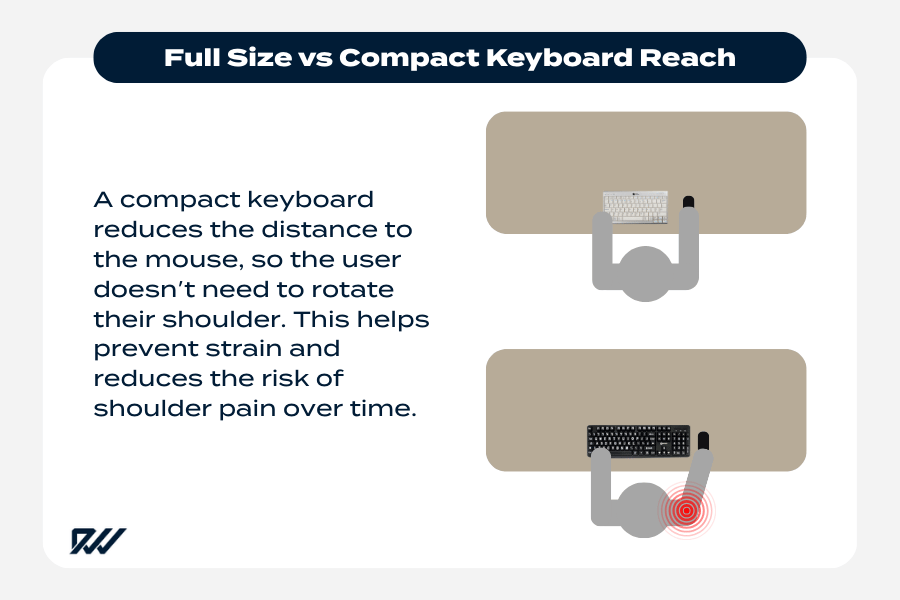
How compact keyboards reduce shoulder reach and help prevent strain.
How a compact keyboard improves ergonomic comfort
- Reduced shoulder reach thanks to a narrower layout.
- More natural wrist positioning, decreasing strain over long sessions.
- Improved mouse proximity for better arm alignment.
- Less desk clutter, allowing you to position items more comfortably.
- Better long-term comfort for remote workers and office professionals.
These advantages add up to a more comfortable typing experience that supports better posture throughout the day.
Space-Saving & Minimalist Desk Setup
Many people choose compact keyboards because they help create a clean, minimalist desk layout—something increasingly popular in UK home offices where space may be limited.
By reducing the keyboard footprint, you free up room for notebooks, external monitors, or simply a more organised and visually appealing workspace.
Compact keyboards also pair well with modern desk accessories, making them a favourite among productivity-focused users and minimalist enthusiasts.
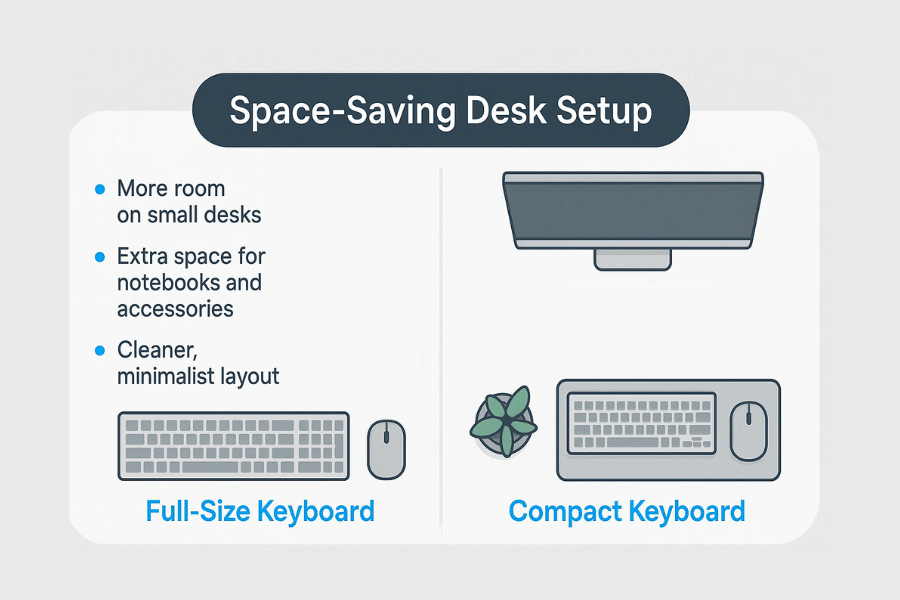
Compact keyboards free up valuable desk space and create a cleaner, more organised setup.
Benefits of saving space with a compact keyboard
- Ideal for small desks, student rooms, and shared workspaces.
- Allows more room for a large mouse mat or additional tech accessories.
- Creates a tidy, clutter-free setup that boosts focus and productivity.
- Pairs well with laptop risers and monitor arms for better ergonomics.
- Enhances the overall aesthetic of a modern, minimalist desk.
By simplifying your desk layout, you create an environment that feels more open, functional, and pleasant to work in—without compromising performance.
Portability for Remote and Hybrid Work
Compact keyboards are also highly valued for their portability. Whether you’re working between home and office, travelling for business, or simply prefer a lightweight typing solution that can move with you, compact keyboards are easy to slip into a bag and carry around.
Despite their smaller size, many models use full-height mechanical switches and sturdy casings, meaning you don’t have to sacrifice typing feel for portability.
Portable keyboard advantages
- Lightweight and travel-friendly for commuters and hybrid workers.
- Smaller footprint fits easily in backpacks or laptop bags.
- Wireless and Bluetooth options simplify multi-device workflows.
- Durable designs ensure reliability during transport.
- Consistent typing experience no matter where you’re working.
This portability makes compact keyboards a smart choice for anyone who doesn’t stay at the same desk every day but still wants a comfortable, high-quality typing experience.
Trade-Offs and Drawbacks of Compact Keyboards
While compact keyboards offer numerous advantages, they also come with a few compromises that may affect how well they fit into certain workflows. Because their primary goal is to reduce size, some layouts remove familiar clusters such as the numpad, dedicated function keys, or the navigational block.
This can introduce an adjustment period, especially for users who rely heavily on these keys for their everyday tasks. Understanding these drawbacks helps you make a balanced decision and ensures you choose a keyboard that genuinely supports your productivity.
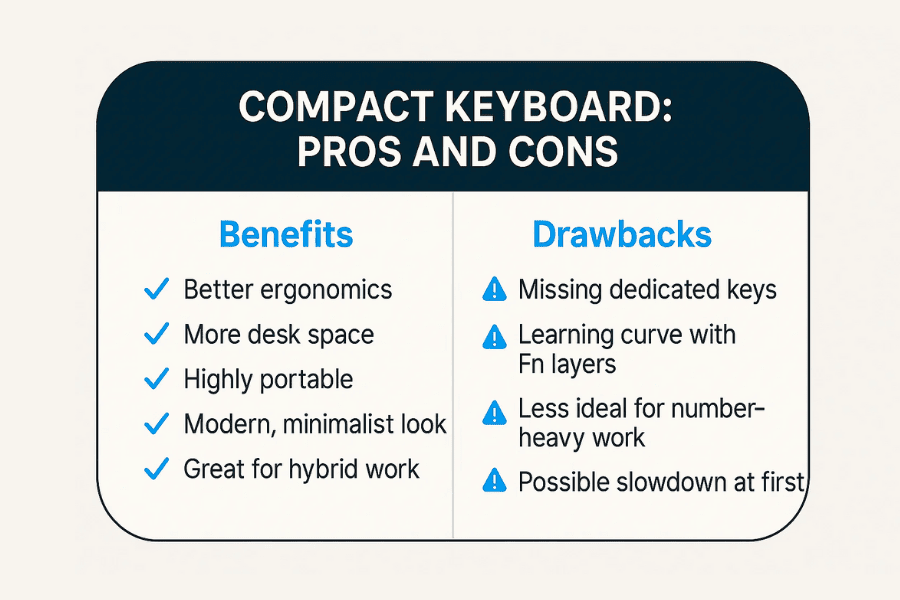
Key benefits and drawbacks of using a compact keyboard.
Missing Dedicated Keys and Reliance on Function Layers
One of the main limitations of compact keyboards is the absence of certain dedicated keys. Depending on the layout—whether 65%, 60%, or 40%—you may lose keys like F1–F12, Home, End, Page Up/Down, or even the arrow keys. Instead, these actions are accessed through Fn-layer shortcuts, which can take time to learn. While many users adapt quickly, others may find this slower or less intuitive, particularly if their workflow involves constant switching between commands.
This shift from dedicated keys to layered keys can affect speed and comfort, especially in tasks such as programming, gaming shortcuts, or productivity applications that rely on a full keyboard layout.
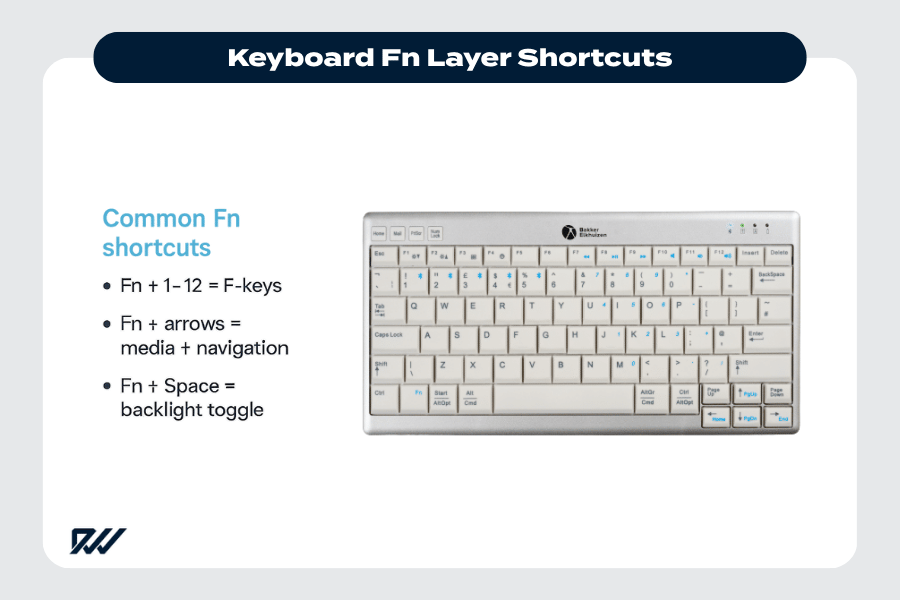
Common Fn layer shortcuts used on compact keyboards.
Common challenges caused by missing dedicated keys
- Increased reliance on Fn shortcuts, which may slow down early adoption.
- Reduced convenience for users who frequently access the function row.
- Navigation keys hidden in layers, which some typists may find disruptive.
- Potential issues for shortcut-heavy workflows, such as coding or editing.
- Less immediate access to media controls, depending on the model.
These limitations don’t make compact keyboards unusable—they simply require users to adjust their habits and learn new shortcuts over time.
Adaptation Period and Muscle Memory Changes
Switching from a full-size keyboard to a compact model often introduces a short adaptation period. Because the layout is condensed and many commands sit behind layers, your muscle memory must adjust.
This can initially affect speed or accuracy, particularly for users who type quickly or rely on specific shortcut patterns. However, most people find that after a few days or weeks of use, the new layout becomes second nature.
The speed of adaptation depends on the layout you choose: 75% and 65% layouts are often easier to transition to, while 60% and below may require a steeper learning curve.
Typical adjustments users may experience
- Relearning shortcut positions, especially for F-keys and navigation tools.
- Hand repositioning due to narrower key spacing.
- Temporary slowdown in typing speed while developing new habits.
- Changing workflow routines to accommodate function layers.
- Increased reliance on printed or digital layout guides during the first week.
Despite these challenges, many users find that compact keyboards ultimately improve efficiency once the new layout becomes familiar.
Not Ideal for Number-Heavy Workflows
For users who frequently handle spreadsheets, accounting tools, or data entry tasks, a compact keyboard may not be the best choice. The lack of a dedicated numeric keypad can significantly slow down tasks that depend on constant numerical input.
Although an external numpad can solve this problem, it adds extra cost and may defeat the purpose of reducing desk clutter.
Professionals who work regularly with figures may prefer a full-size or TKL keyboard to maintain efficiency and workflow speed.
Why compact keyboards may be less suitable for number-focused tasks
- No built-in numpad for fast numerical input.
- More keystrokes required when entering numbers via the top row.
- Workflow interruptions due to switching between layers.
- External numpad may be required, adding cost or space usage.
- Less efficient for finance, data entry, or spreadsheet-heavy roles.
While compact keyboards excel in ergonomics and portability, number-driven roles may benefit from a fuller layout to maintain optimal productivity.
Different Types of Compact Keyboards / Layouts Explained
Compact keyboards come in several different layout styles, each designed to balance size, usability, and functionality in a slightly different way. Understanding these layouts helps you choose a keyboard that fits your workflow—whether you value portability, dedicated arrow keys, or access to specific shortcuts.
From 75% boards to ultra-minimal 40% layouts, each option offers its own blend of convenience and compromise, allowing users to prioritise what matters most to them in a small form-factor keyboard.
Tenkeyless (TKL) Keyboards
Tenkeyless keyboards—often referred to as TKL keyboards—are the next size down from full-size models. They remove only the numeric keypad, leaving the function row, arrow keys, and navigation cluster intact.
This makes them a popular choice for users who want more mouse space and improved ergonomics without sacrificing essential keys. TKLs strike a natural balance between compactness and familiarity, making them ideal for office work, gaming, and general daily typing.
Because they maintain most of the traditional layout, TKL keyboards involve almost no learning curve, which is why they often serve as the entry point into the world of compact keyboards.
Why users choose a TKL keyboard
- Retains all essential keys except the number pad.
- Minimal adaptation required, making it easy for former full-size users.
- More desk space for mouse movement and accessories.
- Great for gaming, especially for low-sensitivity mouse players.
- Available in both wireless and mechanical versions.
A TKL keyboard is a strong option if you want compactness without dramatically changing how you type or navigate daily tasks.
75%, 65% and 60% Keyboard Layouts
Beyond TKL, compact keyboards begin to remove more key clusters to achieve a significantly smaller footprint. 75% keyboards keep the function row and arrow keys but tighten the spacing, producing a compact, vertical layout.
65% keyboards remove the function row but keep dedicated arrow keys and some navigation keys, making them one of the most popular small layouts. 60% keyboards remove the function row, the navigation cluster, and dedicated arrow keys, relying heavily on function layers and shortcuts.
These layouts cater to different user preferences, and each strikes its own balance between compactness and usability, making them favourites among enthusiasts, programmers, and minimalist desk setup fans.
Key differences between 75%, 65%, and 60% layouts
- 75% keyboards keep most full-size keys but in a tighter frame.
- 65% keyboards offer arrow keys and navigation keys with a more compact design.
- 60% keyboards eliminate many dedicated keys, relying on Fn layers.
- Smaller layouts increase portability for travel or hybrid work.
- Learning curve increases as more keys are removed.
These variations help users find a layout that fits their typing habits without sacrificing the benefits of a compact, streamlined desk setup.
Mini Layouts (40%) and Ultra-Compact Options
For users who want the smallest possible keyboard, 40% mini layouts represent the extreme end of compact design.
These keyboards remove almost everything except the alpha keys, with numbers, arrows, and punctuation accessed entirely through multiple layers. They are niche devices often preferred by keyboard enthusiasts who enjoy full customisation and are comfortable with advanced shortcut systems.
Mini layouts excel in ultimate portability and desk space savings, but they also demand the largest adjustment period and may not be suitable for beginners or productivity-heavy workflows.
Why some users choose ultra-compact keyboards
- Extremely small footprint, ideal for minimalist or travel setups.
- Highly customisable, especially in the mechanical keyboard community.
- Encourages efficient typing through layered shortcuts.
- Very lightweight and portable, perfect for on-the-go use.
- Creates a unique, uncluttered aesthetic for modern desk setups.
Although mini layouts are not for everyone, they offer unparalleled compactness and personalisation options for users willing to adapt to their unconventional design.
Are Compact Keyboards Good for Work, Gaming, and Everyday Use?
Compact keyboards are versatile enough to suit a wide range of activities, from office work to competitive gaming. Their smaller footprint creates a more efficient, comfortable workspace while promoting better posture throughout the day. The combination of portability, ergonomic benefits, and modern features—such as wireless connectivity and mechanical switches—make them suitable for almost any environment.
However, each use case has its own considerations, and understanding how compact keyboards perform across different scenarios helps determine whether they fit your personal workflow.
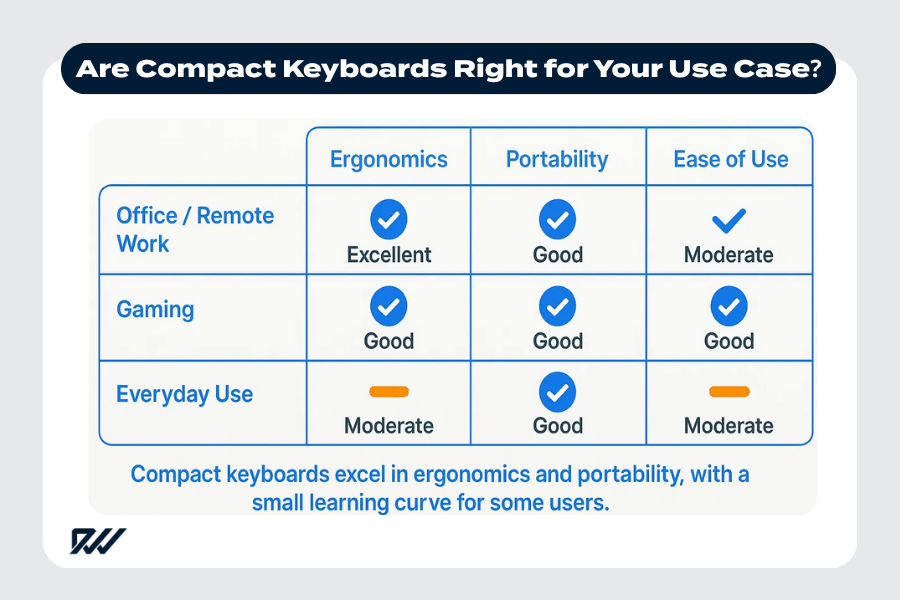
How compact keyboards perform across office work, gaming and everyday use.
Compact Keyboards for Office Work and Remote Setups
For office professionals and remote workers, compact keyboards offer a number of advantages, particularly in environments where desk space is limited. A smaller keyboard allows room for notebooks, documents, or an additional monitor without feeling cramped.
Many workers also find that the closer positioning of the keyboard and mouse reduces physical strain during long typing sessions, helping maintain comfort throughout the day. Combined with wireless functionality, compact keyboards provide a clean and streamlined workspace that supports productivity.
These features make compact keyboards especially appealing for hybrid workers who frequently switch between home and office setups.
Why compact keyboards work well in office environments
- More desk space for documents, accessories, and dual-monitor arrangements.
- Better ergonomics, reducing shoulder and wrist strain.
- Clean, minimalist setups that improve focus and organisation.
- Wireless options for clutter-free working and flexible positioning.
- Portable design ideal for hybrid and remote routines.
Overall, compact keyboards create a comfortable, efficient workspace suitable for long hours of typing and computer-based tasks.
Compact Keyboards for Gaming
In gaming, compact keyboards offer benefits that can significantly improve performance, especially for players who use large mouse ranges. With fewer keys and a smaller footprint, the keyboard takes up less space on the desk, allowing more room for low-sensitivity mouse movements common in shooters and competitive titles.
Many compact gaming keyboards also offer features such as mechanical switches, RGB lighting, and fast response times, ensuring you don’t sacrifice performance for size.
The reduced distance between keys can also make executing combos and in-game shortcuts faster and more efficient once the layout becomes familiar.
Gaming advantages of compact keyboards
- More mouse space, ideal for FPS, MOBA, and competitive gaming.
- Mechanical switches for faster response times and precision.
- Smaller, lighter setup makes repositioning easier during gameplay.
- Custom layers and macros streamline complex in-game commands.
- Enhanced mobility, useful for LAN events or gaming on the go.
With their ergonomic and spatial advantages, compact keyboards are a strong choice for gamers seeking more control and freedom of movement.
Everyday Use and General Typing Tasks
Compact keyboards also shine in everyday use, whether you’re browsing the web, typing emails, studying, or using your computer for general lifestyle tasks.
Their simple layouts and uncluttered design make them comfortable for casual typing while keeping your workspace organised. For users who enjoy a tidy, modern-looking setup, compact keyboards provide a practical and visually appealing option.
Because they’re easy to transport, they also work well for students or professionals who regularly use laptops but prefer a more comfortable external typing experience.
Benefits for everyday computing
- Minimal desk clutter, ideal for home environments.
- Comfortable typing due to closer key positioning and reduced reach.
- Compatible with laptops, tablets, and multiple devices via Bluetooth.
- Lightweight and portable, handy for travel or study sessions.
- Stylish, modern designs that complement contemporary tech setups.
For everyday users, compact keyboards offer the perfect mix of comfort, convenience, and practicality.
What to Look Out for When Buying a Compact Keyboard (UK Buyer’s Checklist)
When buying a compact keyboard, especially in the UK market, it pays to consider several factors to make sure the keyboard fits your typing habits, desk setup, and workflow.
Because compact keyboards trade size and key-density for portability and desk space, the details — layout type, key switches, connectivity, build quality, and extra features — matter more than with a full-size board.
Below are the key aspects to verify before you purchase, helping you find a balance between compactness and usability.
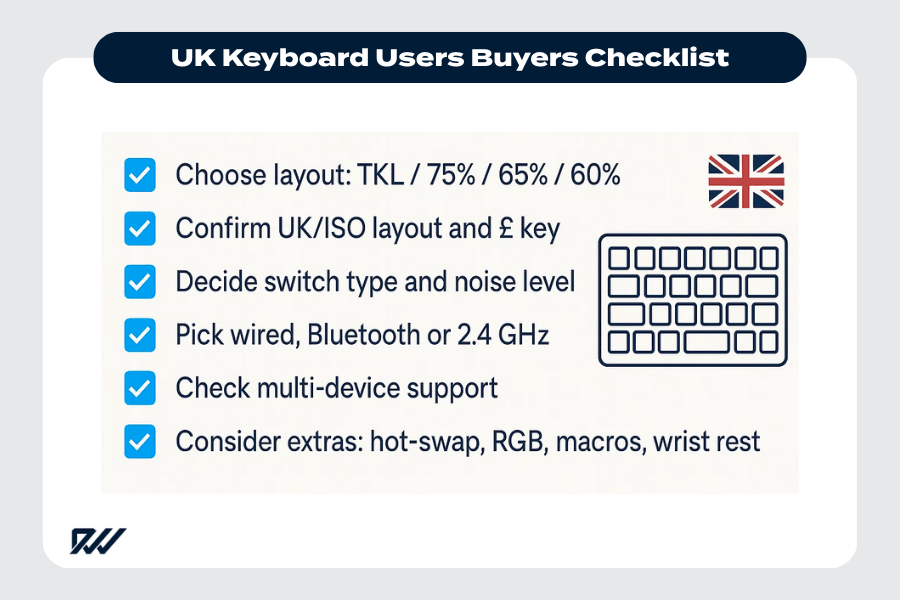
UK compact keyboard buyers checklist for choosing the right layout and features.
Layout and Key Needs — Make Sure the Layout Fits Your Workflow
Before you commit to a compact keyboard, think carefully about the layout and whether it meets your everyday needs. Compact keyboards come in various sizes (TKL, 75%, 65%, 60%, etc.), and each reduces certain keys to shrink the overall footprint. If you require a numeric keypad, frequent function keys, or dedicated navigation keys, a very compact layout may cause friction.
Also — especially in the UK — double-check that the keyboard uses the correct physical layout (e.g. UK/ISO layout) rather than a layout intended for another region; this includes proper key legends (like “£”, “#”, etc.) and appropriate positioning of keys like Enter, Shift, and Alt.
What to check regarding layout and key coverage
- Confirm if the layout is Tenkeyless (TKL), 75%, 65%, or 60% — depending on how many dedicated keys you need.
- Make sure the keyboard supports a UK/ISO physical layout (useful for UK-specific keys and symbols).
- Assess whether you rely on function keys, arrow keys or navigation keys often, and whether you’re comfortable with Fn-layer shortcuts.
- For data-entry or spreadsheet work: ensure you either have a numeric keypad or are fine using alternatives (external numpad or numeric row).
- Consider whether you might need expandable/modular options (e.g. detachable numpad, macro pad) for extra flexibility.
It’s worth spending a few minutes reflecting on how you type, code, game, or work — your layout choice should support those habits rather than demand a workaround.
Build Quality, Switches, Keycaps and Typing Feel
A compact keyboard isn’t just about its size — the switch type, build quality, and overall typing feel significantly influence long-term comfort, durability, and performance.
Many compact keyboards on the market are mechanical, offering robust durability and a satisfying typing experience, but not all mechanical boards are created equal. Because a compact board will likely be your daily driver, investing in a model with good materials and a switch type that suits your use is a smart move.
What to inspect for keyboard quality and feel
- Switch type: mechanical vs membrane. Mechanical tends to last much longer and deliver better feedback, but you may also consider noise level based on your environment.
- Keycap material: PBT keycaps are generally more durable and resist shine than cheaper ABS caps.
- Keyboard build (chassis, stabilisers, case quality): a sturdy build reduces wobble and improves longevity.
- Typing comfort: key travel, actuation force, tactile feedback (if mechanical), and overall ergonomics — especially important for prolonged typing sessions or coding.
- Sound and noise: if you’re in a shared space or quiet environment, consider quieter switches or a board with dampening features.
Choosing a well-built compact keyboard with switches and keycaps tuned to your preferences ensures that you get both the benefits of portability and a pleasant, sustainable typing experience.
Connectivity, Portability, and Compatibility
Another important consideration when buying a compact keyboard is how you intend to use it: whether you need wireless capability, multi-device pairing, portability, or stable wired connections. Because compact keyboards often appeal to remote workers, hybrid setups, or travel-savvy users, these factors can be deciding ones.
Connectivity and portability checklist
- Decide whether you need wired USB, Bluetooth, or 2.4 GHz wireless — each has trade-offs in latency, reliability, and convenience.
- If you travel or move between workspaces, opt for a lightweight build and compact footprint for easy packing.
- Check multi-device support if you switch between laptop, tablet, desktop — handy for hybrid users.
- Ensure OS compatibility (Windows/macOS/Linux), and that key legends or layouts match your operating system (especially for UK usage).
- Consider extras: detachable cables, carrying cases, or hot-swappable switches (if you want to customise later).
A compact keyboard that fits your connectivity needs and offers portability gives you flexibility — whether you’re working from home, on the go, or sharing a workspace.
Additional Features — What Extras Are Worth It?
Finally, the “extras” that some compact keyboards include can add significant value — or sometimes unnecessary cost — depending on what you want. These features can range from media controls and RGB lighting to programmability, hot-swappable switches, and ergonomic accessories.
Considering these carefully helps you avoid paying for features you don’t need while investing in those that improve your typing or gaming experience.
Extras to consider when buying a compact keyboard
- Hot-swappable switches — useful if you want to change switch type in the future without buying a new board.
- Programmable keys / macro support — handy for productivity, coding, or gaming shortcuts.
- Backlighting / RGB lighting — helpful for low-light typing or simply aesthetics (though not essential).
- Wrist rest or ergonomic accessories — improves comfort for long typing sessions.
- Build customisation (e.g. customisable keycaps, different layouts) — valuable for mechanical-keyboard enthusiasts.
- Durability extras — such as reinforced frames, high-quality stabilisers, sound-dampening features, or adjustable feet.
While not all users need every extra, being aware of their presence allows you to choose a keyboard that aligns with both your needs and budget.
Tips for Transitioning to a Compact Keyboard
Switching from a full-size keyboard to a compact layout can be a rewarding experience, but it often requires a short learning phase as your hands adapt to the new spacing and key placement.
The smaller footprint, condensed keys, and use of function layers can feel unfamiliar at first, but with the right approach, most users find the transition smooth and intuitive. These tips help you reduce frustration during the adjustment period and make the most out of your new compact typing experience.
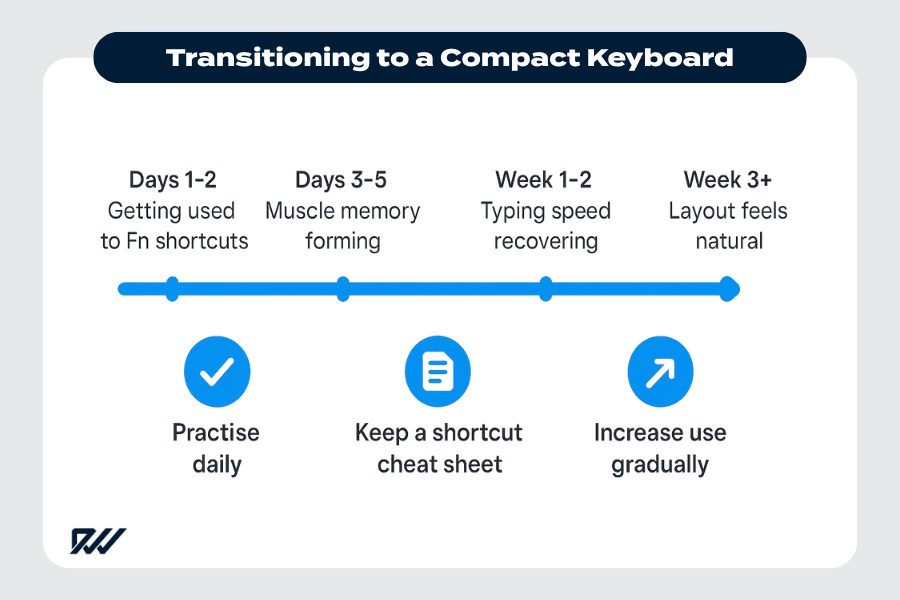
Timeline showing how users adapt to a compact keyboard and tips for a smoother transition.
How to Retrain Muscle Memory — Shortcuts, Fn-Layer Commands, Adapting from Full-Size Layout
When moving to a compact keyboard, the biggest shift is learning to use Fn-layer commands for functions that used to have dedicated keys. This often includes F1–F12, media controls, navigation keys, and shortcuts that rely on specific key positions.
Retraining your muscle memory is simply about consistent use and gradual familiarisation. Most compact keyboards include printed or visual cues to help you understand layer mappings, and many software tools allow custom remapping for a layout that feels more intuitive.
As you practise, your fingers will naturally begin to remember the new positions and combinations, making everyday typing feel fluid again.
Ways to adapt quickly to compact keyboard layouts
- Practise key combinations daily, even for simple tasks, to build muscle memory.
- Learn the Fn-layer mapping early — put a quick reference guide nearby for the first few days.
- Customise shortcuts using keyboard software to match your workflow.
- Start with a familiar layout size (e.g., 75% or 65%) if the jump to 60% feels too steep.
- Increase typing sessions gradually, allowing your hands to adapt naturally.
With consistent use and a little patience, your typing speed and accuracy will return — often improving beyond what you had with a full-size board.
Combining a Compact Keyboard with an External Numpad or Macro Pad if Needed
If your work occasionally requires more keys — such as a numpad for accounting or macros for editing — pairing your compact keyboard with an external numpad or macro pad gives you the best of both worlds. An external pad allows you to keep your main keyboard compact while still having access to additional keys on demand.
The benefit is flexibility: you can position the pad on either side of your keyboard, only plug it in when needed, or even replace it with a more specialised tool depending on your tasks.
This approach preserves desk space while letting you customise your setup to fit your workflow.
Benefits of using add-on accessories
- Adds functionality only when required, avoiding unnecessary bulk.
- Flexible placement — left or right side depending on comfort or handedness.
- Options for mechanical or membrane numpads, depending on preference.
- Macro pads can automate complex tasks, ideal for editing, programming, or gaming.
- Allows a modular setup, upgrading components independently.
For users who want compactness without sacrificing features, an external pad is the ideal middle ground.
Setting Up Your Desk Ergonomically (Mouse Position, Wrist Support, Desk Space)
A compact keyboard naturally improves ergonomics by reducing shoulder reach, but your overall setup still plays a crucial role in your comfort. Positioning your mouse closer to your body, choosing a suitable wrist rest, and organising your desk to reduce clutter can significantly improve your posture and reduce strain.
The smaller keyboard footprint creates more space for these adjustments, ultimately making your workspace feel more comfortable and efficient.
Setting up your desk intentionally helps you get the maximum ergonomic benefit from your compact keyboard.
Key ergonomic adjustments for comfortable use
- Place your mouse close to the keyboard to minimise shoulder strain.
- Use a wrist rest if you prefer a neutral wrist angle during long typing sessions.
- Keep the keyboard centred with your body to avoid twisting.
- Declutter your desk to create an open, comfortable working environment.
- Adjust keyboard tilt — flat or negative tilt can reduce wrist extension.
With the right desk, ergonomic keyboard and mouse setup, your working environment becomes even more comfortable and enjoyable to use daily.
Is a Compact Keyboard Right for You? — Who Will Benefit Most (and Who Might Not)
Compact keyboards offer a long list of advantages, but they aren’t the perfect solution for every user. Whether a compact keyboard suits you depends largely on your workflow, the type of typing you do, and how important certain key clusters are to your tasks.
Understanding who benefits most — and who may feel limited — helps you make a confident decision before switching layouts.
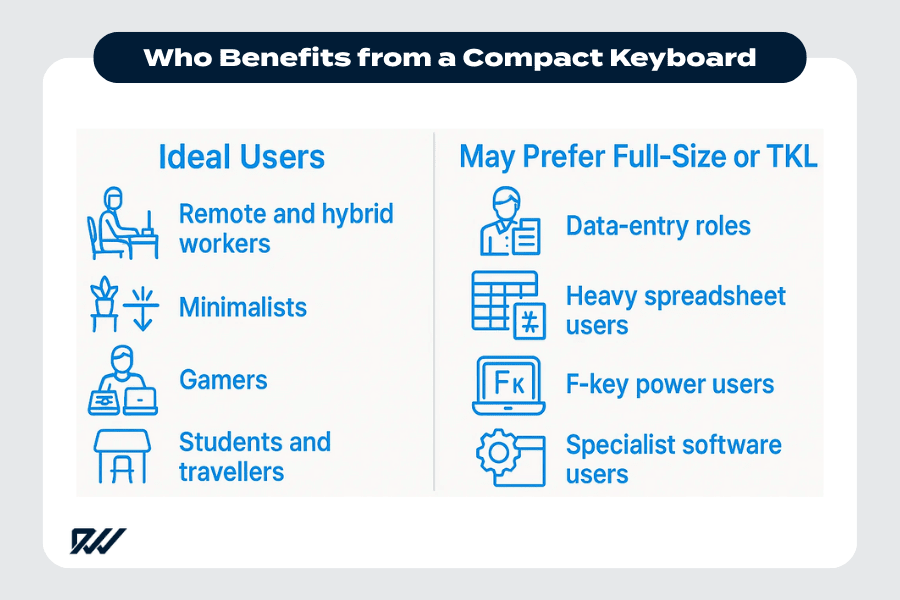
Who compact keyboards are best suited for and which users may prefer a full-size or TKL layout.
Ideal Users: Remote Workers, Minimalists, Gamers, Travellers, Users with Smaller Desks
Many people will find compact keyboards not only convenient but genuinely more comfortable and efficient than traditional full-size ones. If you value desk space, portability, a clean setup, or improved ergonomics, a compact layout can elevate your overall working experience.
For gamers, compact boards offer more mouse room and faster access to clustered keys. For travellers and hybrid workers, the lightweight design is a huge advantage.
People who benefit most from compact keyboards
- Remote and hybrid workers who want a tidy, ergonomic home office.
- Minimalists who prefer a clean, modern desk setup.
- Gamers who need extra mouse space for accuracy or low sensitivity.
- Students and travellers who need a lightweight, portable typing device.
- Users with smaller desks where full-size keyboards feel cramped.
For these groups, compact keyboards often provide a more comfortable and flexible typing experience.
Less Ideal: Heavy Spreadsheet / Number Pad Users, Those Who Rely on Function Keys or Full Key-Set Workflows
Compact keyboards may be less suitable for people with workflows that depend heavily on a full range of dedicated keys. If you frequently use the numpad for data entry, or rely on a full function row for shortcuts, a compact layout may slow you down or require accessories to compensate.
Users in roles like finance, administration, or certain types of engineering may prefer a full-size or TKL layout to avoid relying heavily on layered shortcuts.
Users who may prefer a full-size or TKL keyboard
- Data-entry professionals who need constant access to a numpad.
- Spreadsheet users who rely on fast numerical input.
- Power users of F-keys (e.g., developers, analysts) who want instant access.
- Professionals using specialised software with complex shortcut sets.
- People who dislike layered layouts or complex shortcut combinations.
These users may find that a compact keyboard introduces more friction than convenience.
Conclusion — Making the Switch: Final Verdict
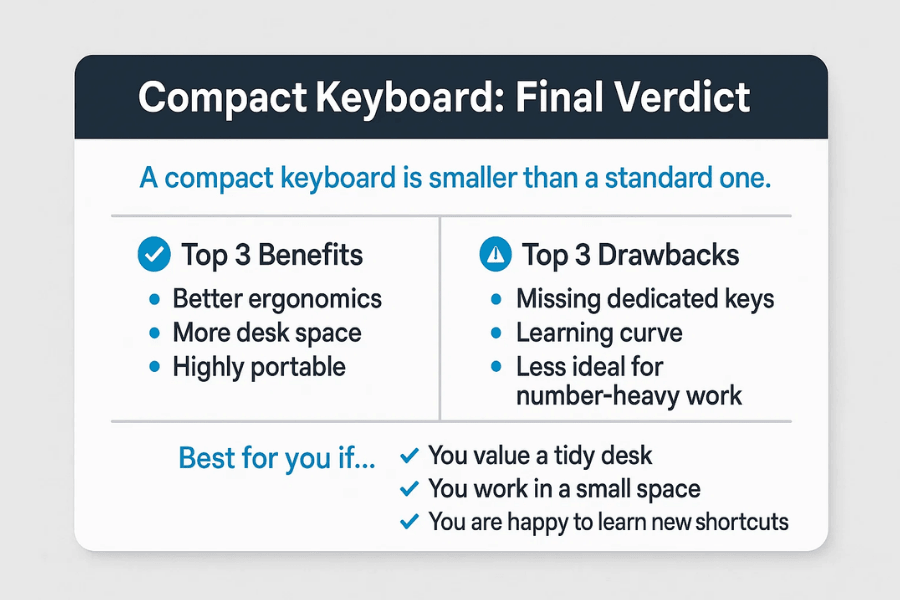
Final verdict on compact keyboards, including key benefits, drawbacks and ideal users.
Compact keyboards offer a powerful combination of portability, ergonomic comfort, and space-saving efficiency, making them a strong choice for a wide range of users. Whether you’re looking to streamline your desk setup, enhance your gaming performance, or create a more comfortable workspace, compact keyboards deliver impressive versatility.
While they come with a few compromises — particularly in terms of missing dedicated keys and the need to use Fn-layer shortcuts — most users find that the advantages outweigh the drawbacks once they adjust.
Ultimately, the decision comes down to your workflow, preferences, and how flexible you are with learning a new layout. For many people, switching to a compact keyboard leads to a cleaner workspace, better posture, and a more enjoyable typing experience. If you value efficiency and portability, a compact keyboard is likely to be a worthwhile upgrade.