Introduction
A high-quality monitor arm is one of the most impactful upgrades you can make to your workspace. Whether you’re building a professional home office, fitting out a corporate environment or refining a minimalist desk setup, the right ergonomic monitor mount not only improves posture but also frees up valuable desk space and enhances screen positioning accuracy.
Poor monitor placement contributes to neck strain, shoulder tension and long-term musculoskeletal issues. However, a properly selected monitor arm allows for correct eye alignment, adjustable height, smoother movement and better cable management — all of which are essential in modern flexible workspaces.
In this buyer’s guide, we rank ten leading monitor arms from respected brands including Ergotron, BakkerElkhuizen and Move. Our rankings combine ergonomic research, manufacturer positioning and real-world workspace requirements, allowing us to assess not only technical performance but also how each model fits into modern professional environments.
Whether you need a single monitor arm for a compact desk or a dual monitor arm for a productivity-focused workstation, this guide will help you choose the best monitor arm for your needs in 2026.
Quick Comparison Table
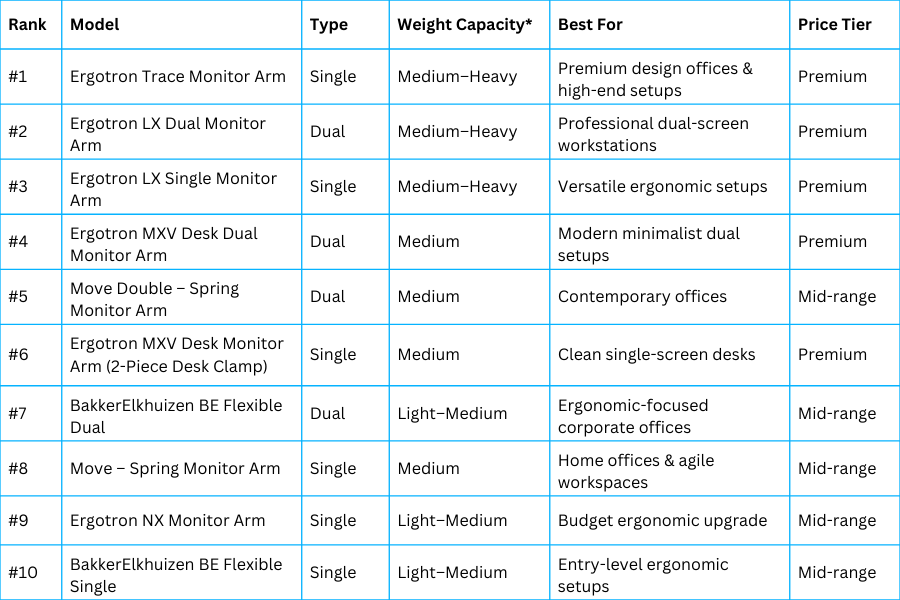
A ranked comparison of leading monitor arms, outlining single vs dual designs, weight support, ideal users and pricing tiers.
In the sections that follow, we examine each model in detail — explaining where it excels, where it compromises, and who it is best suited for.
We also include a practical buying guide to help you understand:
- Single vs dual monitor arms
- Gas spring vs mechanical tension systems
- Weight capacity considerations
- Desk clamp vs grommet mounting
- What truly defines the best ergonomic monitor mount
Let’s begin with our number one ranked option.
Ranked Reviews: Best Monitor Arms in 2026
#1 – Ergotron Trace Monitor Arm
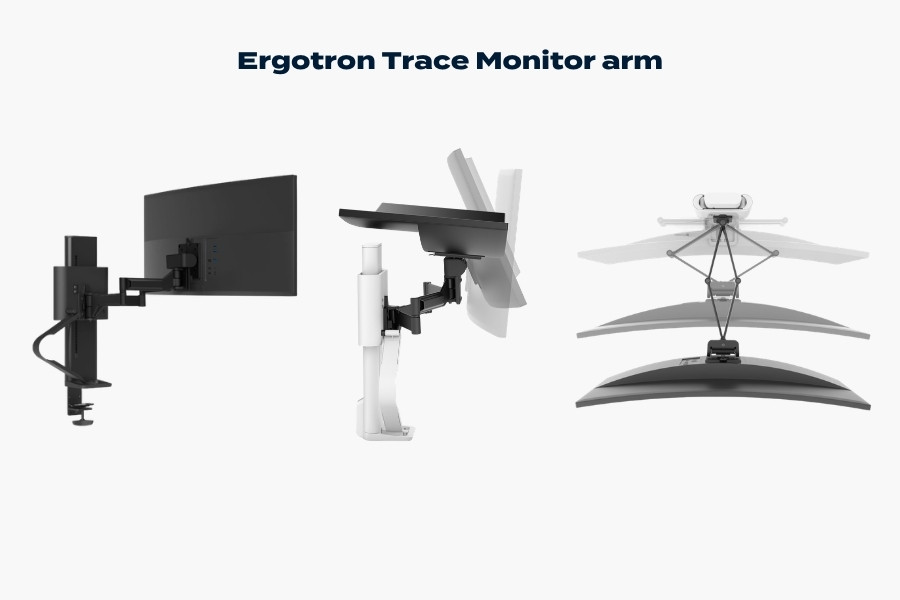
The Ergotron Trace monitor arm demonstrating smooth motion design, height adjustment and modern ergonomic positioning.
Verdict: The best overall monitor arm for premium workspaces, combining outstanding movement, build quality and modern design.
The Ergotron Trace Monitor Arm sets the benchmark for what a high-end ergonomic monitor mount should feel like. Not only is it designed for fluid movement and visual refinement, but it also blends performance engineering with minimalist aesthetics.
Key Features
- Smooth, precision-engineered movement
- Integrated cable management system
- Premium materials and finish
- Compact base footprint
- Designed for frequent daily repositioning
Pros
- Exceptional smoothness and articulation
- Elegant, contemporary appearance
- Strong cable management
- Highly durable construction
- Excellent long-term investment
Cons
- Premium pricing
- Over-specified for basic office needs
Best For
Professionals who frequently adjust their screen position, hot-desking environments, and premium office fit-outs where design matters as much as performance.
Price Category
Premium
#2 – Ergotron LX Dual Monitor Arm
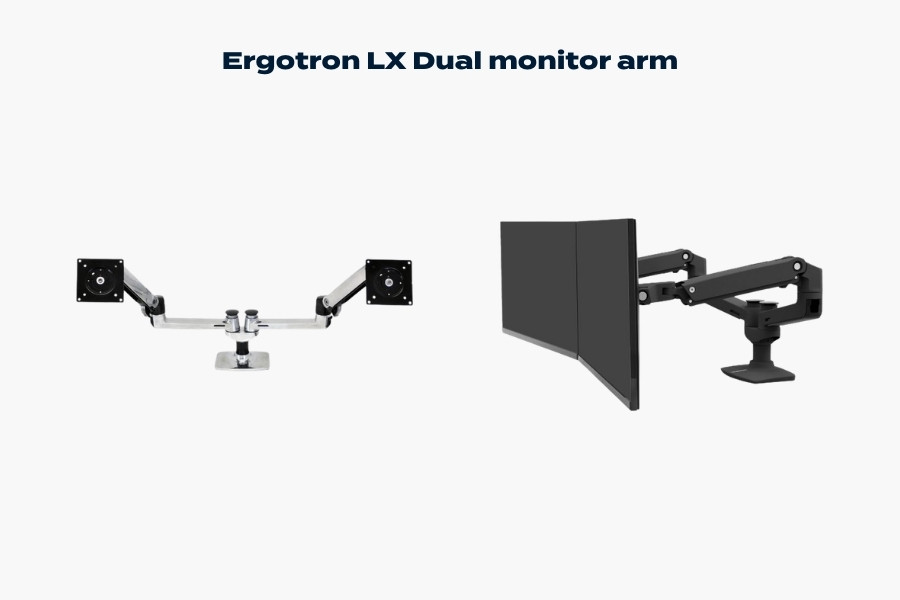
The Ergotron LX dual monitor arm demonstrating flexible positioning and stable support for professional dual-screen workstations.
Verdict: The gold standard dual monitor arm for professional productivity setups.
The Ergotron LX Dual Monitor Arm is widely regarded as one of the most reliable and adaptable dual monitor solutions on the market. Because it is built on Ergotron’s proven arm architecture, it offers strong weight capacity, smooth articulation and long-term durability.
It is ideal for finance professionals, programmers, content editors and anyone working across two screens full-time.
Key Features
- Dual-arm setup with strong independent adjustment
- Robust aluminium construction
- Wide height and reach range
- Integrated cable routing
- Trusted ergonomic performance
Pros
- Extremely stable dual support
- Broad compatibility with monitor sizes
- Long warranty reputation
- Reliable gas-spring movement
Cons
- Industrial aesthetic compared to newer designs
- Higher price than mid-range dual arms
Best For
Serious dual-monitor workstations where performance and longevity are the priority.
Price Category
Premium
#3 – Ergotron LX Single Monitor Arm
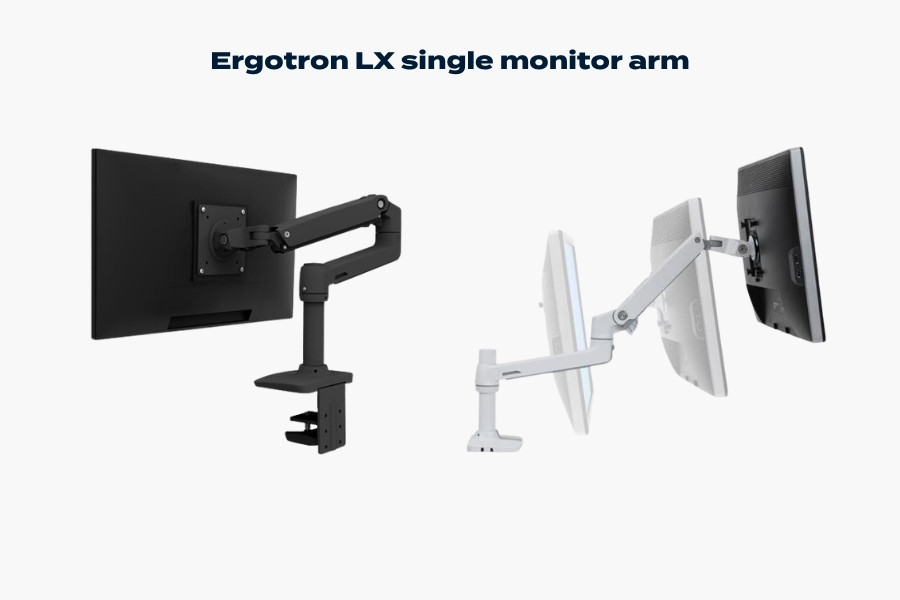
The Ergotron LX single monitor arm demonstrating flexible positioning, durable construction and ergonomic single-screen support.
Verdict: A highly versatile and dependable single monitor arm suitable for most professional setups.
The single-arm version of the LX retains the same structural strength and smooth adjustability as its dual counterpart. It strikes an excellent balance between performance and flexibility, making it one of the safest choices in the premium ergonomic monitor mount category.
It may not be as visually refined as the Trace, but in practical day-to-day use, it remains extremely capable.
Key Features
- Gas-spring height adjustment
- Wide extension and rotation range
- Durable aluminium construction
- Integrated cable management
Pros
- Excellent weight support range
- Proven durability
- Strong ergonomic adjustment
- Suitable for varied desk layouts
Cons
- Design slightly dated compared to Trace
- Premium pricing
Best For
Home offices and professional desks requiring reliable, long-term ergonomic performance.
Price Category
Premium
#4 – Ergotron MXV Desk Dual Monitor Arm
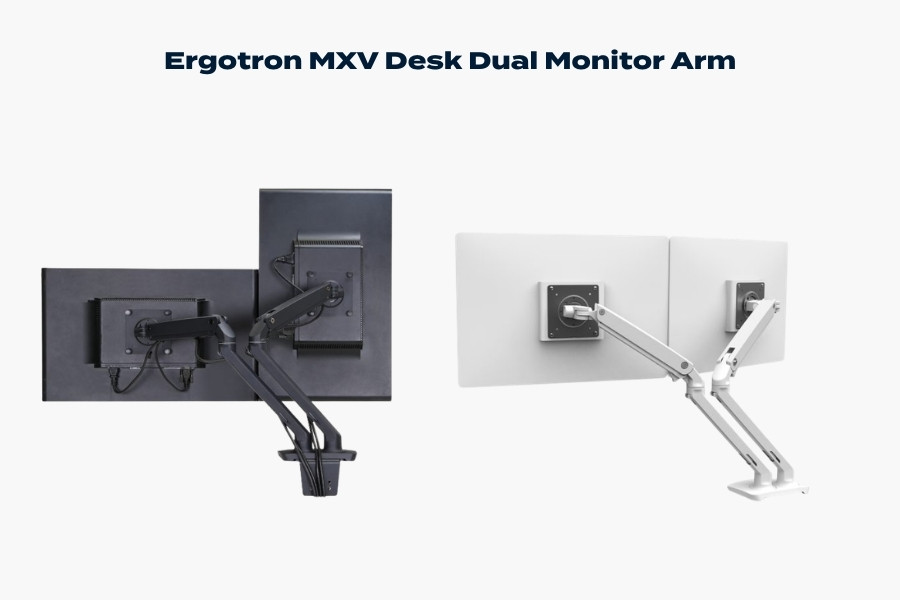
The Ergotron MXV desk dual monitor arm featuring a slim articulated design for modern dual-screen ergonomic workspaces.
Verdict: A refined dual monitor arm designed for modern minimalist desks.
The MXV Dual offers a more streamlined aesthetic compared to the LX, with a sleeker profile and refined cable management. While its weight range is typically narrower than the LX series, it delivers smooth performance in standard office environments.
It is particularly suited to modern corporate spaces where visual cohesion matters.
Key Features
- Slim, modern arm profile
- Tool-free adjustments
- Integrated cable routing
- Compact desk clamp
Pros
- Clean, modern appearance
- Smooth movement
- Less bulky than LX Dual
- Ideal for lighter dual displays
Cons
- Slightly lower weight range than LX
- Still premium priced
Best For
Minimalist offices and collaborative spaces requiring a tidy dual monitor arm solution.
Price Category
Premium
#5 – Move Double – Spring Monitor Arm
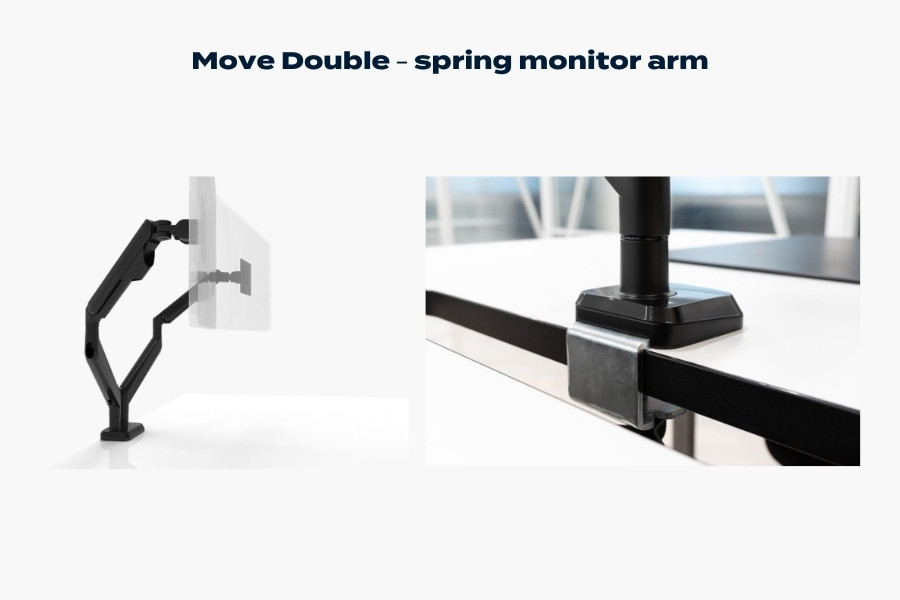
The Move Double spring monitor arm featuring articulated movement and a sturdy desk clamp installation for dual-screen ergonomic setups.
Verdict: A strong mid-range dual monitor arm offering modern styling and good everyday performance.
The Move Double – Spring Monitor Arm targets modern workspaces seeking smooth movement without stepping into premium pricing territory. Its spring-assisted mechanism provides solid adjustability for typical office monitors.
While it may not match Ergotron’s engineering heritage, it performs well for general professional use.
Key Features
- Spring-assisted height adjustment
- Dual-screen support
- Contemporary design
- Integrated cable routing
Pros
- Competitive pricing
- Clean visual profile
- Suitable for hybrid offices
- Straightforward installation
Cons
- Not as robust as premium models
- Limited suitability for heavier monitors
Best For
Businesses equipping multiple desks on a moderate budget.
Price Category
Mid-range
#6 – Ergotron MXV Desk Monitor Arm
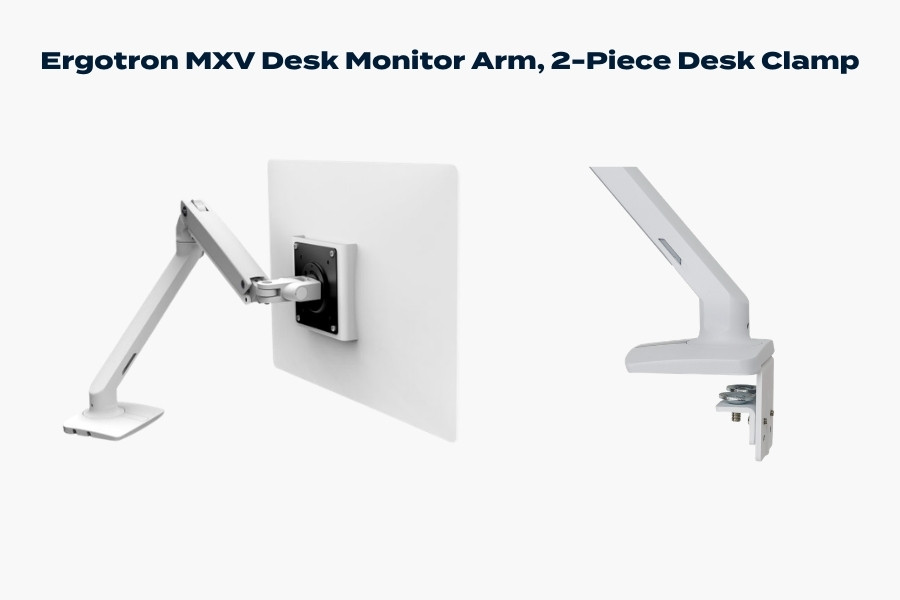
The Ergotron MXV desk monitor arm featuring a slim single-monitor design and a stable two-piece desk clamp installation.
Verdict: A refined single-screen solution that balances aesthetics with reliable ergonomic performance.
The MXV Desk Monitor Arm (2-Piece Desk Clamp) delivers the same clean design language as its dual counterpart but in a compact single-arm format. It is engineered for smooth day-to-day adjustment and works particularly well in modern offices where desk presentation matters.
While it does not quite match the broader weight range of the LX series, it offers more than enough capacity for standard business displays.
Key Features
- Slim, modern arm profile
- 2-piece desk clamp for stable mounting
- Integrated cable management
- Gas-spring height adjustment
Pros
- Elegant, uncluttered appearance
- Smooth and quiet adjustment
- Compact footprint
- Straightforward installation
Cons
- Premium pricing relative to capability
- Not ideal for very heavy monitors
Best For
Minimalist single-screen desks in corporate or home office settings.
Price Category
Premium
#7 – BakkerElkhuizen BE Flexible Dual
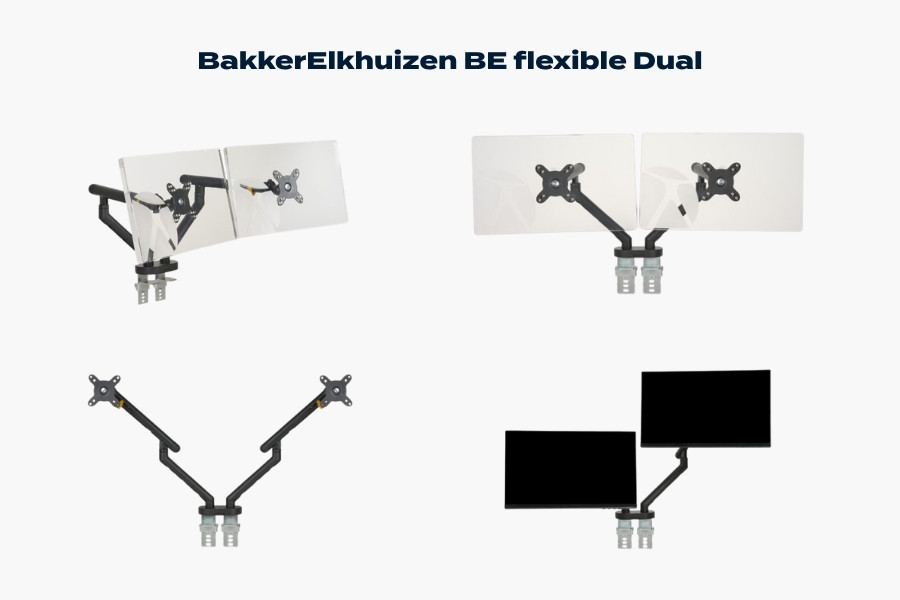
The BakkerElkhuizen BE Flexible dual monitor arm demonstrating ergonomic alignment and flexible positioning for dual-screen workstations.
Verdict: A solid ergonomics-focused dual monitor arm suited to structured office environments.
The BE Flexible Dual reflects BakkerElkhuizen’s strong ergonomic heritage. It is designed with workplace wellbeing in mind and fits well within regulated corporate environments that prioritise posture and compliance.
While it lacks the fluid premium feel of higher-ranked Ergotron models, it delivers dependable adjustment for everyday office use.
Key Features
- Dual monitor configuration
- Adjustable height and tilt
- Cable management routing
- Professional office styling
Pros
- Ergonomics-led brand positioning
- Suitable for corporate rollouts
- Stable dual support
- Sensible mid-range pricing
Cons
- Less refined movement than premium competitors
- More functional than design-led
Best For
Corporate offices seeking ergonomic compliance without premium pricing.
Price Category
Mid-range
#8 – Move – Spring Monitor Arm
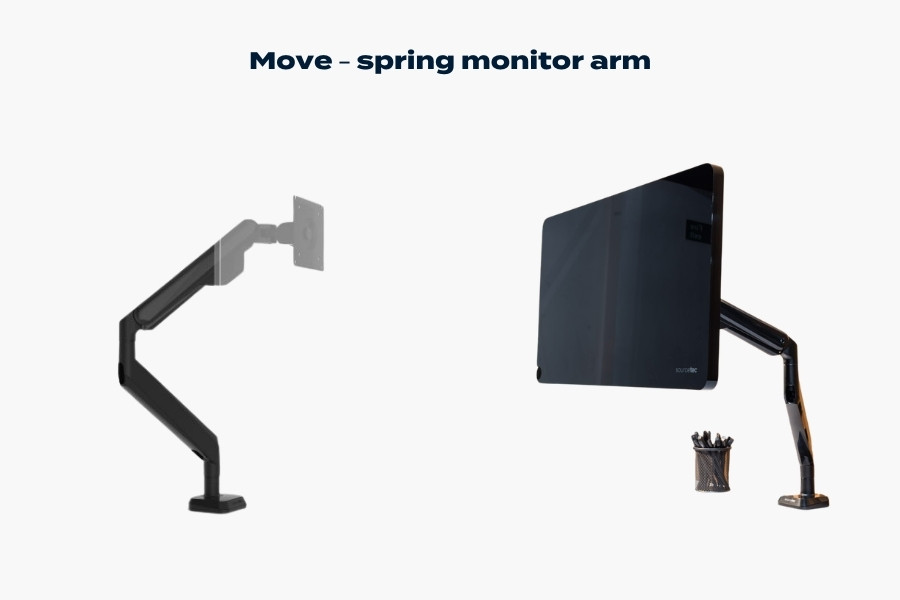
The Move spring monitor arm demonstrating flexible positioning and a clean single-monitor ergonomic workspace setup.
Verdict: A capable and modern single monitor arm for home and agile offices.
The Move – Spring Monitor Arm offers smooth spring-assisted movement and modern styling at a mid-range price point. It performs well for standard monitors and is particularly attractive for hybrid working environments.
Although it does not carry the engineering pedigree of higher-ranked models, it provides good everyday adjustability for typical desk setups.
Key Features
- Spring-assisted height adjustment
- Rotational and tilt flexibility
- Integrated cable routing
- Contemporary finish
Pros
- Good value for money
- Modern appearance
- Suitable for home offices
- Easy installation
Cons
- Limited support for heavier displays
- Slightly less durable than premium options
Best For
Home workers and small businesses upgrading from fixed monitor stands.
Price Category
Mid-range
#9 – Ergotron NX Monitor Arm
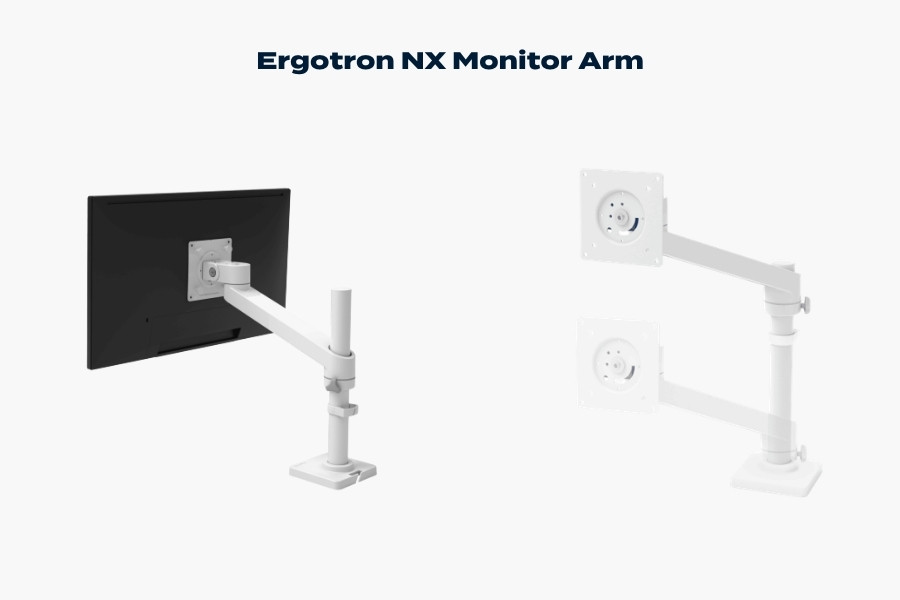
The Ergotron NX monitor arm demonstrating simple single-monitor adjustment, stable mounting and practical ergonomic positioning.
Verdict: An accessible entry point into the Ergotron ecosystem.
The Ergotron NX Monitor Arm is positioned as a more budget-conscious offering within the Ergotron range. It retains solid construction and dependable ergonomics but with a more simplified adjustment range compared to the LX or MXV lines.
It is a sensible upgrade for users who want Ergotron reliability without stepping into premium pricing.
Key Features
- Compact single-arm design
- Adjustable height and tilt
- Clean cable routing
- Trusted brand durability
Pros
- Strong brand reliability
- More affordable than LX or MXV
- Straightforward installation
- Suitable for most office monitors
Cons
- Narrower adjustment range
- Less premium feel
- Not ideal for large or ultrawide displays
Best For
Users seeking dependable ergonomic support at a lower price tier.
Price Category
Mid-range
#10 – BakkerElkhuizen BE Flexible Single
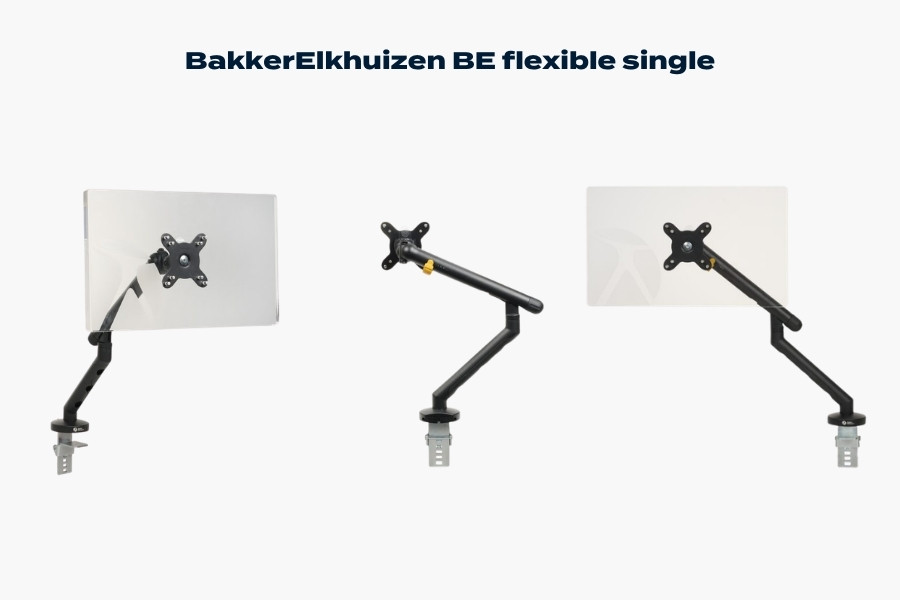
The BakkerElkhuizen BE Flexible single monitor arm demonstrating ergonomic positioning and adjustable single-screen support.
Verdict: A practical entry-level ergonomic monitor arm for light office use.
The BE Flexible Single is best suited to environments requiring a straightforward ergonomic upgrade without advanced articulation demands. It offers essential height and tilt adjustments but does not compete directly with higher-tier gas-spring systems.
Its strength lies in corporate ergonomic positioning rather than premium flexibility.
Key Features
- Single monitor support
- Basic height and tilt adjustment
- Integrated cable routing
- Office-oriented design
Pros
- Suitable for structured office settings
- Ergonomic brand credibility
- Sensible for large rollouts
Cons
- Limited movement range
- Less refined build compared to higher-ranked models
- Best suited to lighter monitors
Best For
Entry-level ergonomic improvements in regulated office environments.
Price Category
Mid-range
How to Choose the Right Ergonomic Monitor Mount
Selecting the best monitor arm is not simply about brand or price. Instead, the right choice depends on your monitor weight, workspace layout, adjustment needs and long-term usage patterns.
Below, we break down the key factors that should guide your decision.
Single vs Dual Monitor Arms
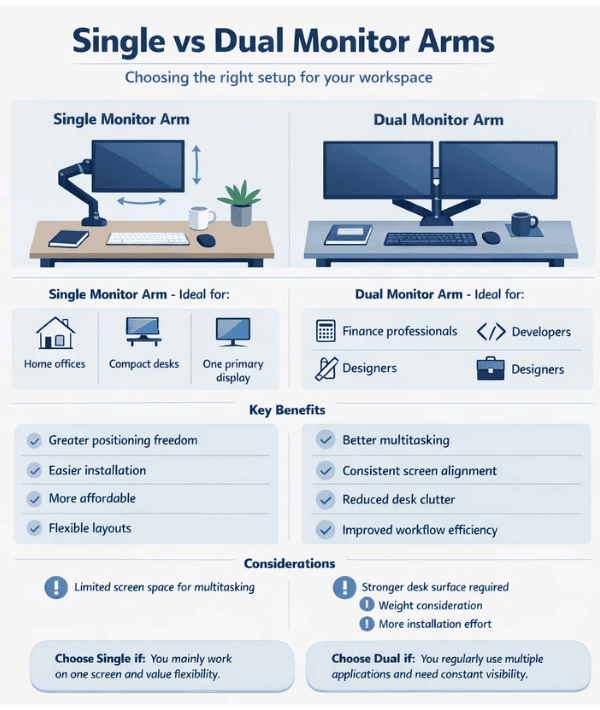
Single Monitor Arms
Ideal for:
- Home offices
- Compact desks
- Users with one primary display
Single arms offer greater positioning freedom per screen and typically provide a wider range of motion. They are also easier to install and more affordable.
Dual Monitor Arms
Ideal for:
- Finance professionals
- Developers
- Designers
- Productivity-heavy roles
A dual monitor arm supports two displays from a shared base. This reduces desk clutter and ensures consistent screen postitioning. However, dual arms require:
- Stronger desk surfaces
- Careful weight consideration
- Slightly more installation effort
If you frequently work across multiple applications, a dual monitor arm can significantly improve workflow efficiency.
Gas Spring vs Mechanical (Static) Arms
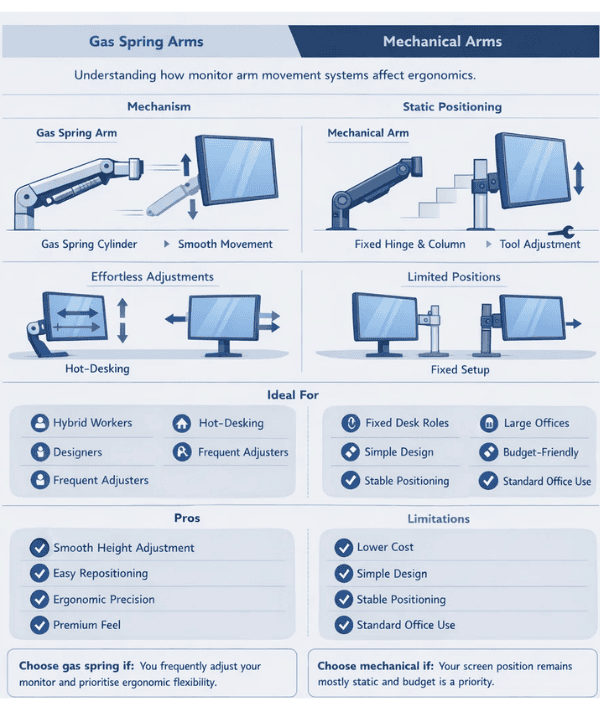
One of the most important distinctions in any monitor arm buying guide is the movement mechanism, as this directly affects daily usability.
Gas Spring Arms
- Smooth vertical height adjustment
- Effortless repositioning
- Ideal for hot-desking or frequent adjustment
- Typically found in mid-range to premium models
Gas-spring arms (such as those in the LX, MXV and Trace ranges) provide fluid movement and precise control.
Mechanical / Static Arms
- Fixed-height columns or limited adjustment
- More budget-friendly
- Suitable for structured office setups
- Best for users who rarely change screen position
If you adjust your monitor frequently, a gas spring system is strongly recommended.
Weight Capacity & Monitor Size
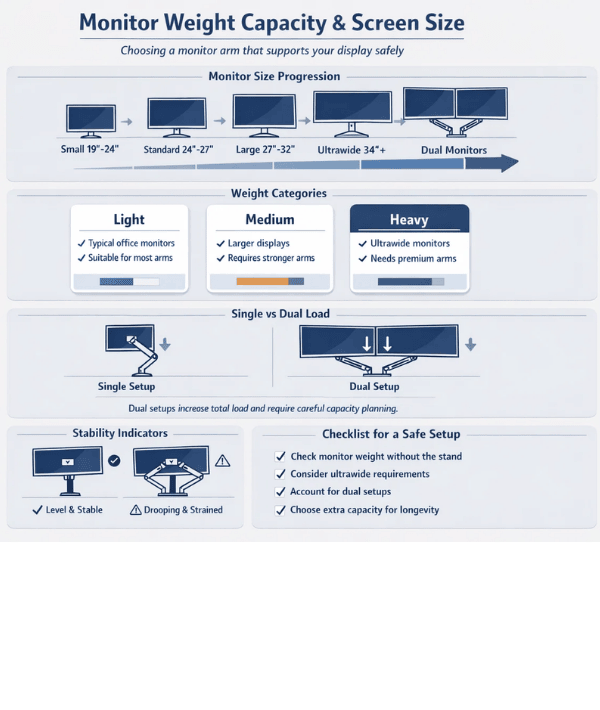
Before purchasing, always check your monitor’s weight (without its stand), as this determines whether the arm will perform correctly.
Consider:
- Standard office monitors typically fall within light–medium weight ranges
- Ultrawide displays require higher capacity arms
- Dual setups double the load on the mount
Higher-ranked models in this guide tend to offer:
- Broader weight compatibility
- Greater stability at full extension
- Better long-term durability
Under-specifying weight capacity can result in sagging or reduced adjustment accuracy over time.
Desk Clamp vs Grommet Mount
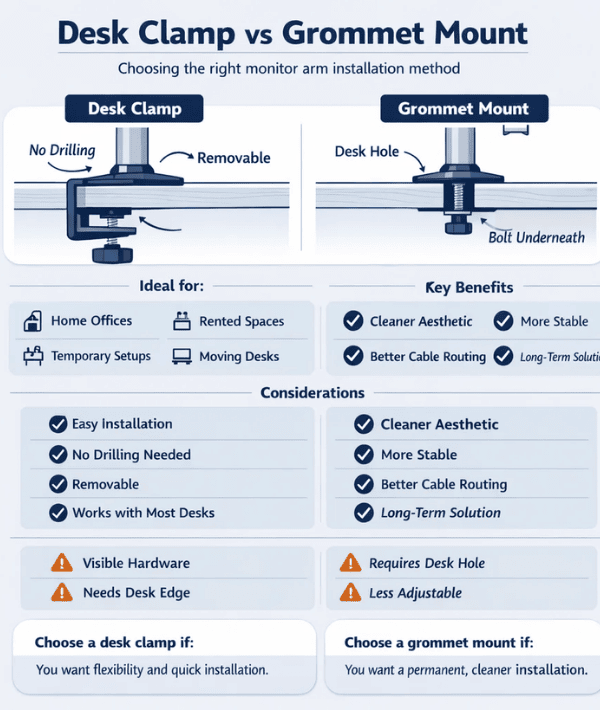
Most monitor arms use one of two mounting systems:
Desk Clamp
- Attaches to the rear edge of the desk
- Easy to install and remove
- No drilling required
- Suitable for most desks
Grommet Mount
- Passes through a hole in the desk
- Cleaner aesthetic
- Often more stable
- Suitable for permanent installations
For rented spaces or temporary setups, desk clamps are usually preferable. For corporate fit-outs or permanent workstations, grommet mounts offer a neater finish.
Build Quality & Longevity
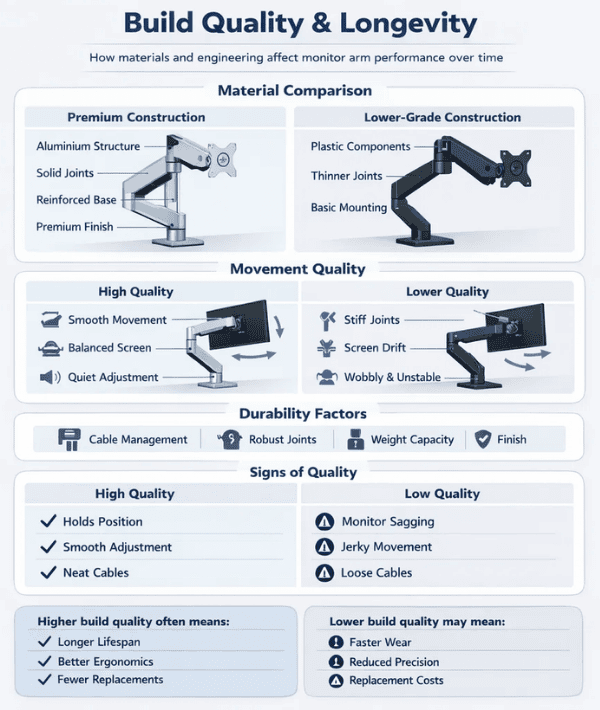
A monitor arm is a mechanical product under constant tension. Key build indicators include:
- Aluminium construction vs plastic components
- Smoothness of articulation joints
- Cable management durability
- Warranty reputation
- Stability at full extension
Premium arms often justify their cost through:
- Longer lifespan
- Better adjustment accuracy
- Reduced long-term replacement costs
Aesthetics & Workspace Design
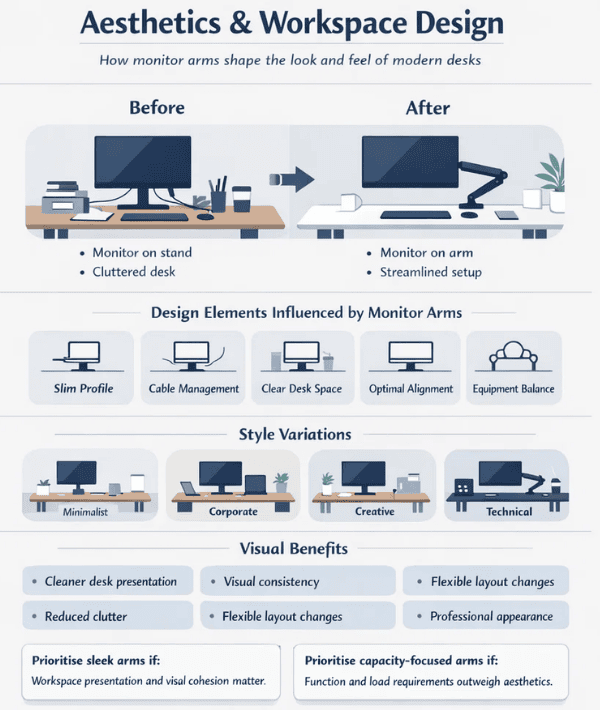
In modern offices, monitor arms are no longer purely functional.
Design considerations include:
- Profile thickness
- Finish quality
- Integrated cable routing
- Visual cohesion with desk systems
Minimalist environments may prioritise sleek arm profiles, while industrial or technical workspaces may focus more on load capacity and flexibility.
What Truly Defines the Best Monitor Arm?
The best monitor arm is one that:
- Supports your monitor weight comfortably
- Moves smoothly without drift
- Matches your workspace design
- Provides long-term durability
- Justifies its price through performance
For frequent adjustments and professional use, premium gas-spring arms remain the benchmark. For structured environments with fixed positioning, mid-range arms can deliver excellent value.
Next, we summarise the overall winners across different categories — including best overall, best premium option, best budget choice and best for heavy monitors — followed by a quick “Who Should Choose Each Model?” reference section.
Final Verdict: Which Monitor Arm Should You Choose?
After evaluating all ten models across build quality, adjustability, durability, ergonomics and value for money, clear leaders emerge in different categories.
Best Overall Monitor Arm
Ergotron Trace Monitor Arm
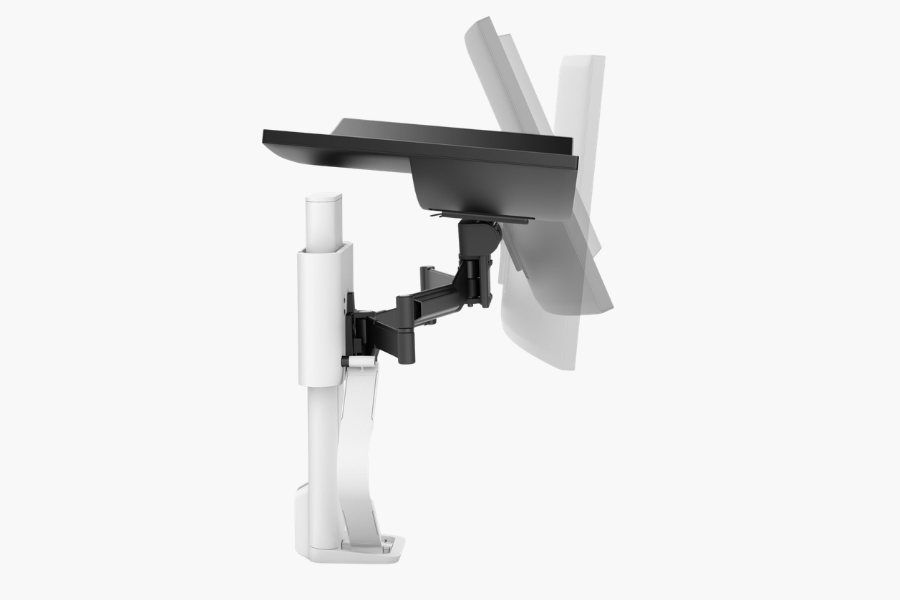
The Ergotron Trace monitor arm demonstrating smooth motion design and refined ergonomic screen positioning.
If budget allows, the Trace is the most refined and future-proof choice. It combines exceptional movement, premium materials and design sophistication. For executive desks, design-led offices and users who frequently reposition their screen, it sets the benchmark.
Best Premium Dual Monitor Arm
Ergotron LX Dual Monitor Arm
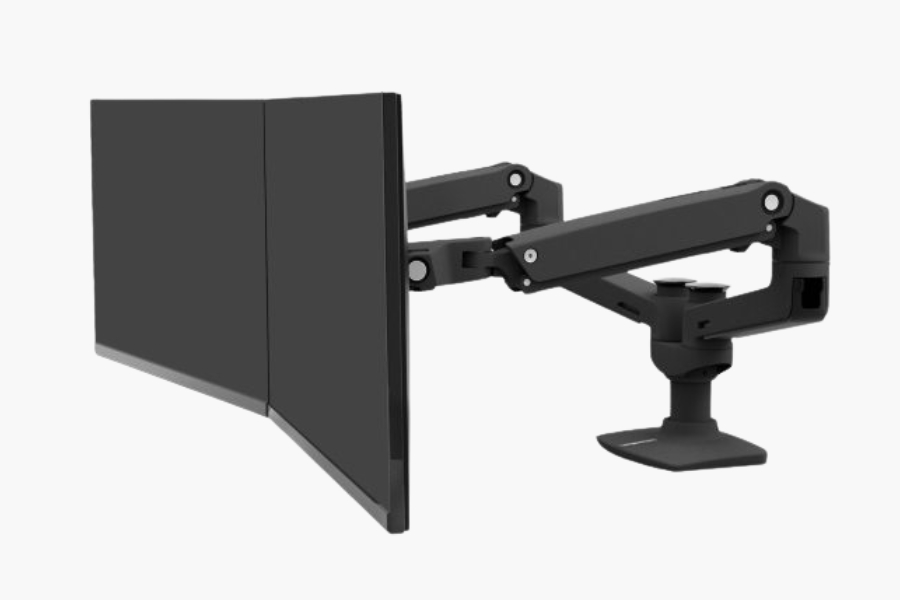
The Ergotron LX dual monitor arm providing reliable alignment and flexible positioning for professional dual-screen workstations.
For serious dual-screen productivity, the LX Dual remains one of the most dependable solutions available. Its structural strength, wide weight compatibility and long-term durability make it ideal for demanding professional environments.
Best Single Monitor All-Rounder
Ergotron LX Single Monitor Arm
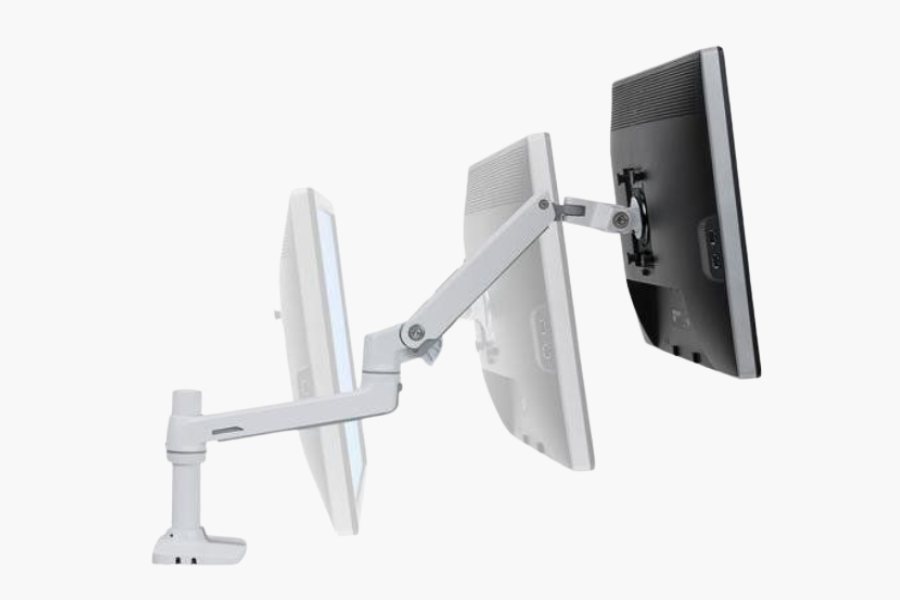
The Ergotron LX single monitor arm offering reliable adjustment, durable construction and versatile ergonomic positioning.
A versatile and proven performer, the LX Single strikes an excellent balance between cost and capability. It is suitable for most professional and home office setups.
Best Mid-Range Dual Option
Move Double – Spring Monitor Arm
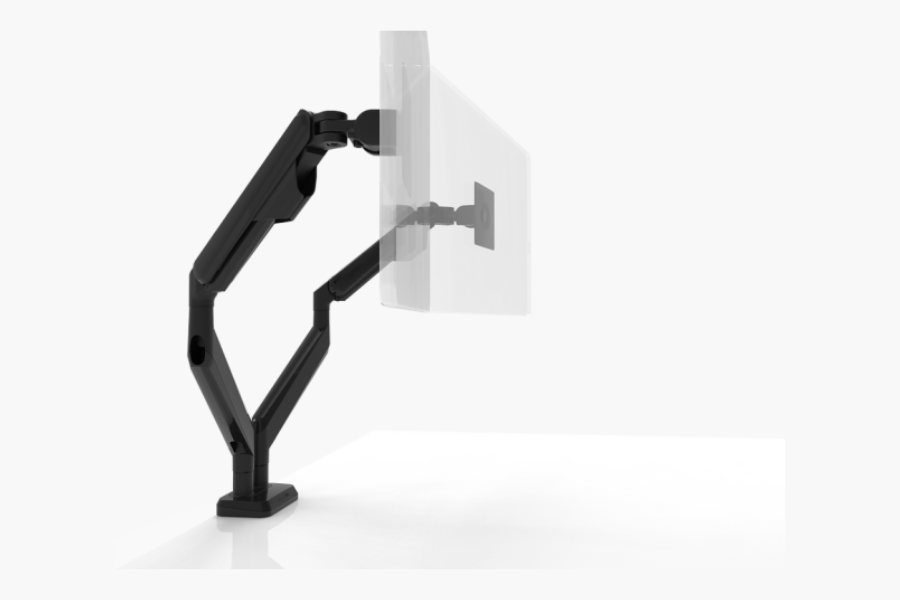
The Move spring monitor arm demonstrating smooth adjustment and modern ergonomic positioning for everyday workspaces.
For businesses outfitting multiple desks or hybrid workspaces, the Move Double delivers solid everyday performance at a more accessible price point.
Best for Corporate Ergonomic Rollouts
BakkerElkhuizen BE Flexible Dual
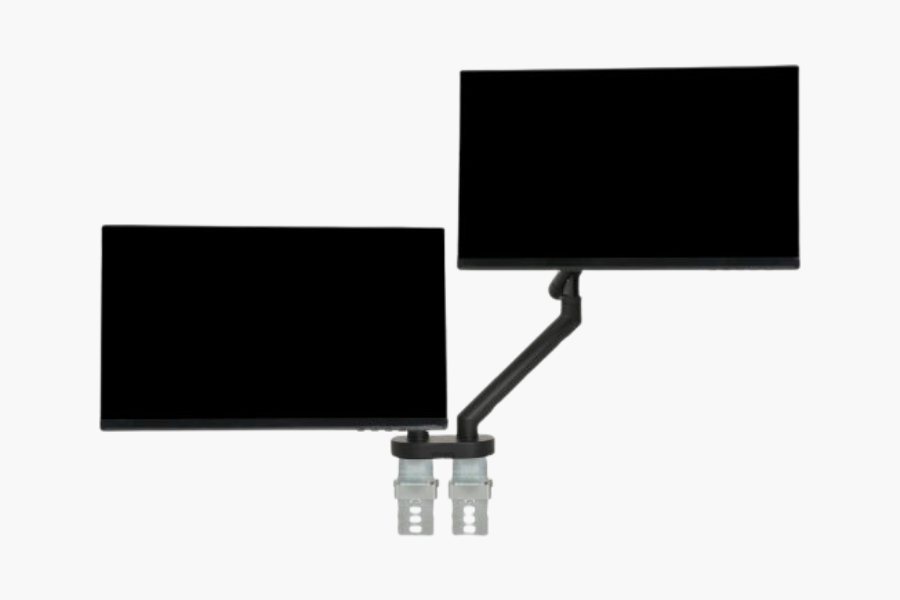
The BakkerElkhuizen BE Flexible dual monitor arm supporting aligned dual displays for structured ergonomic workspaces.
In structured office environments focused on ergonomic compliance rather than premium aesthetics, this model provides dependable performance at mid-range pricing.
Best Entry into a Premium Brand
Ergotron NX Monitor Arm
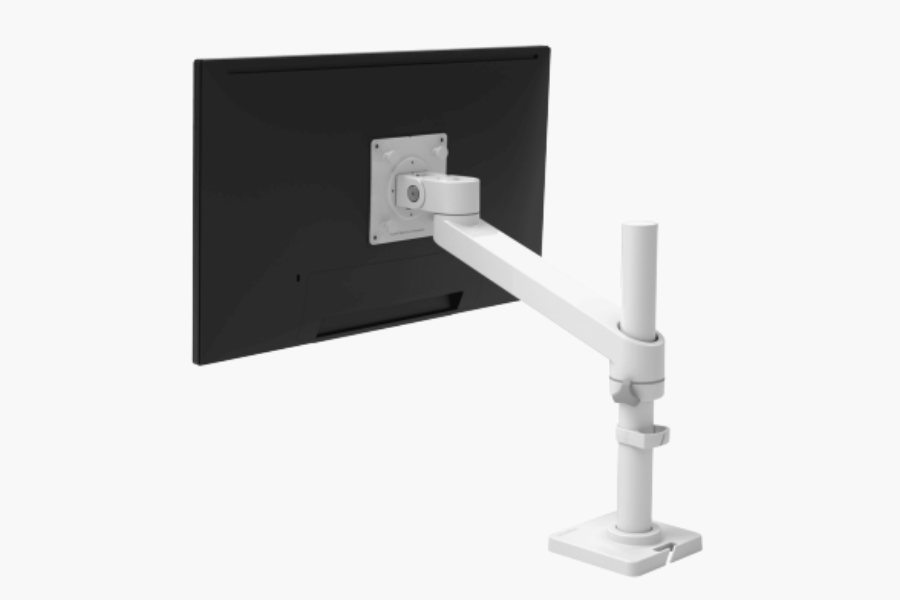
The Ergotron NX monitor arm providing a simple, reliable ergonomic upgrade for single-monitor workstations.
For users wanting Ergotron reliability without stepping into higher price tiers, the NX offers sensible, straightforward functionality.
Who Should Choose Each Model?
To simplify your decision, here is a quick-reference summary:
- Ergotron Trace Monitor Arm – Premium executive desks, design studios, high-adjustment environments
- Ergotron LX Dual Monitor Arm – Finance, development, trading desks, intensive dual-screen users
- Ergotron LX Single Monitor Arm – Professional home offices and long-term ergonomic setups
- Ergotron MXV Desk Dual Monitor Arm – Modern minimalist corporate workspaces
- Move Double – Spring Monitor Arm – Growing businesses balancing performance and cost
- Ergotron MXV Desk Monitor Arm (2-Piece Clamp) – Clean, modern single-screen desks
- BakkerElkhuizen BE Flexible Dual – Compliance-driven office environments
- Move – Spring Monitor Arm – Hybrid workers and home offices
- Ergotron NX Monitor Arm – Practical ergonomic upgrade from fixed stands
- BakkerElkhuizen BE Flexible Single – Entry-level ergonomic improvements in structured workplaces
Final Thoughts
The best monitor arm is not necessarily the most expensive; rather, it is the one that fits your monitor weight, workspace layout and daily working habits.
If you frequently adjust your screen height and position, invest in a high-quality gas-spring model. If your monitor remains largely static, a well-built mid-range option may be entirely sufficient.
A monitor arm is a long-term ergonomic investment. Choose carefully, prioritise build quality and weight compatibility, and match the arm to your working style rather than simply your budget.
By doing so, you will improve posture, free up desk space and create a more productive workspace for years to come.
please following the instructions continue onto the next section, using UK spelling
Conclusion: Choosing the Right Monitor Arm for Long-Term Ergonomics
Investing in the best monitor arm is ultimately about improving how you work every day. The right ergonomic monitor mount reduces neck strain, improves posture alignment and creates a cleaner, more adaptable workspace.
Across this guide, premium models from Ergotron consistently lead in movement precision, durability and long-term value. Their higher upfront cost is often justified by engineering quality and longevity.
Meanwhile, ergonomics-focused solutions from BakkerElkhuizen and modern spring-assisted options from the Move range provide credible mid-range alternatives, particularly for structured corporate rollouts or cost-conscious office upgrades.
Before You Buy, Confirm:
- Your monitor’s weight (without its stand)
- Your desk thickness and mounting compatibility
- Whether you need single or dual support
- How often you adjust screen position
- The visual style of your workspace
If you prioritise frequent repositioning and premium refinement, choose a high-end gas-spring arm.
If your setup is largely static, a well-built mid-range model will provide excellent value.
A monitor arm may seem like a simple accessory; however, in reality it is one of the most important ergonomic components in any modern workstation.
Choose carefully — and build a workspace that supports you properly for the long term.