- In the Workplace
- Mices/Trackpads
Wired vs Wireless Mice: Pros, Cons and Which You Should Choose

Introduction to Wired vs Wireless Mice
Choosing between a wired and a wireless mouse is one of the most common decisions people face when setting up a computer workspace.
Whether you’re working from home, gaming competitively, or simply browsing the web, the type of mouse you choose can have a noticeable impact on comfort, performance and everyday usability. Over the past decade, wireless technology has improved dramatically, narrowing the performance gap and making the decision far less clear-cut than it once was.
Despite these advancements, each option still carries unique advantages and drawbacks. Wired mice remain popular for their reliability and consistent connection, while wireless mice appeal to users who value a clean, clutter-free desk and enhanced mobility.
Understanding the key differences between the two helps ensure you choose a device that aligns with your habits, preferences and budget.

Thinking about upgrading your setup? Many users compare wired vs wireless mice to find the best option for comfort and productivity.
What Defines a Wired Mouse?
A wired mouse is a traditional input device that connects directly to a computer via a physical cable, usually USB. This direct link provides a stable, uninterrupted connection between the mouse and the computer, making wired devices highly dependable for tasks that require precision.
Because power and data travel through the cable, wired mice do not require batteries or charging, which many users view as a major convenience.
Key characteristics of wired mice include:
- A physical cable that connects directly to the computer
- Consistent power supply with no need for batteries
- Typically lower latency due to direct data transmission
- Generally lighter in weight compared to wireless alternatives
- Often more affordable, especially in budget and mid-range models
For users who prioritise responsiveness and reliability—such as competitive gamers or professionals who work for long hours—a wired mouse can feel like the safer and more predictable choice. However, the cable can sometimes restrict movement or contribute to desktop clutter, which is where wireless mice start to shine.
What Defines a Wireless Mouse?
A wireless mouse eliminates the need for a physical connection by using radio frequency (RF) technology or Bluetooth to communicate with the computer. This allows for greater freedom of movement and a tidier desk setup, making it particularly appealing for modern minimalist workspaces or laptop users who travel frequently.
Most wireless mice either use built-in rechargeable batteries or standard disposable ones.
Key characteristics of wireless mice include:
- No physical cable, offering a cleaner and more flexible user experience
- Connectivity via Bluetooth or a USB receiver (RF)
- Rechargeable or replaceable battery power
- Slightly higher latency in some models, though modern options have improved significantly
- Greater portability and ease of use away from a fixed workstation
While wireless technology has improved to the point where many models rival their wired counterparts, users should still consider factors such as battery life and potential signal interference. For general productivity, office work, and everyday computing, wireless mice often provide a more enjoyable and versatile experience.
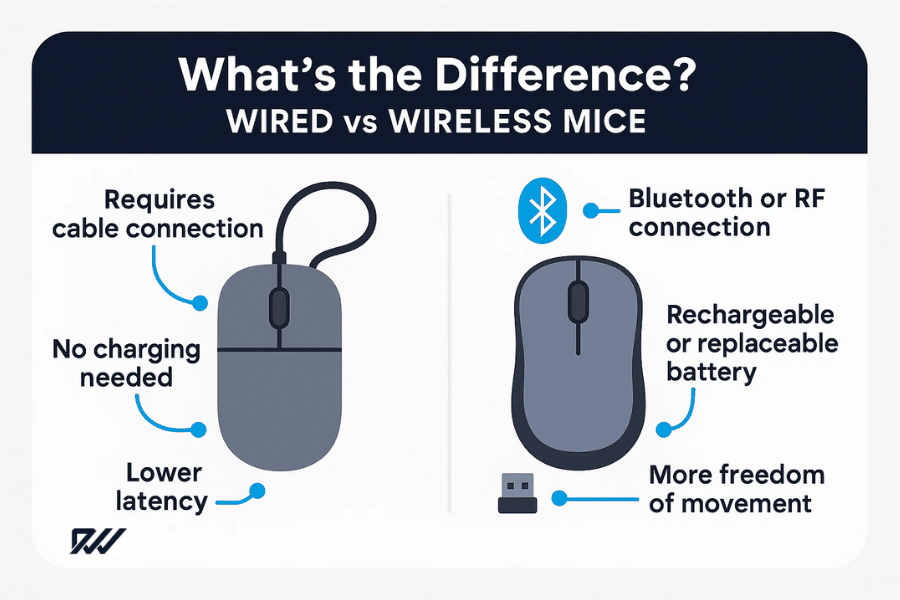
Side-by-side comparison of wired and wireless mice, highlighting connection type, battery needs, latency and movement freedom.
Why This Debate Matters Today
The wired versus wireless debate remains relevant because both types have evolved rapidly, each appealing to different kinds of users.
Advancements in wireless technology have reduced latency, increased battery efficiency and improved reliability, making the choice less about technical limitations and more about personal preference and use case. Meanwhile, wired mice continue to offer unbeatable consistency at often lower prices.
Key reasons the debate continues:
- Improvements in wireless technology have blurred the performance gap
- Growing demand for ergonomic, minimalist and cable-free setups
- Varying needs in gaming, productivity and creative work
- Budget differences between entry-level and premium models
- The increasing importance of portability for remote and hybrid workers
As new features emerge—such as ultra-lightweight designs, high-DPI sensors and advanced connectivity options—understanding the strengths and weaknesses of each type ensures you can make an informed decision. Whether you value absolute precision, desk aesthetics or on-the-go convenience, the right choice ultimately depends on how and where you use your mouse.
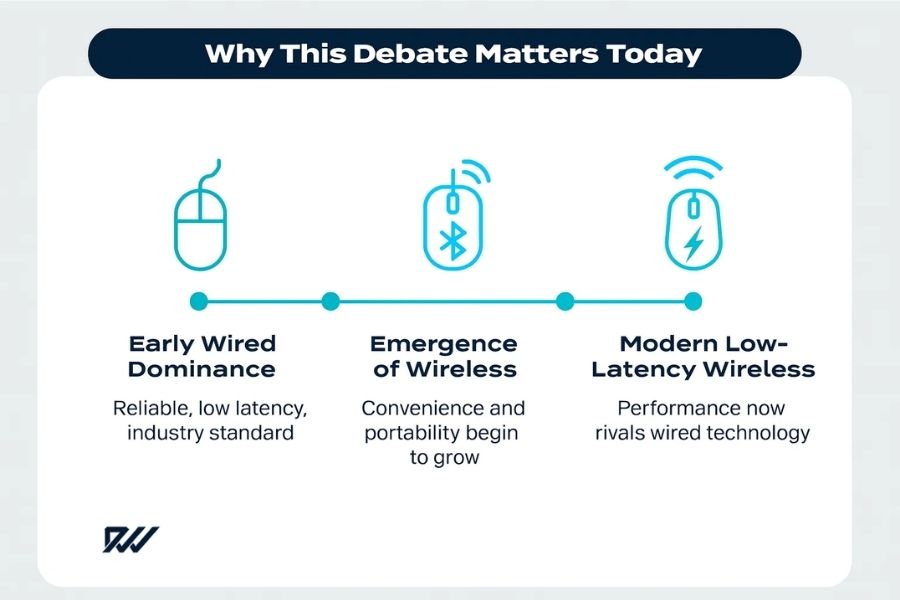
How mouse technology evolved: from reliable wired models to modern low-latency wireless mice that rival traditional performance.
Performance Comparison
Performance is often the deciding factor for users who rely heavily on precision and responsiveness, such as gamers, designers or professionals working with detailed applications. Although both wired and wireless mice now offer strong performance, subtle differences can still influence which option is best suited to your workflow.
Speed and Latency Differences
Latency refers to the delay between moving the mouse and seeing the cursor respond on screen. Historically, wired mice had a clear advantage because data travelled directly through the cable, creating virtually no lag. However, modern wireless technology—especially 2.4 GHz RF and advanced gaming-grade protocols—has closed that gap significantly.
Wireless gaming mice from reputable brands often provide latency that is indistinguishable from wired models, even at competitive levels. That said, very cheap wireless mice may still introduce noticeable lag, making them less ideal for fast-paced or precision tasks.
Key points:
- Wired mice offer consistently low latency due to direct data transmission.
- High-end wireless mice can now match or surpass wired response times.
- Budget wireless models may show input lag under heavy use or interference.
If speed and responsiveness are your top priorities, both wired and quality wireless mice can deliver excellent performance, but it’s important to choose wisely within your price range.
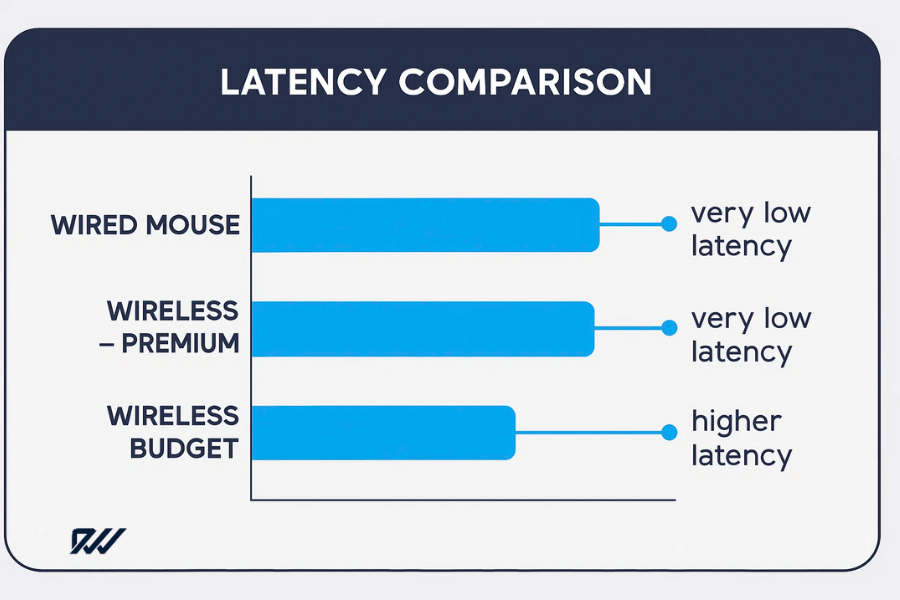
Latency comparison chart highlighting performance differences between wired, premium wireless and budget wireless mice.
Tracking Accuracy and Sensor Technology
A mouse’s accuracy is largely dictated by its sensor. Today’s sensors—whether optical or laser—are extremely capable, and there is no inherent difference between wired and wireless mice in terms of sensor quality. Instead, performance differences come from model variations, not connection type.
Wireless mice used to suffer from inconsistent tracking due to power-saving limitations, but improvements in sensor efficiency and firmware have largely eliminated this issue.
Key points:
- Sensor quality varies by model, not by wired or wireless design.
- High-quality sensors are common in both wired and wireless premium mice.
- Power-saving features in older wireless mice sometimes caused tracking issues, but this is uncommon today.
For detailed work, such as graphic design or photo editing, choosing a mouse with a high-quality sensor matters far more than choosing wired or wireless connectivity.
Reliability During Fast Movements
Reliability under fast or sudden movements is especially important in gaming and fast-paced workflows. Wired mice traditionally had the upper hand because they did not rely on signal transmissions that could be disrupted by interference. Wireless models, however, now employ advanced frequency-hopping and stronger signal protocols to maintain stable connections.
The only potential limitation is battery power: a low or dying battery can affect tracking performance in some wireless mice, whereas wired devices maintain consistent behaviour at all times.
Key points:
- Wired mice provide reliable performance with no signal interference.
- Modern wireless mice use advanced technology to ensure stable tracking.
- Battery levels can affect wireless reliability, especially in older or cheaper models.
Ultimately, both types can handle fast, high-intensity use, but wired mice offer the peace of mind of never being affected by battery or signal issues.
Convenience and Usability
Convenience plays a major role in determining which type of mouse suits your day-to-day needs. While wired mice prioritise consistency and simplicity, wireless mice excel in flexibility and desk aesthetics.
The right choice often depends on how you work, how much space you have, and how often you move between locations.
Cable Management vs Clutter-Free Desks
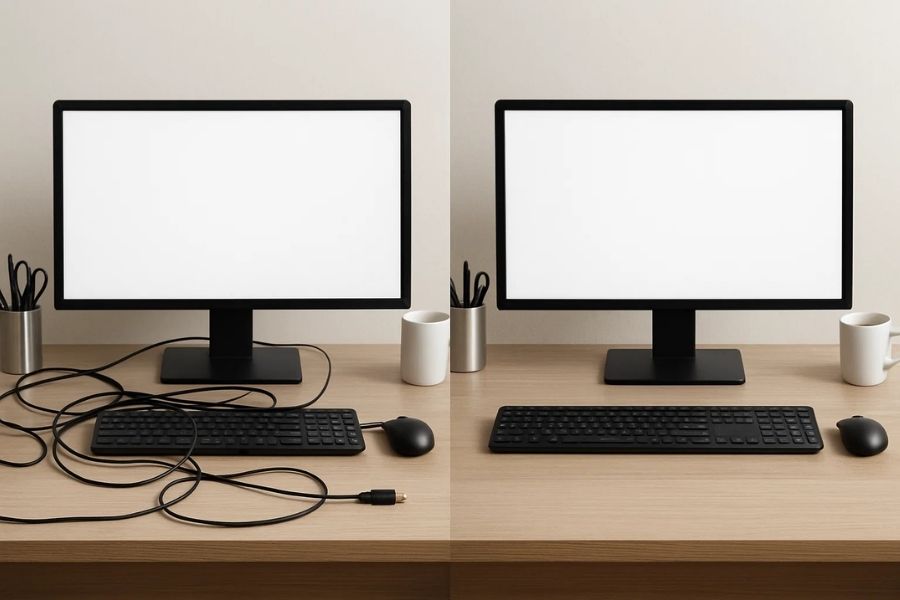
A clear comparison of cable clutter with wired setups versus the tidy, streamlined look achieved when using wireless mice.
One of the biggest practical differences between wired and wireless mice is the presence—or absence—of a cable. Wired mice are always tethered to the computer, which can be either a benefit or a nuisance depending on the user.
Cables can restrict movement, drag across the desk and create clutter, particularly in tight workspaces. Mouse bungees can help, but they are an extra accessory not everyone wants to buy or use. On the other hand, the cable guarantees constant power and a stable connection with no setup required.
Wireless mice remove the cable entirely, offering a more streamlined and minimalistic desktop. This is especially appealing to users who value a clean aesthetic or regularly reorganise their workspace.
Key points:
- Wired mice can cause cable drag or desk clutter.
- Accessories like bungees can reduce cable issues but add complexity.
- Wireless mice enable a cleaner, more flexible desktop layout.
For many users, removing the cable alone is reason enough to choose wireless, while others prefer the simplicity and reliability of a wired connection.
Portability and Travel Considerations
If you frequently travel, switch work locations or use a laptop on the go, portability becomes an important factor. Wireless mice are generally more suited to mobile use because they pack easily without the need to manage cables.
Some wireless mice are designed specifically for travel—compact, lightweight and durable enough to withstand being tossed into a bag. Wired mice can also be portable, but the cable can become tangled or damaged with repeated handling, reducing convenience.
Key points:
- Wireless mice are easier to pack and carry without cables.
- Many wireless models are designed for travel and compact use.
- Wired mice are portable but less tidy and more prone to cable wear.
If mobility is a key part of your routine, a wireless mouse usually offers a smoother experience.
Ease of Setup and Compatibility
Wired mice are largely plug-and-play: connect them to a USB port and they’re ready within seconds. This makes them universally compatible and ideal for users who prefer minimal setup or work across multiple devices that may not support Bluetooth.
Wireless mice can also be very easy to use, but their setup varies depending on the type. RF models require a USB receiver (dongle), while Bluetooth models need to be paired through device settings. Although both processes are straightforward, losing a receiver or dealing with pairing issues can add inconvenience.
Key points:
- Wired mice offer instant plug-and-play connectivity.
- Wireless RF mice require a receiver; losing it can prevent use.
- Bluetooth mice avoid dongles but may require occasional re-pairing.
Both options are generally user-friendly, but wired mice still hold the edge for simplicity, while wireless mice offer greater flexibility with compatible devices.
Battery Life and Power Options
Battery life is one of the most significant differentiators between wired and wireless mice. While wired mice draw constant power directly from your computer, wireless models rely on either rechargeable or disposable batteries.
This adds a layer of maintenance that some users find negligible and others find inconvenient. Understanding how each power option works can help you choose a mouse that fits your routine and tolerance for upkeep.
Rechargeable vs Replaceable Batteries
Wireless mice typically use one of two power systems: built-in rechargeable batteries or removable batteries (usually AA or AAA). Each approach has distinct advantages depending on how you prefer to manage power.
Rechargeable wireless mice are convenient for users who prefer not to purchase disposable batteries.
Many modern models charge via USB-C or use magnetic charging docks, making the process quick and intuitive. However, they need to be recharged periodically, and forgetting to charge can leave you temporarily without a functioning mouse.
Mice that use replaceable batteries offer long-running times—often several months on a single battery—but require keeping spares on hand. They are ideal for users who prefer long intervals between maintenance or who work in environments where charging isn’t practical.
Key points:
- Rechargeable mice are convenient and environmentally friendly.
- Replaceable batteries often last longer between power cycles.
- Forgetting to charge a rechargeable mouse can interrupt workflow.
Choosing between the two often comes down to personal preference and how often you want to think about power management.
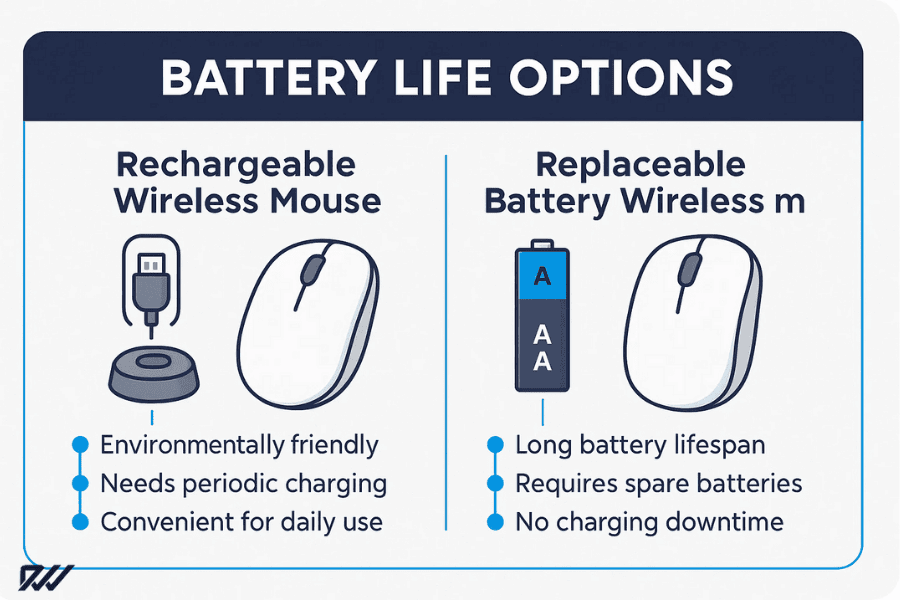
Battery life comparison showing the differences between rechargeable and replaceable battery wireless mice.
Battery Life Expectations for Modern Wireless Mice
Battery life has improved dramatically in recent years. Modern wireless mice can last anywhere from weeks to months on a single charge or battery, depending on usage patterns and features such as RGB lighting or high-performance mode.
Some high-end models boast over 100 hours of continuous use, and low-power productivity mice may last up to a year. Bluetooth mice generally consume less power than 2.4 GHz RF models, but the trade-off can be slightly higher latency.
Key points:
- Battery life varies widely depending on model and usage.
- Productivity mice often prioritise ultra-low power consumption.
- Gaming mice with RGB lighting drain battery more quickly.
Understanding your typical usage—intense gaming, office work, travel, or mixed use—helps determine what battery capacity you need.
Power Consumption Differences
Different connection types and sensors influence how much power a wireless mouse uses. High-performance sensors, RGB lighting and rapid polling rates increase energy consumption, making gaming models shorter-lived between charges. Productivity-focused mice often use energy-efficient sensors and low polling rates to extend battery life.
Wired mice avoid all of these concerns since they draw uninterrupted power from the computer. This can be a deciding factor for users who never want to think about recharging or replacing batteries.
Key points:
- Gaming features increase power consumption in wireless models.
- Productivity mice are designed for long-term efficiency.
- Wired mice maintain consistent power with zero maintenance.
If you prioritise uninterrupted use and zero maintenance, a wired mouse offers clear advantages. If mobility and freedom of movement are more important, the slight inconvenience of managing battery life is often worth the trade-off.
Durability and Maintenance
Durability is a key factor when choosing between a wired and wireless mouse, especially for users who rely on their devices daily for work, gaming or travel.
Although both types are built to withstand regular use, the presence or absence of a cable, internal battery components and build quality can all affect long-term reliability. Understanding these differences helps you select a mouse that will last and remain dependable over time.
Wear and Tear on Wired Cables
The cable on a wired mouse is both a functional necessity and a potential point of failure. Over time, frequent bending, twisting or pulling can lead to fraying, internal wire damage or reduced flexibility.
This is especially common for users who travel often or have limited desk space where cables repeatedly rub against edges.
That said, many modern wired mice now feature reinforced or braided cables designed to withstand heavy use. These improvements extend lifespan significantly, but the cable remains more vulnerable than the body of the mouse itself.
Key points:
- Cable wear is the most common failure point in wired mice.
- Frequent movement and desk friction accelerate deterioration.
- Reinforced or braided cables offer improved durability.
Despite the risk of cable damage, a well-built wired mouse can last for years with proper care—particularly when used in a stable, stationary setup.
Longevity of Wireless Components
Wireless mice eliminate cable wear entirely, which can contribute to better overall physical durability. However, they include additional internal components such as batteries, receivers and wireless transmitters. These parts can degrade over time or fail due to heavy use, heat exposure or manufacturing variance.
Rechargeable batteries, in particular, have a finite lifespan. After a few years, they may hold less charge or require more frequent recharging. Some high-end wireless mice allow battery replacement, but many are sealed units, meaning reduced battery performance can shorten the usable life of the device.
Key points:
- No cable means fewer external wear points in wireless mice.
- Internal batteries degrade with age and repeated charging cycles.
- RF receivers can be lost or damaged, rendering the mouse unusable.
For most users, the convenience of wireless operation outweighs these longevity concerns, but it’s worth considering if you prefer products that remain functional for the longest possible time.
How Environmental Factors Affect Each Type
Both wired and wireless mice can be affected by environmental conditions such as dust, humidity and temperature. Dust buildup can impact the scroll wheel, buttons and sensor performance, while extreme temperatures can affect battery health in wireless models.
Wireless mice may also face signal interference in environments crowded with Bluetooth or RF devices. This rarely causes permanent damage but can temporarily reduce responsiveness until conditions improve.
Key points:
- Dust and debris can affect sensors and mechanical parts on any mouse.
- Wireless batteries are sensitive to temperature and storage conditions.
- RF and Bluetooth interference may impact wireless performance.
Regular cleaning and mindful storage go a long way in maintaining a mouse’s performance, whether it’s wired or wireless. With basic care, both types can remain functional and reliable over several years.
Gaming Considerations

Gaming performance can vary depending on whether you choose wired vs wireless mice, especially for fast-paced, competitive play.
For gamers—particularly those involved in fast-paced or competitive play—the choice between a wired and wireless mouse can significantly impact performance. While both types are now capable of delivering high precision and responsiveness, certain characteristics may make one option more suitable depending on your gaming style, preferred genres and competitive level.
| Factor | Wired | Wireless |
| Latency | Excellent | Excellent (on premium models) |
| Weight | Typically lighter | Slightly heavier due to battery |
| Freedom of movement | Limited by cable | Excellent |
| Reliability | No battery concerns | Depends on battery level |
Latency Requirements for Competitive Gamers
Latency is one of the most important factors for competitive gaming. Even a slight delay between your hand movement and the on-screen response can affect accuracy in fast shooters, MOBAs or real-time strategy games. Traditionally, wired mice dominated this area due to their near-instant data transmission.
Modern wireless gaming mice, however, have evolved dramatically. Advanced low-latency technologies—such as high-speed 2.4 GHz protocols—allow many wireless models to match or outperform wired mice in response times. For most players, the difference is now imperceptible, though budget wireless models may still lag behind.
Key points:
- Professional gamers often prefer low-latency hardware for reliability.
- High-end wireless mice now offer latency comparable to wired models.
- Cheap wireless mice may introduce lag unsuitable for competitive play.
If you are a competitive gamer, opting for a reputable gaming-grade mouse is more important than choosing wired or wireless based solely on perceived latency.
Weight and Customisation Options
Weight affects how quickly and comfortably a mouse can be moved during gameplay. Wired mice tend to be slightly lighter because they lack internal batteries, which can make them appealing for FPS players who rely on rapid flick movements.
Wireless gaming mice, however, have become significantly lighter thanks to improved battery technology and honeycomb shell designs. Many now weigh nearly the same as wired models. Customisation features—such as adjustable weights, side buttons and DPI switches—are common in both types, although wired mice may offer a slightly broader range of budget-friendly customisable options.
Key points:
- Wired mice are often lighter, benefiting fast-twitch gaming.
- Wireless mice are catching up due to lightweight battery designs.
- Both wired and wireless models offer extensive customisation.
The ideal choice depends on whether you value a lighter mouse or the freedom to move without cable drag.
Popular Choices Among Esports Players
Esports professionals use both wired and wireless mice at the highest levels of competition, reflecting how far wireless performance has come. In titles like CS:GO, VALORANT and Overwatch, many players have switched to wireless models due to their low latency, high accuracy and freedom from cables.
That said, some players still prefer wired mice for their proven reliability and zero battery concerns during long sessions. The choice often comes down to personal preference and familiarity rather than strict performance limitations.
Key points:
- Esports players use both wired and wireless mice at pro levels.
- Wireless mice are increasingly popular due to improved performance.
- Long-standing pro players may stick with wired models out of habit.
Ultimately, both mouse types are fully viable for gaming, and the “better” choice depends on your own comfort and playing style rather than a universal advantage.
Price and Value Comparison
Price is a major factor when choosing between wired and wireless mice, as the cost can vary widely depending on features, brand and intended use. While wired mice typically offer better value at the lower end of the market, wireless models often command higher prices due to additional components and technology.
Understanding how pricing scales across both types helps you decide which option delivers the best value for your budget and needs.
| Category | Wired Mouse | Wireless Mouse |
| Budget (£10–£25) | Good sensor, reliable | Basic sensor, higher latency |
| Mid-Range (£25–£60) | Excellent performance, gaming options | Good performance, long battery life |
| Premium (£60+) | High-end gaming features | Advanced wireless tech, ultra-low latency |
Cost Differences and What You Get
Wired mice are generally more affordable because they require fewer internal components. You can find reliable wired models at very low prices, making them ideal for budget-conscious users or those who simply need a dependable everyday device. Even mid-range wired gaming mice tend to cost less than their wireless counterparts with similar specifications.
Wireless mice, on the other hand, include batteries, transmitters and more complex internal circuits, which contribute to higher manufacturing costs. Premium wireless models often come with advanced features such as ultra-low latency wireless protocols, long-lasting rechargeable batteries and multi-device connectivity.
Key points:
- Wired mice offer excellent performance at lower prices.
- Wireless mice cost more due to added hardware and technology.
- High-end wireless models can rival or exceed wired performance.
While wireless options are usually pricier, many users find the added freedom and modern features worth the investment.
Budget Options for Each Type
If you are shopping on a tight budget, wired mice offer the best range of low-cost choices without compromising on essential performance. Even inexpensive wired gaming mice can feature decent sensors, customisable buttons and ergonomic designs.
Affordable wireless mice are available too, but compromises are more common. Lower-priced wireless models may have poorer battery life, higher latency or less precise sensors. These can still be perfectly adequate for general office tasks or casual use but may fall short for demanding applications.
Key points:
- Budget wired mice generally offer superior reliability and performance.
- Low-cost wireless mice are suitable for basic use but may have limitations.
- Mid-range wireless models provide a good balance of features and value.
Your intended use—casual, office, gaming or creative—should guide how much you invest and which type offers the best return.
Long-Term Cost Considerations
Initial purchase price is only part of the picture. Long-term costs can vary depending on maintenance and power requirements. Wired mice have virtually no ongoing costs because they draw power from the computer and lack parts that need replacing.
Wireless mice, however, may incur additional expenses. Models with replaceable batteries require regular replacements, while rechargeable ones may eventually need servicing if the internal battery degrades. There’s also the potential expense of replacing a lost USB receiver in RF models.
Key points:
- Wired mice have minimal long-term costs and consistent performance.
- Wireless mice may incur battery or accessory replacement expenses.
- Rechargeable wireless models generally offer the best long-term value.
When considering long-term value, think about how frequently you use your mouse, how long you plan to keep it and whether the convenience of wireless operation justifies any extra upkeep costs.
Pros and Cons Summary
| Feature | Wired Mouse | Wireless Mouse |
| Latency | Very low, consistent | Very low on high-end models; varies on budget models |
| Reliability | No interference; constant power | Can be affected by battery and signal |
| Portability | Less portable due to cable | Highly portable |
| Maintenance | None | Requires charging/batteries |
| Cost | Typically cheaper | Generally more expensive |
| Desk Setup | Cable clutter | Clean, minimal |
Summarising the strengths and weaknesses of wired and wireless mice helps clarify which option best fits different users. While both types have become highly capable, each offers distinct advantages depending on your priorities—whether that’s performance, convenience, cost or portability.
The following breakdown provides a clear overview to guide your decision-making.
Pros and Cons of Wired Mice
Wired mice remain popular for their reliability, consistency and budget-friendly pricing. They are often the go-to choice for gamers, office workers and anyone who values a straightforward, maintenance-free device. However, the presence of a cable still introduces some limitations.
Pros of wired mice:
- Consistent, low-latency performance
- No batteries or charging required
- Typically more affordable than wireless models
- Lightweight due to the absence of internal batteries
- Plug-and-play compatibility
- No risk of signal interference
Cons of wired mice:
- Cable drag can hinder movement
- Cable wear and tear over time
- Less portable and less tidy on the desk
- Limited range and flexibility
- Additional accessories (like bungees) may be needed for optimal use
Wired mice remain excellent for users who prioritise performance and simplicity over aesthetics and mobility.
Pros and Cons of Wireless Mice
Wireless mice have become increasingly sophisticated, offering low-latency performance, long battery life and freedom from cables. They suit users who value a clean workspace, travel frequently or simply prefer the flexibility of untethered operation. However, their benefits come with a few practical considerations.
Pros of wireless mice:
- No cable, offering more freedom of movement
- Cleaner, more minimalist desk setup
- Highly portable and ideal for travel
- Rechargeable options reduce ongoing costs
- Modern models offer latency comparable to wired mice
- Multi-device connectivity available on some models
Cons of wireless mice:
- Higher initial cost due to additional technology
- Requires battery charging or replacement
- Potential for lost USB receivers (in RF models)
- Slight risk of signal interference in busy environments
- Battery degradation over time
Wireless mice are perfect for users who prioritise flexibility, mobility and workspace aesthetics, especially when using modern, high-performance models.
Which One Should You Choose?
Choosing between a wired and wireless mouse ultimately depends on how you use your computer, what you value most in a peripheral and the environment in which you work or play.
Both options can offer exceptional performance when chosen carefully, but each excels in different scenarios. This section breaks down recommendations based on common use cases to help you find the best fit.

A tidy wireless workspace showing the kind of clean, modern setup many users consider when choosing between wired vs wireless mice.
For Office and Productivity Work
For everyday office tasks such as word processing, spreadsheets, browsing and general productivity, both wired and wireless mice perform well. However, wireless mice often provide a more comfortable, streamlined experience, especially in modern workspaces where reducing cable clutter can make a significant difference.
Wireless models with ergonomic designs, quiet clicks and long battery life are particularly well-suited for office environments. Bluetooth connectivity is also useful if you frequently switch between a laptop, tablet or desktop.
Why wireless is often better for office use:
- A cleaner desk improves comfort and organisation
- Modern wireless mice offer excellent battery efficiency
- Bluetooth support allows multi-device workflow
- No noticeable latency for typical office tasks
Wired mice remain a solid option for users who prefer simplicity, lower cost and zero maintenance.
For Casual or On-the-Go Use
If portability is a priority—such as for students, remote workers or anyone who uses a laptop outside of a fixed desk—wireless mice have a clear advantage. They pack easily, eliminate cable tangles and work well whether you’re in a café, library, train or shared workspace.
Compact wireless models are especially convenient for travel, while Bluetooth mice save USB ports by eliminating the need for a receiver.
Why wireless suits mobile users:
- Compact, cable-free portability
- Easy to store in a bag without tangling
- Convenient Bluetooth pairing for laptops and tablets
- Long battery life on low-power models
Wired mice can work for on-the-go setups, but their cables can be inconvenient and more prone to damage from frequent packing.
For Professional or Competitive Gaming
Competitive gaming demands speed, precision and absolute reliability. Wired mice have traditionally been the first choice for esports players due to their zero-latency performance and consistent power source.
However, many modern wireless gaming mice now match wired performance, making them a viable option even at the professional level. The freedom from cable drag can offer a smoother feel during rapid movements.
Choosing for gaming:
- Choose wired if you prioritise guaranteed low latency, uninterrupted power and typically lower cost.
- Choose wireless if you value freedom of movement and are willing to invest in a high-quality gaming model with reliable low-latency technology.
Ultimately, both wired and wireless mice can perform exceptionally well in gaming, but wired models still hold a slight advantage for users who want absolute consistency with no battery considerations.

Everyday comfort and workflow play a big role when choosing between wired vs wireless mice, especially before making a final decision.
Final Verdict
The choice between a wired and wireless mouse is no longer as clear-cut as it once was. Thanks to major advancements in wireless technology, both options now offer excellent performance, precision and comfort. The best choice ultimately depends on your priorities, daily habits and the environment in which you use your computer.
For users who value maximum reliability, zero maintenance and consistently low latency, a wired mouse remains the most dependable option. It’s cost-effective, simple to use and ideal for competitive gaming or long hours of productivity where you never want to worry about battery levels or signal drops.
For those who prefer a clean, flexible and portable setup, a wireless mouse offers unmatched convenience. Modern wireless models provide exceptional battery life, near-identical performance to wired options and a far more streamlined workspace. They are particularly well-suited for office environments, travel and hybrid work arrangements.
In the end, both types have matured to the point that neither is objectively “better” for every user. The right choice hinges on your workflow, preferences and the balance you want between performance and convenience. Taking into account your budget, how you use your device and the features you value most will ensure you pick a mouse that enhances your comfort, efficiency and overall computing experience.