Introduction
Selecting the right ergonomic chair for your body type is an important factor in maintaining comfort and support during long hours of desk work. Although many office chairs appear similar at first glance, ergonomic seating is not a one-size-fits-all solution. Differences in height, body proportions, and posture all influence how well a chair supports the spine, joints, and muscles throughout the working day.
An effective ergonomic chair for posture should adapt to the user rather than forcing the body into a fixed sitting position. Adjustable components such as seat height, lumbar support, armrests, and seat depth allow the chair to accommodate different body shapes and working styles.
This flexibility is particularly important in modern workplaces where employees may spend extended periods sitting at a desk.
When a chair does not properly match the user’s body dimensions, the lack of support can place unnecessary strain on the lower back, neck, and shoulders. Over time, poorly fitted seating may contribute to discomfort and musculoskeletal issues. Choosing the best ergonomic office chair therefore involves considering how well its adjustments allow the seating to support your specific body type while providing reliable ergonomic seating support.
The Link Between Ergonomic Fit and Posture
How the Wrong Chair Causes Back, Neck and Shoulder Pain
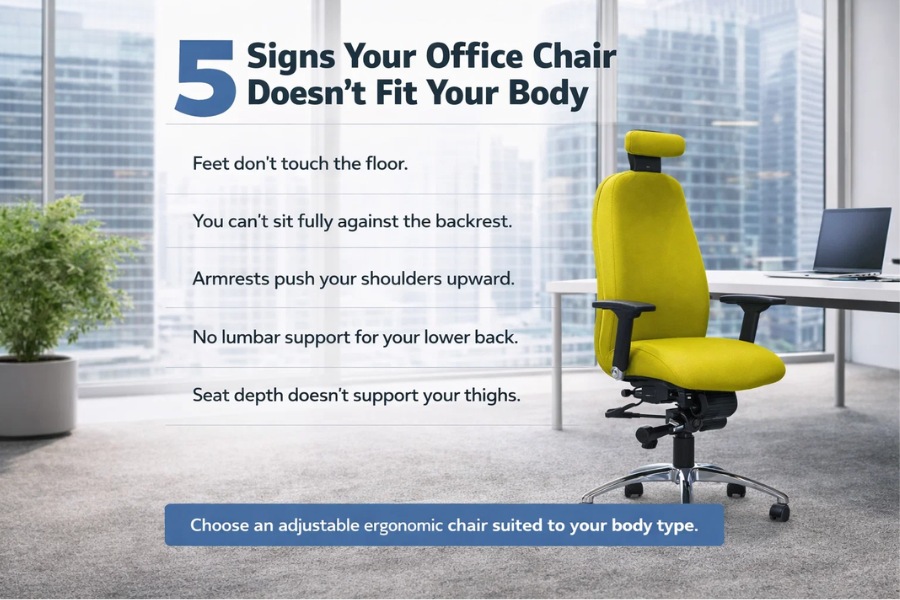
When a chair does not match the user’s body proportions, it can lead to discomfort and musculoskeletal strain. Poorly fitted seating often creates pressure points, awkward sitting positions, and poor spinal alignment, which can contribute to fatigue and pain over time.
Common problems caused by mismatched seating include:
- Seat too deep: Forces smaller users to sit forward, removing lumbar support and increasing pressure on the lower back.
- Backrest too low: Fails to support the upper spine, leaving the shoulders and neck unsupported.
- Armrests too high: Push the shoulders upward, creating tension in the neck and upper back.
- Armrests too low: Provide little arm support, causing users to lean forward while working.
These issues highlight why choosing the best ergonomic office chair requires careful consideration of body dimensions and adjustability. Proper ergonomic seating support helps distribute body weight evenly and maintain spinal alignment, reducing the risk of discomfort during prolonged sitting.
Key Ergonomic Features That Adapt to Different Body Types
Modern ergonomic chairs are designed with adjustable components so the chair can adapt to the user’s body rather than forcing the user into a fixed sitting position. This flexibility allows the chair to support a wide range of body shapes, heights, and working styles.
Key adjustable features include:
- Seat height adjustment: Ensures the feet rest flat on the floor while the thighs remain supported, improving circulation and reducing pressure beneath the legs.
- Backrest height and lumbar support: Allows the lumbar support to align with the natural curve of the lower spine, helping maintain healthy posture.
- Adjustable armrests: Support the arms comfortably while typing or using a mouse, reducing tension in the shoulders and neck.
- Tilt mechanisms: Encourage subtle movement throughout the day, supporting dynamic sitting and reducing stiffness.
Together, these adjustments allow an ergonomic chair for body type to deliver more personalised support, helping users maintain comfort and healthier posture during long periods of desk work.
Best Ergonomic Chairs for Petite or Smaller Body Types
People with smaller body frames often struggle with office chairs designed for average-sized users. Oversized seating can make it difficult to sit comfortably, as the backrest, seat depth, and armrests may not align properly with the body.
When a chair is too large, petite users may sit forward rather than fully against the backrest. This reduces lumbar support and increases strain on the lower back. Seats that are too deep can also prevent the knees from bending naturally at the edge of the chair.
Armrests may create additional issues if the chair cannot adjust low enough. If armrests sit too high relative to the desk, the shoulders may lift while typing, leading to discomfort in the neck and upper back.
Choosing an ergonomic chair for body type that accommodates smaller proportions helps maintain better posture and comfort. Chairs with lower seat height ranges, adjustable seat depth, and adaptable lumbar support typically provide more effective ergonomic seating support for petite users.
What Petite Users Should Look For in an Ergonomic Chair
Petite users benefit most from chairs with adjustment ranges that suit smaller body proportions. These adjustments help ensure the chair supports the body properly during extended desk work.
Key features to look for include:
- Lower seat height range: Allows feet to rest flat on the floor while maintaining proper leg positioning.
- Shorter seat depth: Enables users to sit fully against the backrest while keeping a small gap behind the knees.
- Adjustable lumbar positioning: Allows the lumbar support to align with the natural curve of the lower spine.
When these adjustments are available, an ergonomic chair for posture can provide better support and promote healthier sitting habits for smaller users.
Seat Depth and Backrest Height Considerations
Seat depth and backrest height are particularly important for petite users. If the seat is too deep, it may press against the back of the knees and prevent the user from sitting fully against the backrest. This often leads to leaning forward, which reduces lumbar support and places extra strain on the spine.
A correctly sized seat allows the user to sit back comfortably while maintaining a small gap behind the knees. This position supports the thighs while allowing healthy circulation.
Backrest height must also match the user’s body proportions. If the backrest is too tall or poorly shaped, the lumbar support may sit too high on the spine. Chairs with appropriately scaled backrests ensure the lumbar region and upper back receive proper support.
When seating matches body proportions, the best ergonomic office chair can provide more consistent ergonomic seating support and improve comfort throughout the working day.
Featured Chair: RS74 Bespoke Ergonomic Office Chair
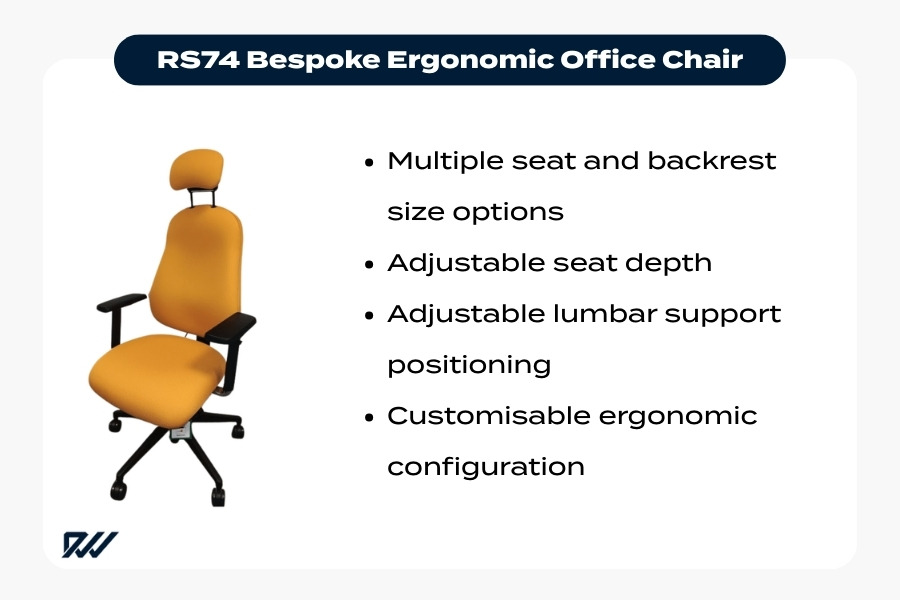
RS74 bespoke ergonomic office chair with adjustable seat depth and customisable lumbar support for personalised ergonomic seating.
The RS74 Bespoke Ergonomic Office Chair is designed to accommodate a wide range of body sizes, including smaller users. Its main advantage is the availability of multiple seat and backrest sizes, allowing the chair to be configured to suit different body proportions.
Key features include:
- Multiple seat and backrest size options to suit different body frames
- Adjustable seat depth for shorter leg lengths
- Adjustable lumbar support positioning for correct lower-back alignment
- Customisable ergonomic configuration to improve fit and comfort
Chairs with multiple sizing options are particularly valuable when selecting an ergonomic chair for body type. Instead of relying solely on standard adjustments, customised configurations provide more precise ergonomic seating support, improving comfort and posture for a wider range of users.
Best Ergonomic Chairs for Average Body Types
Many office chairs are designed to suit a wide range of users, particularly those with average height and body proportions. However, even when a chair is considered suitable for most people, adjustability remains essential. An adjustable ergonomic chair allows users to fine-tune seating positions so the chair continues to provide proper support during long periods of desk work.
While standard ergonomic chairs often fit reasonably well, small adjustments can significantly improve comfort and posture. Seat height, lumbar positioning, and armrest placement all influence how effectively the chair supports the spine and upper body.
Without these adjustments, even a well-designed chair may fail to provide proper ergonomic office chair support. For example, lumbar support that sits slightly too high or low may not align with the lower back, while incorrectly positioned armrests can lead to shoulder tension.
Selecting the best ergonomic office chair therefore means choosing one with enough adjustment range to support everyday posture changes and provide reliable ergonomic seating for desk work.
What Makes a Chair Suitable for Most Users
Chairs designed for a broad range of users typically offer mid-range adjustment capabilities that accommodate common height ranges and body proportions. This allows many office workers to achieve a comfortable and supportive sitting position without requiring highly specialised configuration.
Key features that make a chair suitable for most users include:
- Seat height adjustment: Allows feet to rest flat on the floor while knees remain roughly level with the hips, supporting healthy posture.
- Adjustable seat depth: Ensures the thighs are supported while maintaining a small gap behind the knees.
- Supportive backrest and lumbar system: Helps maintain the natural curve of the spine during desk work.
Together, these features enable a chair to provide consistent ergonomic chair for back support for a wide range of everyday body types.
The Importance of Adjustable Armrests and Lumbar Support
Armrests and lumbar support are among the most important features for maintaining healthy posture during desk work. When properly adjustable, these components help ensure the chair supports the body’s natural alignment.
Adjustable armrests allow users to position their arms comfortably while typing or using a mouse. Ideally, elbows should remain close to the body with forearms roughly parallel to the desk. Correct armrest height keeps the shoulders relaxed rather than raised or hunched.
Lumbar support is equally important. The lower spine naturally curves inward, and properly positioned lumbar support helps maintain this shape while sitting. This reduces strain on the lower back and supports better posture over time.
Together, these adjustments allow an ergonomic chair for posture to provide balanced upper-body support and help reduce fatigue during prolonged desk work.
Featured Chair: Ergochair Zenki Plus
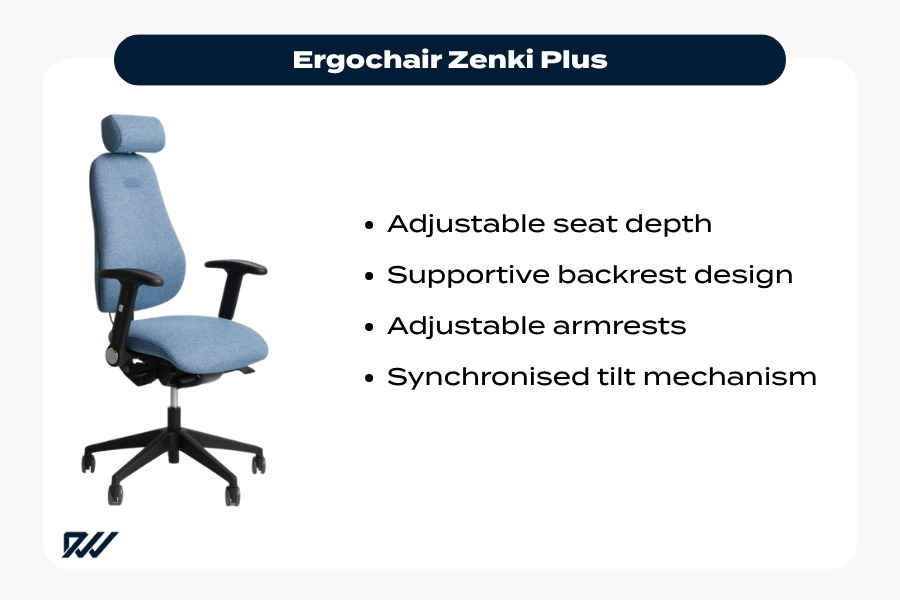
Ergochair Zenki Plus ergonomic office chair with adjustable seat depth, supportive backrest, and synchronised tilt mechanism.
The Ergochair Zenki Plus is a versatile seating option designed to support a wide range of office users. Its adjustable features allow the chair to adapt to different body proportions while maintaining reliable ergonomic office chair support.
Key features include:
- Adjustable seat depth to accommodate different leg lengths and improve thigh support
- Supportive backrest design that promotes natural spinal alignment
- Adjustable armrests to keep the shoulders relaxed while working
- Synchronised tilt mechanism that encourages subtle movement throughout the day
The synchronised tilt system allows the chair to move naturally with the user’s body, helping maintain comfort while supporting dynamic sitting. By combining adjustability with supportive design, the Zenki Plus helps users maintain healthy posture and comfort during long working hours.
Best Ergonomic Chairs for Tall Users
Taller individuals often experience difficulties with office chairs designed for average-height users. Standard chairs may have backrests that are too short or seats that do not extend far enough to support longer legs, making it difficult to sit fully back while maintaining good posture.
Without adequate thigh or upper-back support, tall users may begin to sit forward or slouch. This reduces the effectiveness of lumbar support and places additional strain on the spine throughout the working day.
Choosing an ergonomic chair for tall people helps address these issues. Chairs designed for taller users typically include:
- Higher backrests to support the full length of the spine
- Deeper seats for improved thigh support
- Extended adjustment ranges to accommodate greater height
These features provide better ergonomic chair for back support and help maintain proper posture throughout the working day.
Why Tall Users Need High-Back Ergonomic Chairs
High-back ergonomic chairs are particularly beneficial for taller individuals because they support the spine from the lower back through to the shoulders. When the backrest extends high enough, users can sit fully against the chair while maintaining consistent support along the spine.
This full-length support helps maintain natural spinal alignment and reduces the need for the upper-back and neck muscles to compensate for poor seating support. Over time, this can reduce fatigue and discomfort during long working hours.
High-back chairs also help ensure lumbar support sits at the correct position on the lower spine. On standard chairs, lumbar support may sit too low for tall users, reducing its effectiveness.
By supporting more of the spine, an ergonomic chair for tall people provides more complete ergonomic office chair support during extended desk work.
Seat Height and Leg Support Explained
Seat height and seat depth are especially important for taller users. Chairs designed for average-height users may not adjust high enough to maintain proper leg positioning.
If the seat height is too low, the knees may sit higher than the hips, placing extra pressure on the lower back. A greater seat height adjustment range allows taller users to position the chair so their feet rest flat on the floor while maintaining correct posture.
Seat depth is equally important. Deeper seats provide better support for longer legs, helping distribute body weight more evenly and reduce pressure points.
Key considerations include:
- Higher seat height range to accommodate longer legs
- Deeper seat depth for proper thigh support
- Balanced leg positioning to maintain circulation and posture
When these adjustments are correct, an ergonomic chair for tall people can provide effective ergonomic seating for desk work.
Featured Chair: RH Logic 220 High Back Office Chair
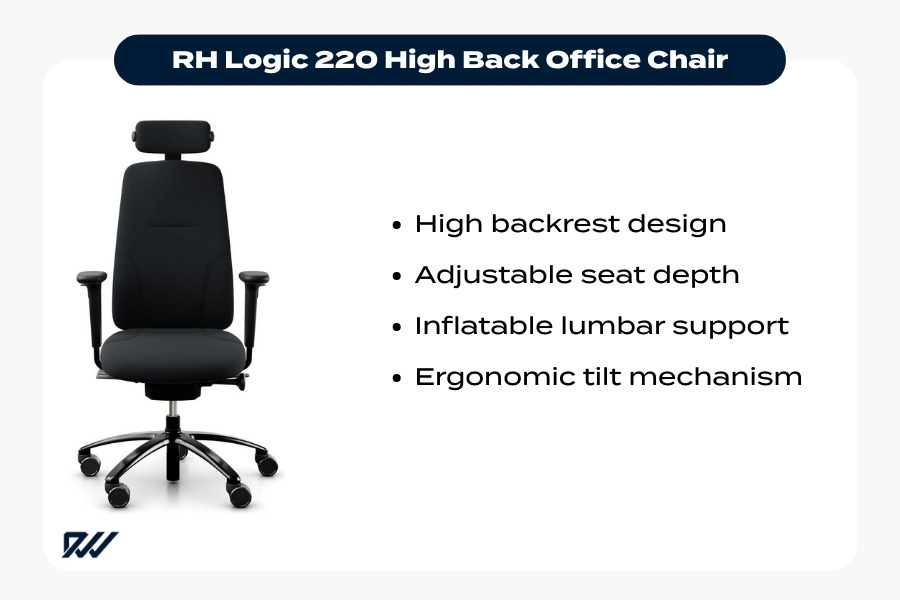
RH Logic 220 high back ergonomic office chair designed for taller users with adjustable seat depth and inflatable lumbar support.
The RH Logic 220 High Back Office Chair is designed to support taller users while maintaining strong ergonomic functionality.
Key features include:
- High backrest design providing extended spinal and shoulder support
- Adjustable seat depth to accommodate longer legs
- Inflatable lumbar support that adapts to the natural curve of the lower back
- Ergonomic tilt mechanism that encourages natural movement while seated
The extended backrest allows users to maintain full contact with the chair, ensuring consistent lumbar and upper-back support. Meanwhile, the adjustable seat depth improves thigh support for taller body proportions.
Combined with its dynamic tilt mechanism, the RH Logic 220 helps reduce stiffness and fatigue, supporting comfortable and balanced posture throughout the working day.
Best Ergonomic Chairs for Big and Tall Users
Individuals with larger body frames often require office seating that provides additional space, strength, and stability. Standard office chairs are typically designed for average users, which means they may lack sufficient seat width, structural reinforcement, or weight capacity for some people.
A well-designed big and tall ergonomic chair maintains the same ergonomic principles as standard office seating while offering greater durability and support. These chairs are typically built with:
- Wider seats for improved comfort and weight distribution
- Reinforced frames and bases for stability
- Higher weight capacities to support larger body types
Without proper support, users may adjust their posture to compensate for poorly fitting seating, placing additional strain on the lower back, shoulders, and hips. Choosing seating specifically designed for larger users helps maintain spinal alignment and consistent ergonomic office chair support during long working days.
Weight Capacity and Reinforced Ergonomic Design
Ergonomic chairs designed for larger users include stronger internal structures and higher weight capacities to ensure stability and long-term durability.
A strong frame and heavy-duty mechanisms are essential for maintaining reliable ergonomic support. Chairs that lack sufficient reinforcement may flex or shift during use, which can affect posture and comfort over time.
Many big and tall ergonomic chairs therefore include:
- Reinforced frames and seat structures for added stability
- Higher weight capacities to support larger users safely
- Heavy-duty tilt mechanisms designed for long-term use
- Durable adjustment systems that maintain reliable support
These features ensure the chair continues to provide effective ergonomic chair for back support while maintaining comfort and structural integrity during long sitting periods.
Wider Seats and Stronger Frames
Seat width and cushioning play an important role in supporting larger body types. Wider seat pans provide more space to sit comfortably while maintaining proper posture. This extra room also helps distribute body weight more evenly, reducing pressure points during extended sitting.
Reinforced seat structures and durable bases also improve overall stability, particularly when users shift position throughout the day.
For example, the BodyBilt J3504 features a reinforced seat structure approximately 22% larger than standard seats and supports users up to 226 kg (500 lbs). This larger seating area helps accommodate users outside the typical size range while maintaining ergonomic support.
When combined with adjustments such as lumbar support and seat depth control, wider seats and stronger frames allow big and tall ergonomic chairs to deliver both comfort and long-term durability.
Featured Chair: BodyBilt J3504 Big & Tall Chair
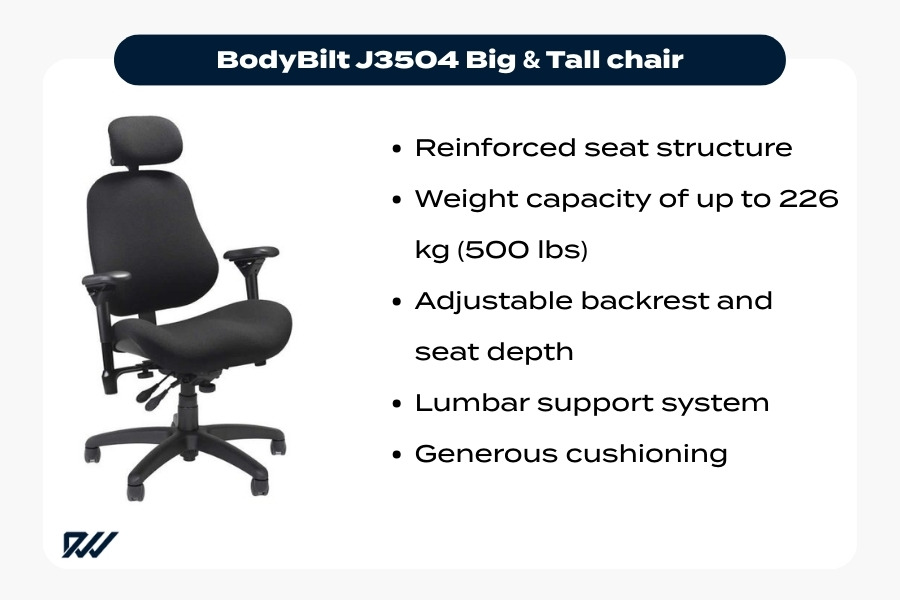
BodyBilt J3504 big and tall ergonomic office chair with reinforced structure and adjustable lumbar support for larger users.
The BodyBilt J3504 Big & Tall Chair is designed to support larger users while maintaining strong ergonomic functionality.
Key features include:
- Reinforced seat structure larger than typical office chairs
- Weight capacity of up to 226 kg (500 lbs)
- Adjustable backrest and seat depth for personalised positioning
- Lumbar support system to maintain spinal alignment
- Generous cushioning for improved comfort during long sitting periods
Despite its heavy-duty construction, the chair still provides full ergonomic adjustability. This allows the seating to adapt to the user’s body rather than forcing a fixed sitting position.
The combination of durability, adjustability, and supportive cushioning makes the J3504 a strong example of a reliable big and tall ergonomic chair for prolonged desk work.
Featured Chair: BodyBilt B2503 Bariatric Chair
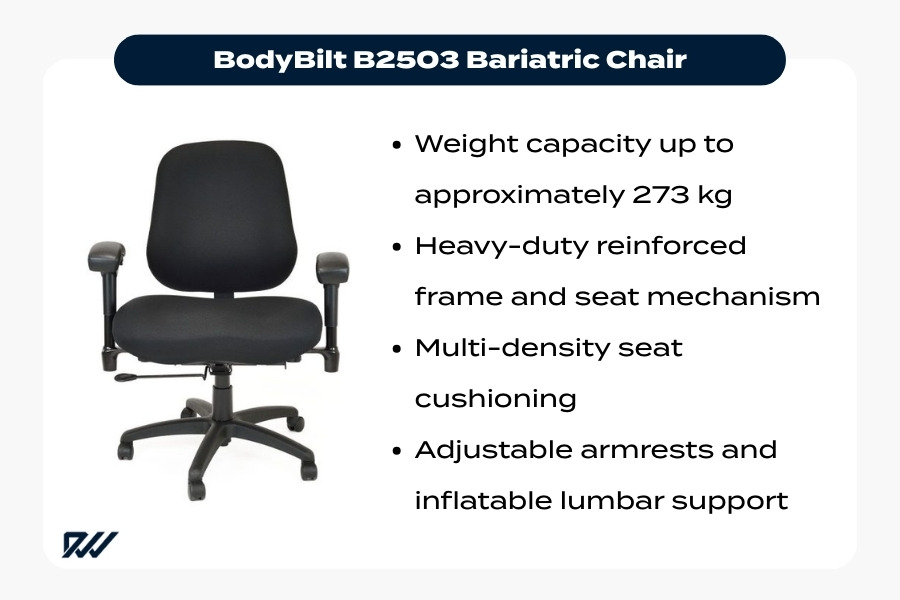
BodyBilt B2503 bariatric ergonomic office chair designed for larger users with reinforced construction and adjustable lumbar support.
The BodyBilt B2503 Bariatric Chair is designed for users who require an even higher weight capacity and reinforced support.
Bariatric ergonomic chairs focus on combining heavy-duty engineering with ergonomic adjustability so that larger users can maintain proper posture and comfort.
Key features include:
- Weight capacity up to approximately 273 kg (42 stone)
- Heavy-duty reinforced frame and seat mechanism
- Multi-density seat cushioning for improved pressure distribution
- Adjustable armrests and inflatable lumbar support
These features demonstrate how bariatric seating can maintain the same ergonomic principles as standard office chairs while providing greater strength and stability.
By combining reinforced engineering with adjustable support, chairs such as the B2503 help larger users maintain proper posture and comfort during extended periods of desk work.
Best Ergonomic Chairs for Highly Customised Body Support
While many ergonomic chairs are designed to suit a broad range of users, some individuals require more tailored seating solutions. Unique body proportions, long-term back conditions, or specialised workplace requirements can make it difficult to achieve proper support with standard office chairs.
In these situations, custom ergonomic seating provides a more personalised approach. Highly adjustable chairs allow users to fine-tune key elements such as seat depth, backrest height, lumbar positioning, and armrest placement.
This level of adjustability allows the chair to adapt to the user’s body rather than forcing the body to adapt to the chair. For people who spend long hours sitting each day, this flexibility can play an important role in maintaining a comfortable ergonomic chair for posture and improving long-term workplace comfort.
When a Standard Chair Isn’t Enough
Standard ergonomic chairs work well for many people, but some users require more specialised support due to health conditions or unusual body proportions.
Highly adjustable chairs allow users to configure seating more precisely to match their individual needs. Adjustments such as seat depth, backrest angle, and lumbar positioning help maintain natural spinal alignment and reduce pressure on sensitive areas.
These chairs can be particularly helpful for people who experience:
- Chronic back pain or spinal alignment issues
- Musculoskeletal conditions
- Long periods of continuous desk work
By allowing more precise positioning, customised seating provides more consistent ergonomic office chair support and can help reduce strain on the back, shoulders, and neck.
Adaptive Ergonomic Seating for Musculoskeletal Conditions
Adaptive ergonomic seating is designed to provide additional flexibility and support for users managing musculoskeletal conditions. These chairs often incorporate advanced adjustment systems and specialised cushioning.
Common adaptive features include:
- Adjustable lumbar systems that allow users to change both height and support intensity
- Multiple seat and backrest sizes to better match body proportions
- Advanced cushioning materials, such as memory foam or multi-density foam, to reduce pressure points
These features help distribute body weight more evenly and maintain proper spinal alignment during prolonged sitting. As a result, highly adjustable seating can provide more effective ergonomic chair for back support, particularly for users with specialised ergonomic needs.
Featured Chair: Ergochair Adapt 650 Series
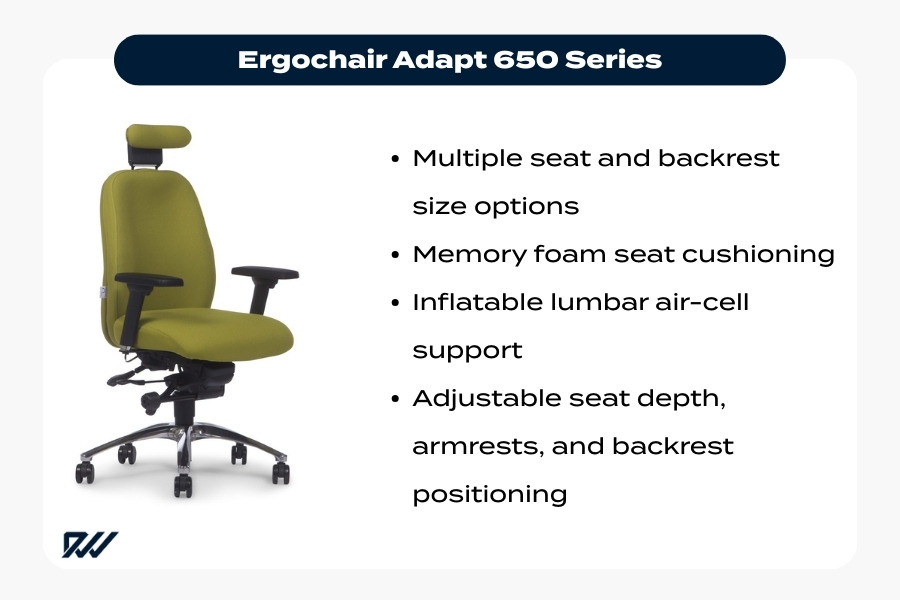
Ergochair Adapt 650 Series ergonomic office chair with memory foam cushioning and inflatable lumbar support for customised seating.
The Ergochair Adapt 650 Series is designed to provide highly customised ergonomic support across a wide range of body types.
Its design focuses on adaptability, allowing users to configure the chair to suit their individual requirements.
Key features include:
- Multiple seat and backrest size options for a more personalised fit
- Memory foam seat cushioning to improve comfort and reduce pressure points
- Inflatable lumbar air-cell support that can be adjusted for precise lower-back support
- Adjustable seat depth, armrests, and backrest positioning
These adjustments allow the chair to be tailored to the user’s body, providing flexible custom ergonomic seating that supports posture and comfort during extended desk work.
Through this high level of configuration, the Adapt 650 Series demonstrates how personalised seating can deliver reliable ergonomic office chair support for a wide variety of workplace needs.
Ergonomic Chair Features That Help Every Body Type
While body shapes and proportions vary, certain ergonomic features benefit almost anyone who spends long hours at a desk. The most effective adjustable ergonomic chair is one that offers a wide range of adjustments so the chair adapts to the user rather than forcing the user into a fixed position.
When properly adjusted, ergonomic seating helps maintain spinal alignment, reduce pressure on joints, and support comfortable posture throughout the day. Good ergonomic office chair support also allows the muscles around the spine to relax rather than constantly compensating for poor seating.
Because people naturally shift position during the day, ergonomic chairs should also support movement. Chairs that combine adjustability with controlled movement provide more consistent ergonomic seating for desk work, helping reduce stiffness and improve circulation.
Adjustable Lumbar Support
Lumbar support is one of the most important features in an ergonomic chair for posture. The lower spine naturally curves inward, and maintaining this curve helps support healthy spinal alignment while sitting.
Adjustable lumbar systems allow users to position support precisely where it is needed. Key benefits include:
- Height adjustment to align with the natural curve of the lower back
- Adjustable support intensity to suit different body shapes and preferences
- Improved weight distribution across the backrest
- Reduced slouching and lower-back strain
Proper lumbar positioning provides essential ergonomic chair for back support, particularly during extended desk work.
Seat Depth and Height Adjustment
Seat height and seat depth are fundamental adjustments that help ensure the chair properly supports the lower body.
Correct positioning should allow:
- Feet flat on the floor
- Knees roughly level with the hips
- Even weight distribution across the seat
Seat depth also plays a key role in comfort. When adjusted correctly, users should be able to sit fully back against the backrest while maintaining a small gap behind the knees. This ensures the thighs are supported without restricting circulation.
Together, these adjustments allow an adjustable ergonomic chair to accommodate different leg lengths and body proportions while maintaining effective ergonomic seating for desk work.
Armrest Positioning and Shoulder Support
Armrests help support the arms and reduce strain on the neck, shoulders, and upper back. When positioned correctly, they allow the arms to rest comfortably while maintaining a natural working posture.
Ideally, armrests should allow:
- Elbows bent at roughly 90 degrees
- Forearms positioned parallel to the desk surface
- Shoulders to remain relaxed and neutral
Incorrect armrest positioning can cause tension in the upper body. Armrests that are too high may raise the shoulders, while armrests that are too low may cause users to lean forward.
Adjustable armrests therefore play an important role in maintaining balanced posture and reliable ergonomic office chair support.
Dynamic Movement and Tilt Mechanisms
Remaining in a fixed position for long periods can lead to stiffness and reduced circulation. Many ergonomic chairs therefore include tilt or synchro mechanisms that allow the chair to move naturally with the user’s body.
These mechanisms help:
- Encourage small posture changes throughout the day
- Reduce pressure on the lower back
- Improve circulation and reduce stiffness
- Engage different muscle groups during sitting
By supporting gentle movement while maintaining stability, these mechanisms improve the effectiveness of ergonomic seating for desk work and help maintain healthier posture during long working hours.
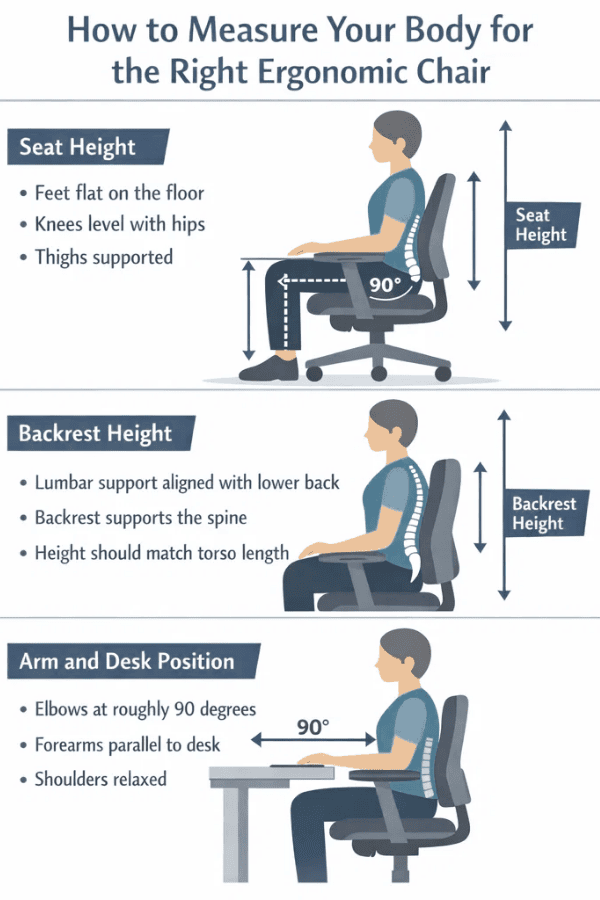
How to Measure Your Body for the Right Ergonomic Chair
Choosing the right ergonomic chair for body type is easier when a few basic body measurements are considered. Understanding your height, leg length, and torso length helps determine whether a chair’s adjustment range will provide proper support.
Key measurements help ensure the chair’s seat height, seat depth, and backrest align with the body. When these dimensions match the user’s proportions, it becomes easier to maintain healthy posture and comfort throughout the working day.
Without considering these factors, even the best ergonomic office chair may not provide effective support. For example:
- A chair that cannot adjust high enough may cause the knees to sit above the hips.
- A seat that is too deep may prevent the user from sitting fully against the backrest.
Taking a few simple measurements before choosing an adjustable ergonomic chair helps ensure the seating provides reliable ergonomic office chair support for daily desk work.
Seat Height vs Leg Length
Seat height should closely match the user’s leg length to support proper lower-body positioning.
Correct seat height should allow:
- Feet flat on the floor
- Knees roughly level with the hips
- Even weight distribution across the seat
Common problems caused by incorrect seat height include:
- Seat too high: Feet cannot rest flat, placing pressure beneath the thighs and restricting circulation.
- Seat too low: Knees rise above the hips, increasing strain on the lower back.
A chair with a suitable seat height adjustment range helps users achieve a balanced and comfortable sitting position during desk work.
Backrest Height and Spinal Support
Backrest height should match the length of the user’s torso so that the chair can support the full spine while positioning lumbar support correctly.
Different users may benefit from different backrest heights:
- Taller users: Often require higher backrests to support the upper back and shoulders.
- Smaller users: May benefit from shorter backrests that position lumbar support correctly on the lower spine.
A properly fitted backrest helps maintain the natural curve of the spine and reduces muscle strain. When combined with adjustable lumbar positioning, it plays a key role in maintaining healthy posture during long sitting periods.
Desk Height and Arm Position
Ergonomic comfort also depends on the relationship between chair height and desk height. When seated correctly:
- Elbows should bend at roughly 90 degrees
- Forearms should remain parallel to the desk surface
- Shoulders should stay relaxed
Incorrect desk-to-chair alignment can lead to posture problems:
- Desk too high: Shoulders rise while typing, creating neck and shoulder tension.
- Desk too low: Users may lean forward, increasing strain on the upper back and neck.
Adjusting chair height and armrests helps create a balanced working position and improves ergonomic seating for desk work.
Final Thoughts: Choosing the Right Ergonomic Chair for Your Body
Selecting the right ergonomic chair is an important part of creating a comfortable and supportive workspace. Because body proportions and working styles vary, no single chair suits everyone. The most effective chairs are those that offer a wide range of adjustments so the seating can adapt to the user.
When choosing an ergonomic chair for body type, it is helpful to consider:
- Body height and torso length
- Leg length and seat depth requirements
- Lumbar support positioning
- Overall adjustment range
A well-designed adjustable ergonomic chair allows users to customise seat height, backrest position, armrests, and tilt settings. This flexibility helps maintain proper posture and provides reliable ergonomic office chair support during long periods of desk work.
By prioritising ergonomic design and proper chair fit, individuals can create a workspace that supports healthier posture, improved comfort, and better productivity. Well-fitted seating plays a key role in long-term workplace wellbeing.