Vertical Mouse vs Regular Mouse: Which Is Better for Comfort and Productivity?
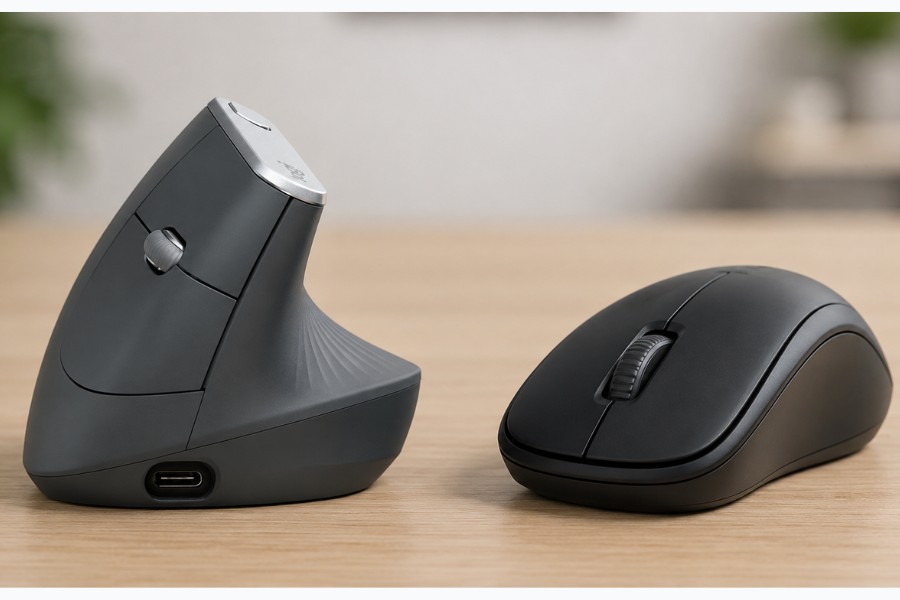
Choosing between a vertical mouse and a regular mouse can have a significant impact on your daily comfort, especially if you spend long hours working at a computer. While a standard mouse remains the most common option, vertical mice have become increasingly popular among users looking to reduce wrist strain and improve ergonomics.
Both mouse types are designed to perform the same core function, but they encourage very different hand and wrist positions. Understanding how each design affects posture, comfort, and usability can help you decide which option is best suited to your workspace and working habits.
In this guide, we compare vertical mice and regular mice in detail, including their ergonomic benefits, potential drawbacks, and which users may benefit most from making the switch.
Discover Remtek Workplace’s range of mice and find the perfect solution for your needs.
What Is a Vertical Mouse?
A vertical mouse is an ergonomic mouse designed to position the hand in a more natural handshake posture. Unlike a regular flat mouse, a vertical mouse rotates the hand sideways, which can help reduce forearm twisting during computer use.
The main goal of a vertical mouse is to minimise strain on the wrist, forearm, and shoulder. Many users find that this design encourages a more relaxed arm position, particularly during long periods of desk work.
Vertical mice are available in several different angles and sizes. Some models use a gentle tilt for easier adjustment, while others adopt a steeper design intended to maximise ergonomic support.
Most vertical mice also include features commonly found on standard mice, including programmable buttons, adjustable DPI settings, wireless connectivity, and rechargeable batteries. This allows users to improve comfort without sacrificing functionality.
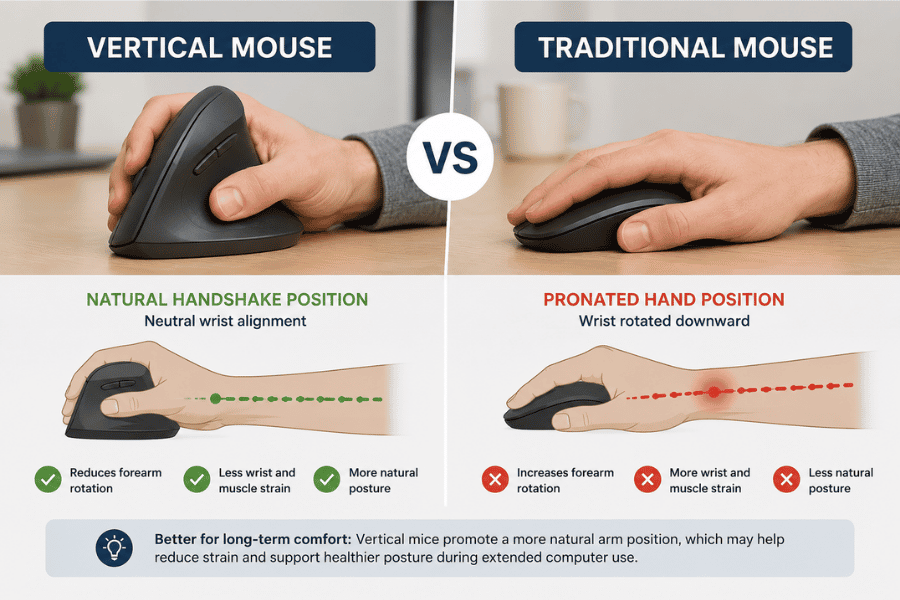
Vertical mice encourage a more natural hand position that may help reduce wrist strain and improve comfort during long hours at a desk.
What Is a Regular Mouse?
A regular mouse uses a flat or slightly curved design that positions the hand facing downward. This style has been the standard for decades and remains the most widely used mouse design across offices, homes, and gaming setups.
Because most people begin using regular mice from an early age, they usually feel familiar and intuitive straight away. There is very little learning curve involved, which makes them easy to use across different devices and work environments.
Regular mice come in a huge range of sizes, shapes, and price points. Some are designed for lightweight portability, while others focus on productivity, gaming performance, or premium comfort features.
Although many modern regular mice include ergonomic shaping, they still encourage some level of forearm pronation. Over long periods, this hand position may contribute to wrist tension or repetitive strain for some users.
How Vertical Mice Change Hand Positioning
One of the biggest differences between a vertical mouse and a regular mouse is the way the hand rests during use. A vertical mouse rotates the hand into a sideways position that more closely resembles a natural resting posture.
With a standard mouse, the forearm rotates downward so the palm faces the desk. This movement is known as pronation, and prolonged pronation can place additional tension on the wrist and forearm muscles during repetitive computer work.
Vertical mice aim to reduce this strain by allowing the hand to remain in a more neutral position. Many users report reduced wrist pressure and improved comfort after adapting to the design.
The change in hand position can also affect how the arm moves across the desk. Some users notice less shoulder movement and reduced muscle fatigue during extended work sessions, especially when combined with an ergonomic workstation setup.
Key Differences Between Vertical and Regular Mice
The most noticeable difference between vertical and regular mice is their overall shape and hand orientation. Regular mice keep the hand flat, while vertical mice rotate the hand into a more upright position.
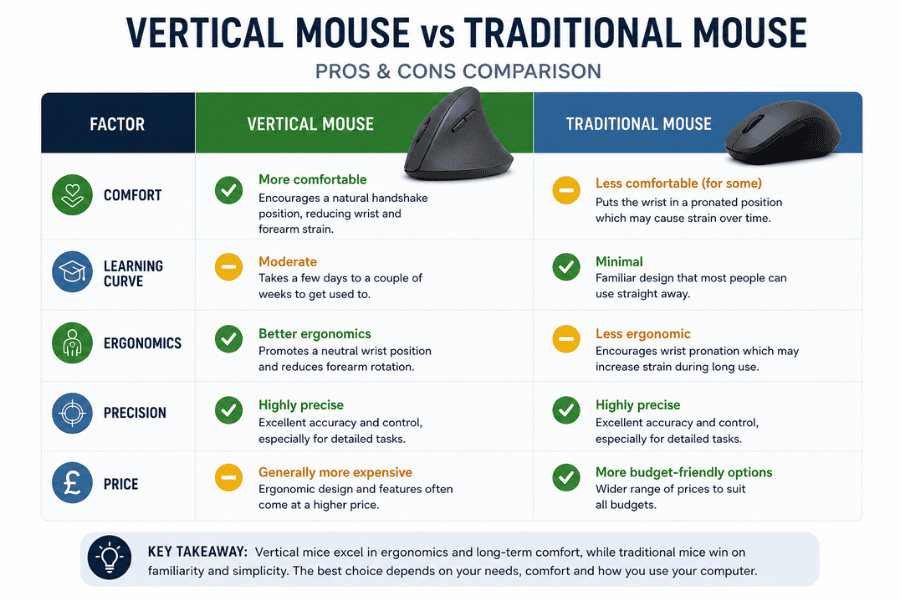
Vertical mice offer improved ergonomic support and long-term comfort, while traditional mice remain familiar, precise, and budget-friendly for everyday computer tasks.
Another major difference is the adjustment period. Regular mice feel familiar immediately, whereas vertical mice often require several days of use before they begin to feel natural.
There are also differences in movement style and grip. Vertical mice tend to encourage broader arm movement, while regular mice often rely more heavily on wrist movement and smaller motions.
Some of the main differences include:
- Hand and wrist positioning
- Learning curve and adaptation
- Grip style and arm movement
- Ergonomic support
- Suitability for prolonged desk work
These differences can affect comfort levels significantly depending on the individual user. What feels comfortable for one person may not work as well for another.
Ergonomic Benefits of a Vertical Mouse
The primary advantage of a vertical mouse is improved ergonomics. By reducing forearm rotation, vertical mice may help minimise tension that builds up during repetitive computer use.
Many users choose vertical mice because they experience discomfort while using a standard mouse for long periods. Symptoms such as wrist pain, forearm tightness, and hand fatigue are common reasons people begin exploring ergonomic alternatives.
Vertical mice can also encourage healthier posture throughout the upper body. A more neutral wrist position may reduce unnecessary muscle strain in the forearm and shoulder during daily tasks.
Some users find that switching to a vertical mouse improves overall comfort even if they do not currently experience pain. Preventative ergonomics can be just as important as addressing existing discomfort.
Does a Vertical Mouse Reduce Wrist Pain?
A vertical mouse may help reduce wrist pain for users who experience strain from prolonged computer use. The upright hand position is designed to reduce awkward wrist angles and minimise repetitive twisting movements.
For people who spend several hours per day using a mouse, this ergonomic support can make a noticeable difference over time. Many users report feeling less tension in the wrist and forearm after switching to a vertical design.
However, results can vary depending on the cause of the discomfort. A poorly adjusted desk, incorrect chair set up, or unsuitable keyboard positioning can also contribute to wrist pain, even when using an ergonomic mouse.
To achieve the best results, a vertical mouse should ideally be used as part of a complete ergonomic workstation setup. Good posture and regular movement breaks remain equally important.
Are Vertical Mice Better for RSI and Carpal Tunnel Syndrome?
Vertical mice are often recommended for people dealing with repetitive strain injuries or carpal tunnel syndrome. Their design aims to reduce muscle tension and minimise pressure caused by repetitive wrist movement.
Many users with RSI symptoms find vertical mice more comfortable because the hand remains in a more natural position during use. Reducing forearm pronation may help lower strain on tendons and nerves over extended periods.
That said, an ergonomic mouse is not a guaranteed medical solution. Severe or persistent pain should always be assessed by a qualified healthcare professional.
In many cases, combining ergonomic equipment with improved workstation habits can provide the greatest long-term benefit. Regular breaks, stretching, and proper desk ergonomics all play an important role in reducing strain.
Learning Curve and Adjustment Period
One of the main challenges when switching to a vertical mouse is the adjustment period. Because the hand position differs from a regular mouse, it can initially feel unfamiliar or slightly awkward.
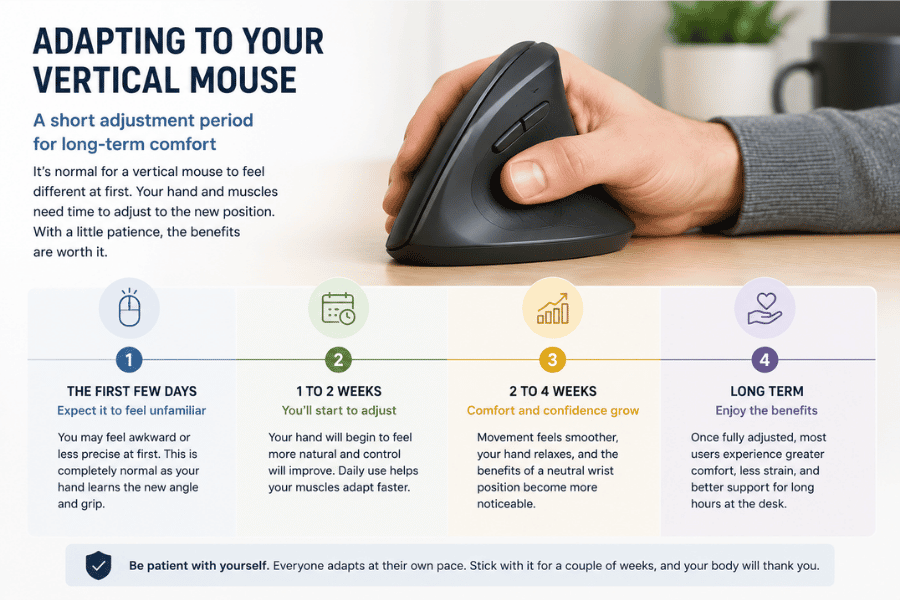
Most users adapt to a vertical mouse within a few days to a couple of weeks, with comfort and ergonomic benefits becoming more noticeable over time.
Most users adapt within a few days to a couple of weeks, depending on how often they use a computer. During this period, cursor control and precision may temporarily feel less natural than with a standard mouse.
Starting with shorter sessions can make the transition easier. Some users alternate between a vertical mouse and a regular mouse while adjusting to the new grip style.
After the adaptation period, many users report that returning to a regular mouse feels noticeably less comfortable. The benefits often become more apparent during long work sessions.
Which Mouse Is Better for Long Hours at a Desk?
For extended office work, many users prefer vertical mice because they prioritise long-term comfort and reduced strain. The ergonomic hand position can help minimise fatigue during prolonged periods of computer use.
Regular mice may still feel more responsive and familiar, especially for users who rely heavily on precision or fast cursor movement. However, long hours of repetitive wrist movement can become uncomfortable for some people over time.
The best option often depends on individual working habits. Someone using spreadsheets and emails all day may benefit more from ergonomic support, while occasional users may feel comfortable with a standard mouse.
It is also important to consider the rest of the workstation setup. An ergonomic mouse works best when paired with a supportive chair, proper desk height, and good posture habits.
Which Option Is Better for Small Hands?
Hand size plays an important role when choosing between a vertical mouse and a regular mouse. An oversized mouse can create unnecessary tension regardless of how ergonomic the design claims to be.
Many regular mice are available in compact sizes, making them easier for users with smaller hands to control comfortably. Some ergonomic mice can feel bulky if they are not specifically designed for smaller hand sizes.
Fortunately, several manufacturers now produce compact vertical mice intended for smaller hands. Choosing the correct size can improve comfort, control, and overall usability significantly.
When selecting any ergonomic mouse, it is important to consider hand dimensions alongside shape and grip style. A properly fitted mouse should feel natural without requiring excessive stretching or gripping effort.
Common Drawbacks of Vertical Mice
Although vertical mice offer clear ergonomic benefits, they are not perfect for every user. One of the most common drawbacks is the initial learning curve required to adjust to the different hand position.
Some users also find vertical mice less precise during detailed tasks at first. This usually improves with practice, but the adjustment period can feel frustrating initially.
Vertical mice can also be larger and less portable than standard mice. Travelling frequently with a bulky ergonomic mouse may not be ideal for every user.
Potential drawbacks include:
- Short adjustment period
- Larger physical size
- Fewer design options compared to regular mice
- Not all models suit every hand size
Despite these limitations, many users still find the ergonomic advantages worthwhile once they become comfortable with the design.
Who Should Use a Vertical Mouse?
Vertical mice are particularly well suited to people who spend long hours working at a computer. Office workers, designers, programmers, and remote workers often benefit most from improved ergonomic support.
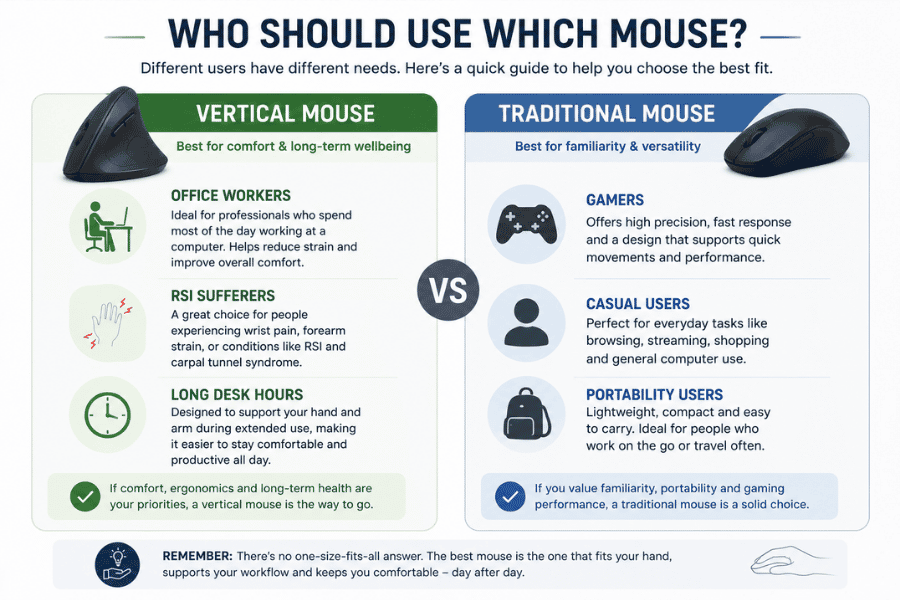
Choosing between a vertical mouse and a traditional mouse depends on your working style, comfort needs, and how many hours you spend using a computer each day.
Users who experience wrist discomfort, forearm tension, or repetitive strain symptoms may also find vertical mice more comfortable than regular designs. The natural hand position can help reduce pressure during repetitive tasks.
People with limited desk space or highly portable setups may prefer more compact ergonomic alternatives instead. Comfort preferences vary significantly between individuals.
A vertical mouse is not necessarily essential for everyone, but it can be a valuable upgrade for users prioritising comfort and long-term ergonomic support.
Best Vertical Mouse Alternatives to Consider
While vertical mice are one of the most popular ergonomic options, they are not the only solution available. Some users prefer trackball mice because they reduce arm movement and save desk space.
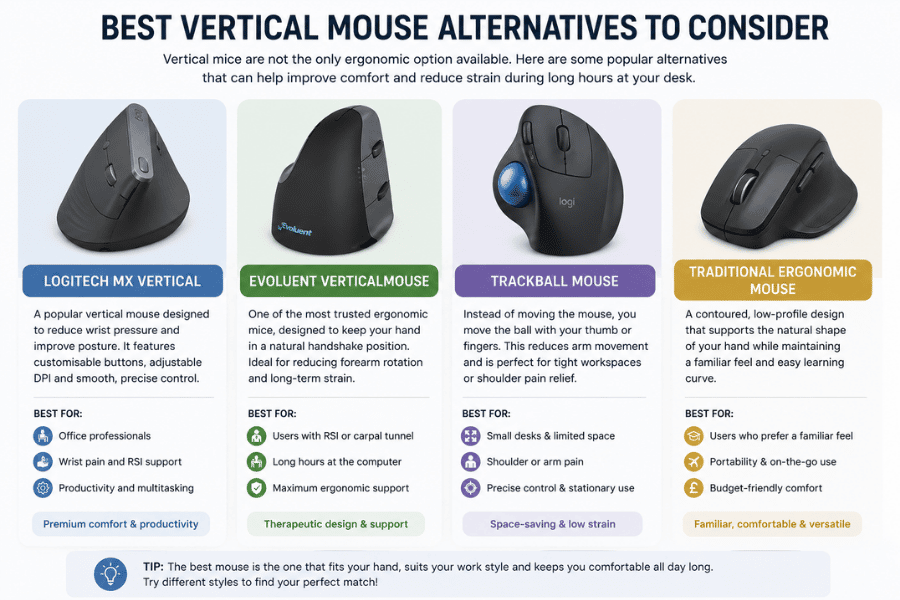
Different ergonomic mouse designs suit different working styles, from vertical mice for wrist support to trackball mice for reduced arm movement and compact desk setups.
Others may prefer ergonomic regular mice with sculpted hand support and improved thumb rests. These designs retain a familiar shape while still offering better comfort than basic flat mice.
Popular ergonomic alternatives include:
- Trackball mice
- Ergonomic wireless mice
- Contoured productivity mice
- Adjustable ergonomic mice
The best ergonomic setup often depends on personal comfort, workflow, and workspace limitations. Testing different designs can help identify the most suitable long-term option.
How to Choose Between a Vertical and Regular Mouse
Choosing between a vertical mouse and a regular mouse depends largely on comfort, working style, and ergonomic needs. Users experiencing discomfort may benefit from trying a vertical design to see whether it improves posture and reduces strain.
Regular mice remain an excellent option for users who prioritise familiarity and immediate ease of use. Many people continue using them comfortably for years without issues.
Before making a decision, consider factors such as:
- Daily computer usage
- Existing wrist or arm discomfort
- Desk setup
- Hand size
- Preferred grip style
The ideal mouse should feel supportive, natural, and comfortable during extended use. Small ergonomic improvements can make a significant difference over time.
Final Verdict: Is a Vertical Mouse Worth Switching To?
For many users, switching to a vertical mouse is worth considering, particularly if comfort and ergonomics are a priority. The natural hand position can help reduce wrist strain and improve long-term comfort during desk work.
Regular mice still offer familiarity, versatility, and a shorter learning curve. For casual users or those without discomfort, a standard mouse may continue to work perfectly well.
Ultimately, the best choice depends on individual comfort preferences and working habits. A well-designed ergonomic mouse can improve both productivity and overall wellbeing when used as part of a healthy workstation setup.
Explore our range of ergonomic vertical mice to find the right solution for your needs:
- Evoluent Vertical Mouse 4
- R-Go HE Ergonomic Vertical Mouse
- R-Go Basic Ergonomic Vertical Bluetooth Mouse
- R-Go Twister Mouse
- Logitech MX Vertical
- BakkerElkhuizen FastForward Vertical Mouse
Need help choosing the right ergonomic mouse? Contact our team for expert advice and we’ll help you find the best solution for your needs.