- Ergonomic
- Home Working
- In the Workplace
Best Ergonomic Mouse Buying Guide: 12 Great Options
What Makes an Ergonomic Mouse Different?
An ergonomic mouse is designed to support a more natural hand, wrist, and arm position while using a computer. Unlike traditional flat mice, ergonomic models reduce unnecessary strain by encouraging healthier posture and minimising repetitive movements throughout the day.
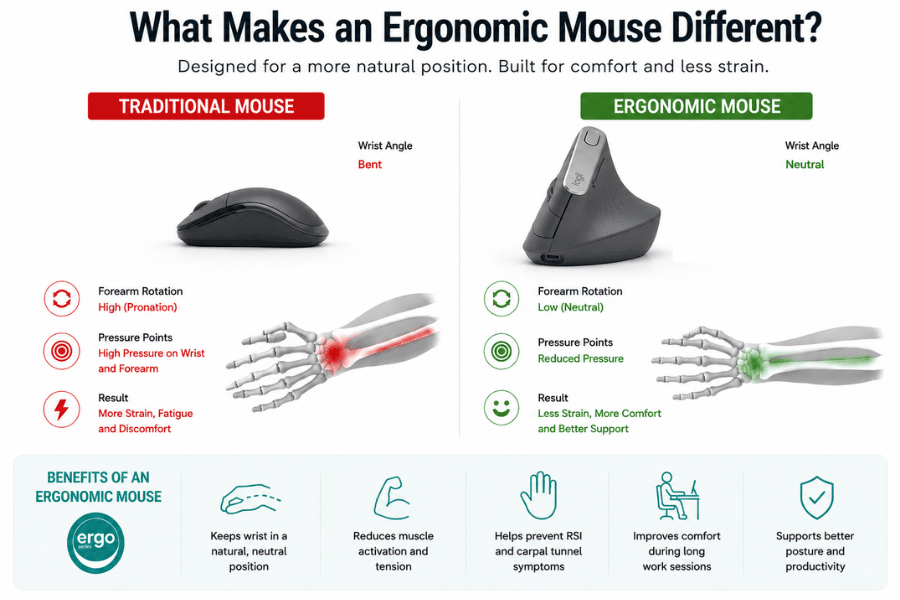
For people who spend long hours at a desk, the right ergonomic mouse can make a noticeable difference in comfort and productivity. Many designs focus on reducing pressure on the wrist, forearm, and fingers, helping users avoid discomfort associated with repetitive strain injuries (RSI), carpal tunnel syndrome, and general fatigue.
Ergonomic mice come in several different shapes and styles, each targeting specific comfort needs and working preferences. Some are designed for a handshake-style grip, while others support the entire hand to reduce muscle tension during extended use.
Why Choosing the Right Ergonomic Mouse Matters
Choosing the best ergonomic mouse is not simply about comfort — it can also improve the way you work. A poorly designed mouse may force your wrist into unnatural positions, creating tension that builds over time and contributes to long-term discomfort.
The right ergonomic mouse supports natural movement and allows your hand to rest more comfortably while navigating tasks. This can help reduce fatigue during long work sessions, making it easier to stay productive throughout the day.
Different users also have different ergonomic requirements depending on hand size, grip style, and working habits. Someone dealing with wrist pain may benefit from a vertical mouse, while another user may prefer a trackball design that minimises arm movement altogether.
When selecting an ergonomic mouse, it is important to think about your daily workflow, desk setup, and personal comfort preferences. Features such as adjustable angles, programmable buttons, wireless connectivity, and thumb support can all play an important role in finding the right fit.
Discover Remtek Workplace’s range of ergonomic mice and find the perfect solution for your needs.
Types of Ergonomic Mice Explained
There are several types of ergonomic mice available, each offering a unique approach to comfort and usability. Vertical mice are among the most popular because they position the hand in a more natural handshake posture, helping reduce forearm rotation and wrist strain.
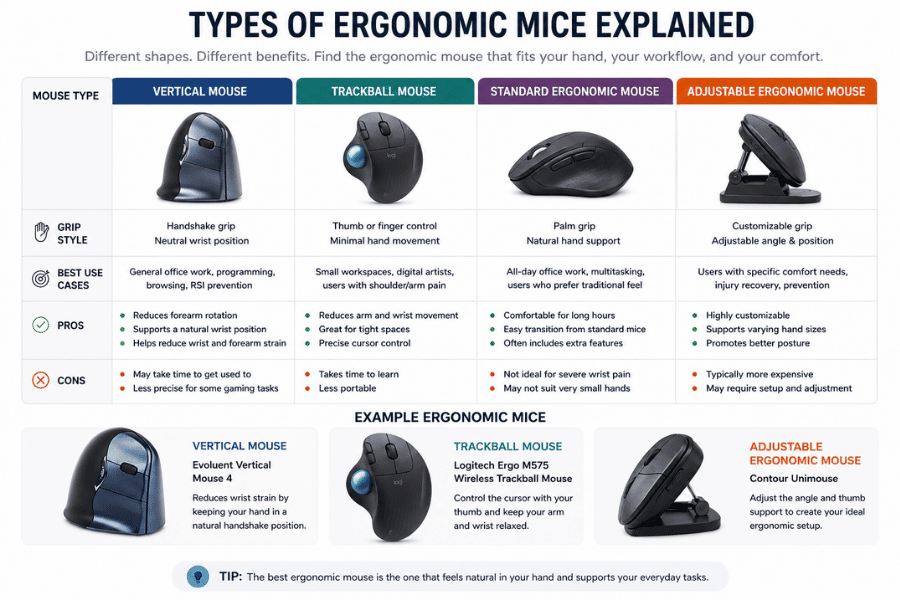
Trackball mice are another popular option, especially for users with limited desk space or shoulder discomfort. Instead of moving the entire mouse, the user controls the cursor by rotating a built-in ball with their thumb or fingers, reducing repetitive arm movement.
Some ergonomic mice focus on adjustable designs that can be customised to suit different hand positions. Others prioritise lightweight movement, compact portability, or full-hand support for maximum comfort during extended use.
The best ergonomic mouse for one person may not work for another, which is why understanding the different styles available is essential before making a purchase. Trying different shapes and grip positions can help identify the most comfortable long-term solution.
Features to Look for in an Ergonomic Mouse
When comparing ergonomic mice, several important features should be considered before making a decision. Comfort should always be the priority, but additional functionality can significantly improve the overall user experience.
Some of the most useful ergonomic mouse features include:
- Adjustable DPI settings for cursor sensitivity
- Wireless Bluetooth or USB connectivity
- Programmable shortcut buttons
- Rechargeable batteries
- Adjustable tilt angles
- Thumb and palm support
- Silent clicking technology
Hand size also plays a major role in choosing the right mouse. A mouse that is too large or too small can create unnecessary tension, even if it is technically ergonomic in design.
Build quality is another important factor, especially for users who spend several hours a day working at a computer. A well-built ergonomic mouse should feel supportive, responsive, and durable enough for long-term daily use.
Best Ergonomic Mice Compared
Choosing the best ergonomic mouse depends on more than just appearance or brand recognition.
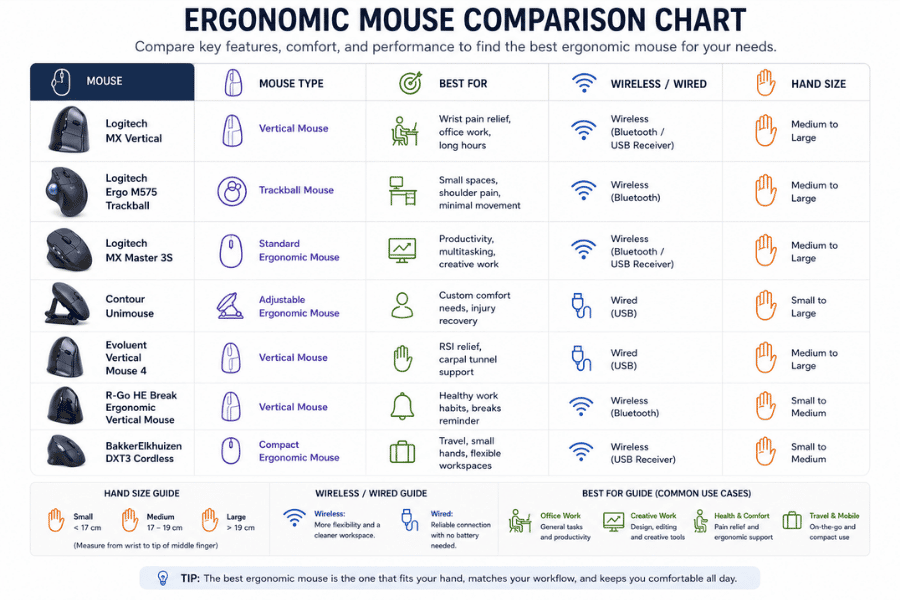
Different ergonomic mouse designs are built to support different working styles, hand sizes, and comfort needs. Some prioritise wrist support through vertical positioning, while others focus on reducing arm movement, improving productivity, or offering highly adjustable hand placement.
In the comparison below, we look at some of the best ergonomic mice available today, highlighting their key strengths, ergonomic features, and the types of users they are best suited for.
BakkerElkhuizen DXT3 Cordless Ergonomic Mouse
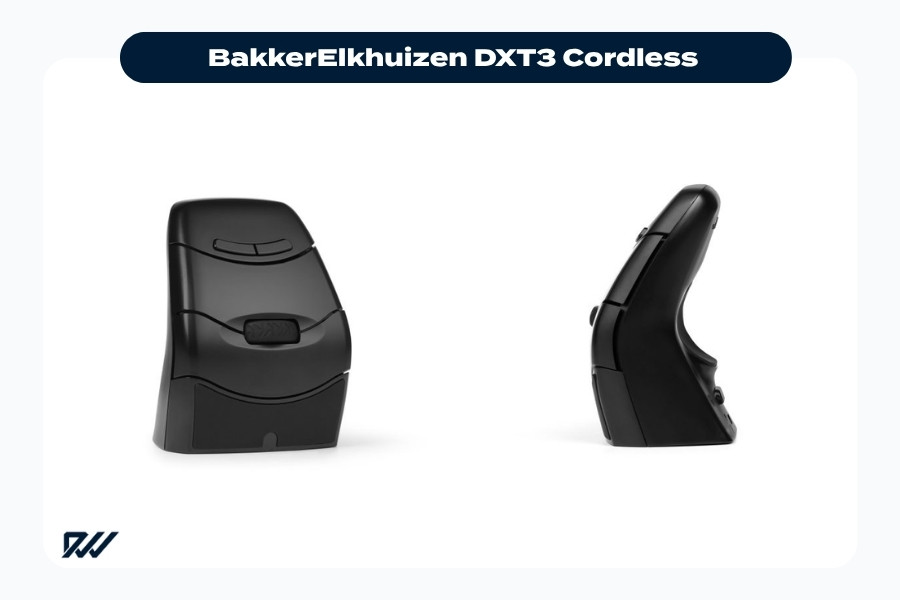
The BakkerElkhuizen DXT3 Cordless combines a compact ergonomic design with ambidextrous functionality for comfortable everyday office use.
The BakkerElkhuizen DXT3 Cordless Ergonomic Mouse is designed for users who prefer a compact yet highly adaptable ergonomic solution. Its ambidextrous design allows both left and right-handed use, making it ideal for shared workspaces and flexible working environments.
Despite its smaller size, the DXT3 focuses heavily on reducing muscle strain through precise fingertip control. This design encourages smaller hand movements, which may help minimise tension during prolonged computer use.
BakkerElkhuizen Fastforward Vertical Mouse
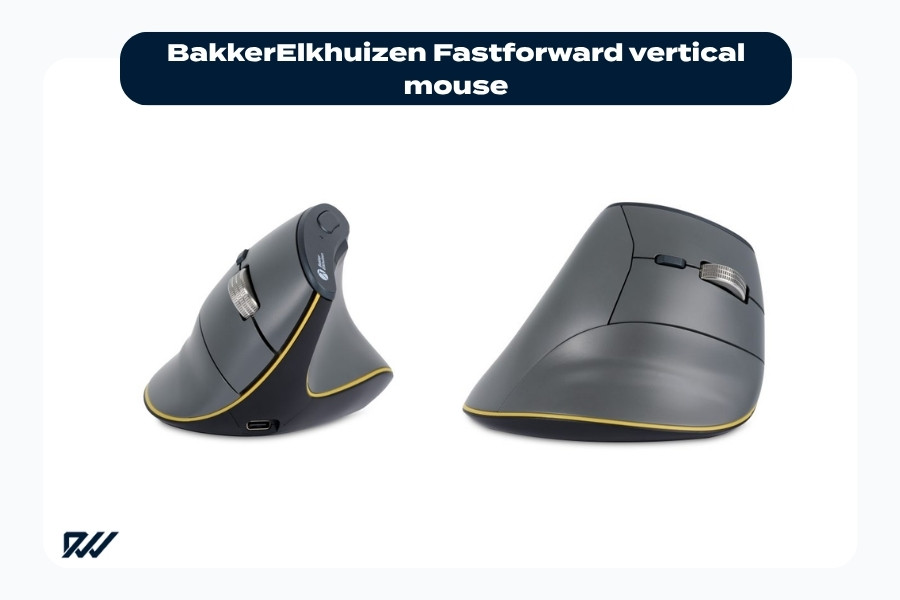
The BakkerElkhuizen Fastforward vertical mouse is designed to promote a more natural wrist position and improve comfort during long hours of computer work.
The BakkerElkhuizen Fastforward Vertical Mouse adopts a classic vertical design that positions the hand in a more natural posture. This handshake-style grip can help reduce forearm twisting and wrist pressure during everyday tasks.
Its lightweight build and ergonomic angle make it suitable for office users who want improved comfort without a steep learning curve. The design supports smoother movement while encouraging healthier wrist positioning throughout the working day.
Contour Unimouse
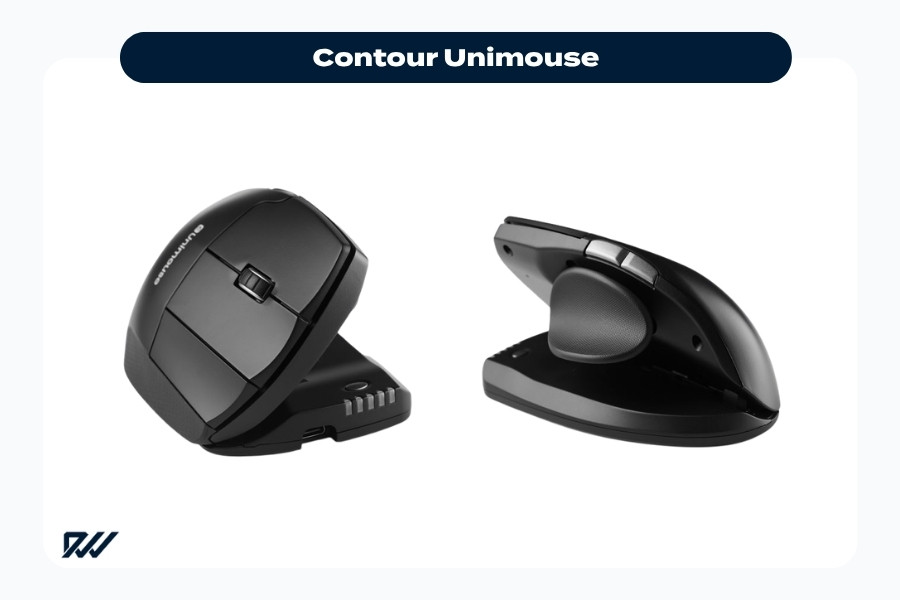
The Contour Unimouse offers a highly adjustable ergonomic design with customisable tilt angles and thumb support for personalised comfort.
The Contour Unimouse stands out because of its highly adjustable ergonomic design. Users can alter the angle of the mouse body and reposition the thumb support to create a personalised fit.
This flexibility makes it particularly appealing for people with ongoing wrist discomfort or unique ergonomic requirements. The adjustable design allows users to experiment with different hand positions to find the most comfortable setup.
Dicota Wireless Ergonomic Mouse Relax
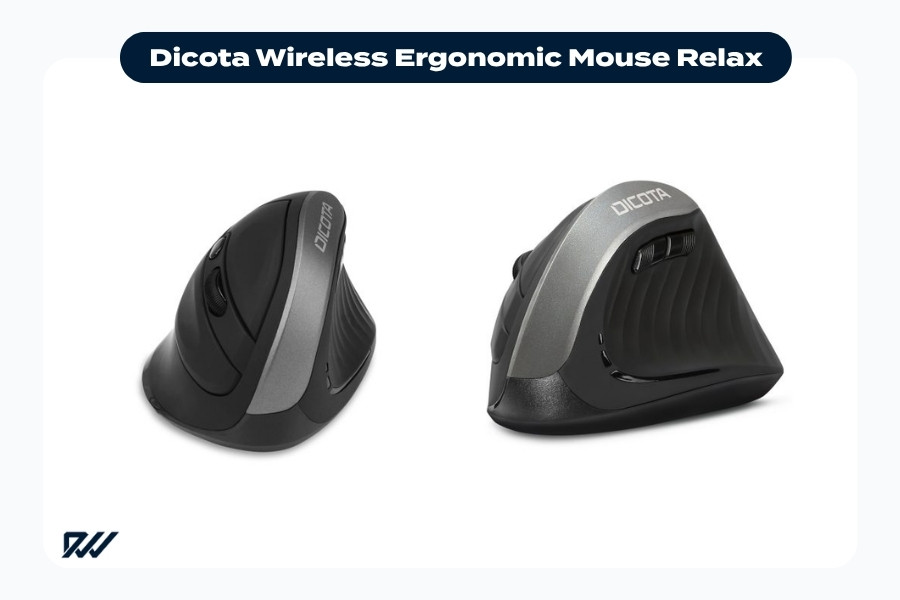
The Dicota Wireless Ergonomic Mouse Relax combines a vertical ergonomic shape with wireless convenience for improved comfort during daily computer work.
The Dicota Wireless Ergonomic Mouse Relax offers a budget-friendly ergonomic solution for everyday office use. Its vertical shape encourages a more relaxed hand position while maintaining a familiar feel for users transitioning from a standard mouse.
Wireless functionality also helps reduce cable clutter, making it a practical choice for cleaner desk setups. For users seeking an affordable entry point into ergonomic accessories, this mouse provides a simple and accessible option.
Evoluent Vertical Mouse 4
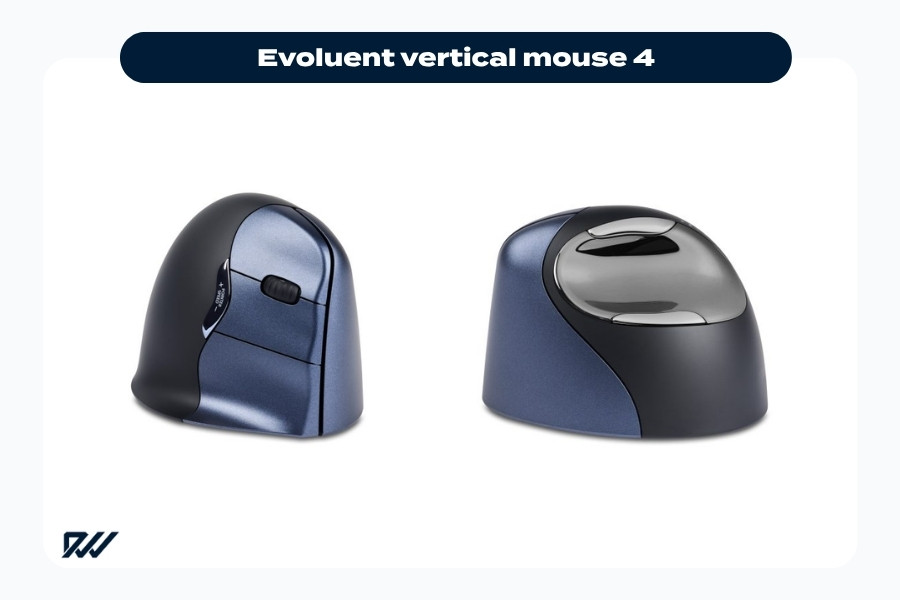
The Evoluent Vertical Mouse 4 uses a vertical ergonomic design to support natural wrist alignment and reduce strain during extended computer use.
The Evoluent Vertical Mouse 4 is one of the most recognisable ergonomic mice on the market. Its vertical grip is specifically designed to reduce forearm pronation, helping users maintain a more natural posture while working.
Many users appreciate its larger shape and supportive grip, especially during long office sessions. The programmable buttons and adjustable pointer speed also provide additional productivity benefits for advanced users.
Handshoe Shift Mouse
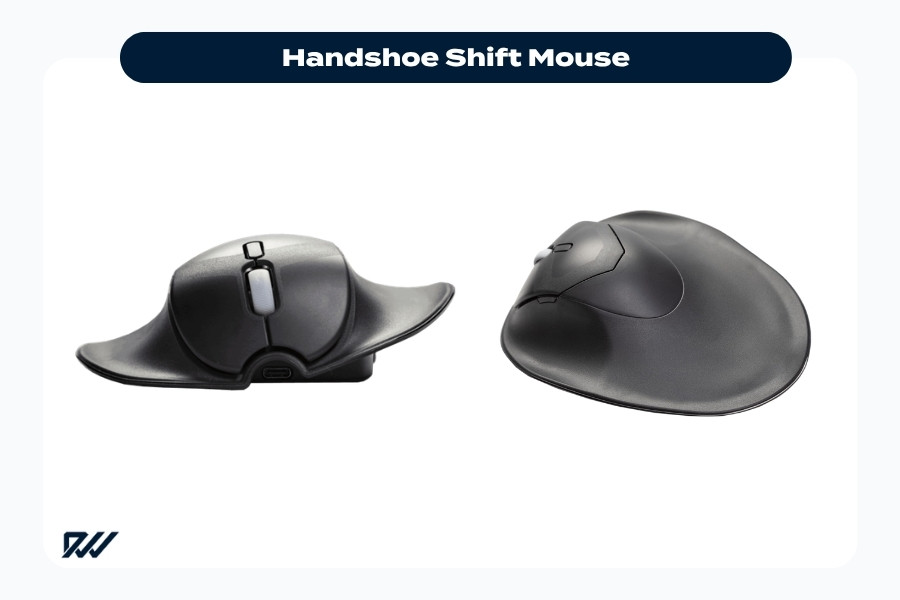
The Handshoe Shift Mouse is designed to provide full-hand ergonomic support, helping reduce wrist strain and muscle tension during long work sessions.
The Handshoe Shift Mouse focuses on full-hand support to minimise unnecessary muscle activity. Unlike many traditional mice, this design encourages the hand to rest comfortably across the entire surface of the device.
This approach may help reduce strain in the fingers and wrist during extended use. Its sculpted shape is particularly suited to users looking for maximum palm support and reduced gripping effort.
Logitech Ergo M575 Wireless Trackball Mouse
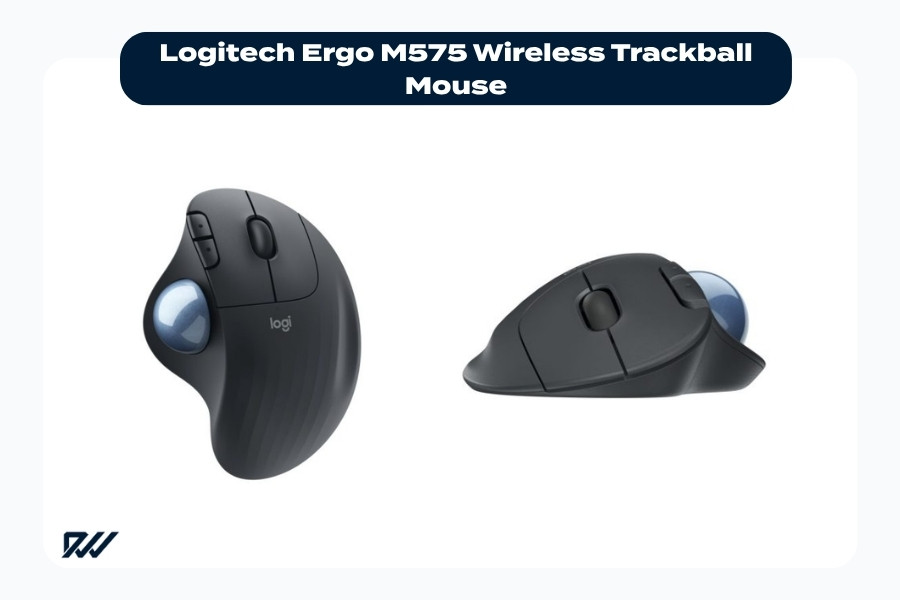
The Logitech Ergo M575 Wireless Trackball Mouse reduces arm movement with a thumb-controlled trackball design built for ergonomic comfort and smaller desk setups.
The Logitech Ergo M575 Wireless Trackball Mouse offers a different ergonomic experience by eliminating the need to move the mouse itself. Instead, users control the cursor using a thumb-operated trackball.
This design can help reduce shoulder and arm movement while also saving desk space. It is especially popular among users who experience upper arm fatigue or work in compact environments.
Logitech MX Master 3S
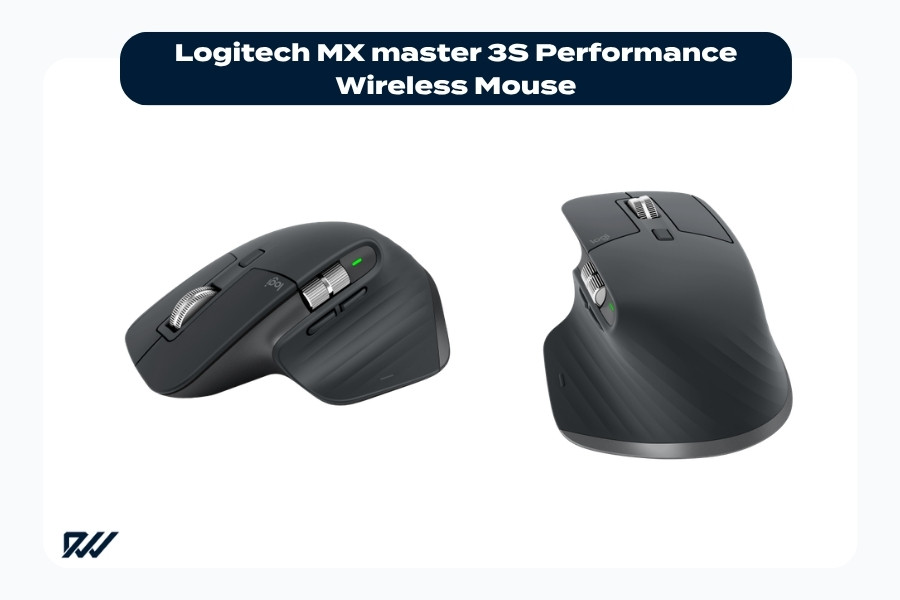
The Logitech MX Master 3S combines ergonomic comfort with advanced productivity features for professional office and creative workflows.
The Logitech MX Master 3S combines premium productivity features with ergonomic comfort. While not a fully vertical mouse, its sculpted shape provides excellent hand support for extended work sessions.
The MX Master 3S is particularly popular among creative professionals and multitaskers thanks to its advanced scrolling, multi-device connectivity, and customisable controls. Its ergonomic design balances comfort with high-end functionality.
Logitech MX Vertical
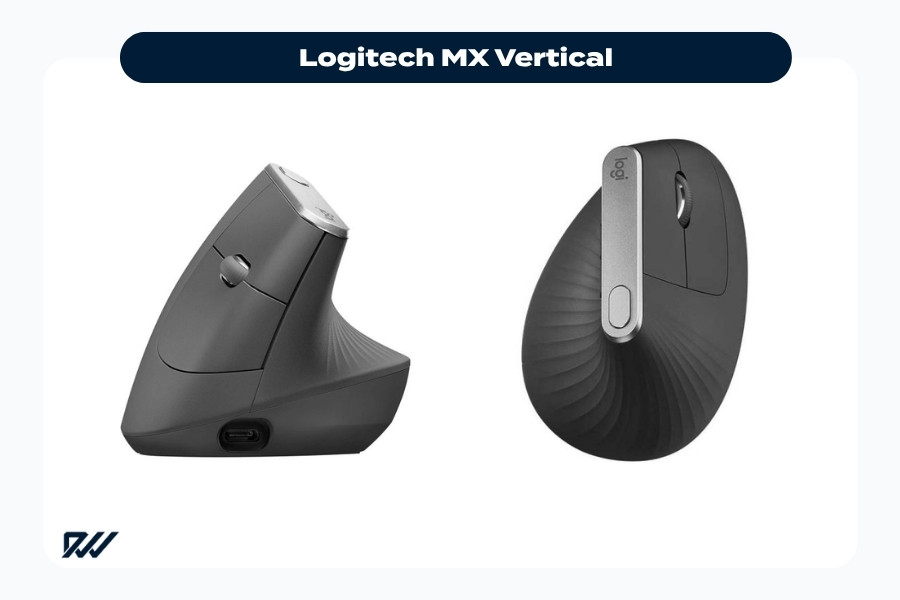
The Logitech MX Vertical uses a vertical ergonomic design to promote natural wrist alignment and improve comfort during long work sessions.
The Logitech MX Vertical is designed specifically to reduce wrist pressure through its steep vertical angle. The handshake-style grip encourages a more natural forearm position that may help reduce discomfort during prolonged use.
Its premium build quality and wireless functionality make it a popular choice for professional office setups. Users transitioning from traditional mice often find the MX Vertical easier to adapt to than more aggressive ergonomic designs.
R-Go Basic Ergonomic Vertical Bluetooth Mouse Medium Right
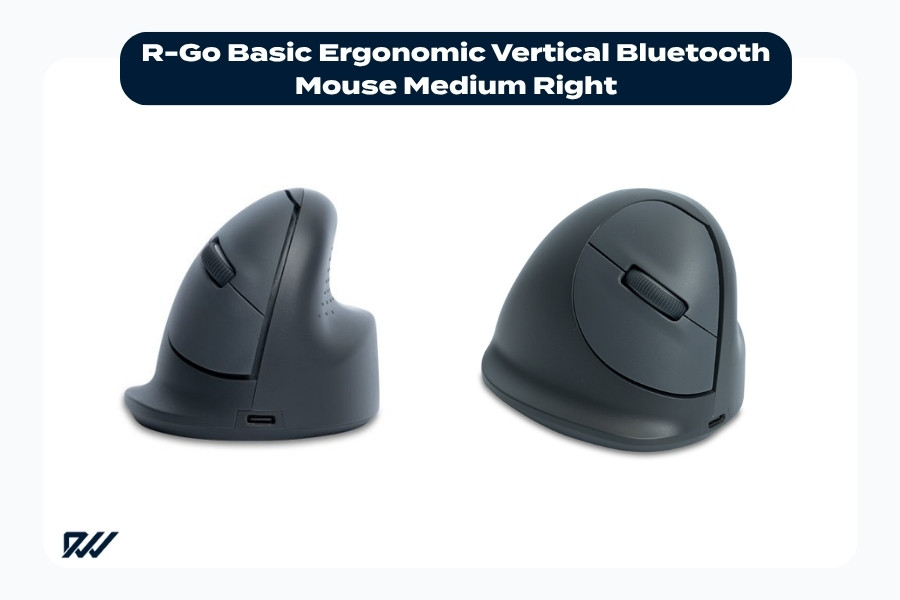
The R-Go Basic Ergonomic Vertical Bluetooth Mouse supports a natural wrist position with a lightweight vertical design for everyday office comfort.
The R-Go Basic Ergonomic Vertical Bluetooth Mouse offers a lightweight vertical design aimed at improving comfort during daily computer work. Its medium-sized shape is intended to support a relaxed hand position while reducing muscle tension.
Bluetooth connectivity also makes it convenient for modern wireless workstations. The minimalist design appeals to users who want ergonomic support without unnecessary complexity.
R-Go HE Break Ergonomic Vertical Bluetooth Mouse Small Right
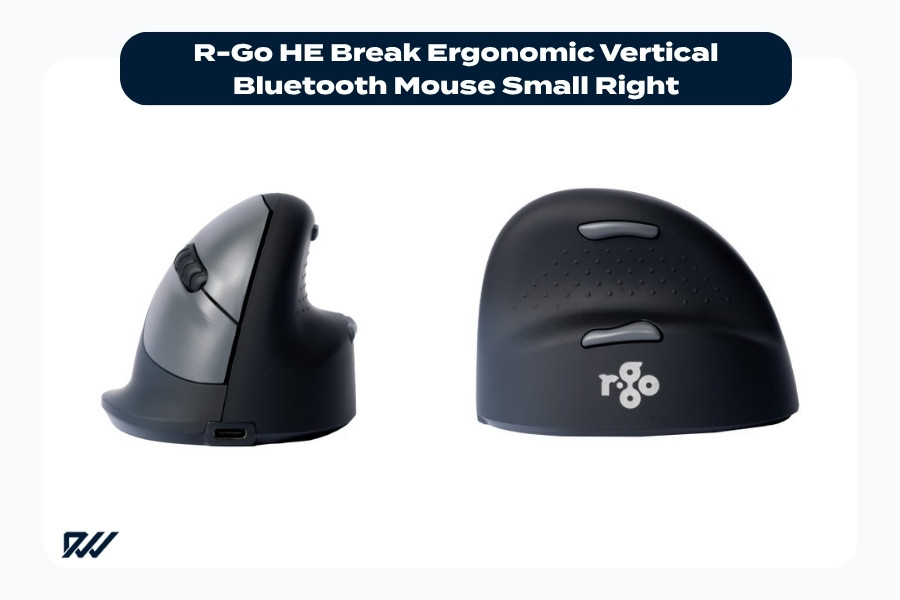
The R-Go HE Break Ergonomic Vertical Bluetooth Mouse combines a compact vertical design with built-in break reminder functionality to support healthier computer habits.
The R-Go HE Break Ergonomic Vertical Bluetooth Mouse includes built-in break reminders designed to encourage healthier working habits. These reminders help users take regular pauses throughout the day, which may reduce strain caused by repetitive movements.
Its smaller size makes it particularly suitable for users with smaller hands. Combined with its vertical grip, the mouse is designed to promote both ergonomic posture and improved workplace wellbeing.
R-Go Twister Mouse
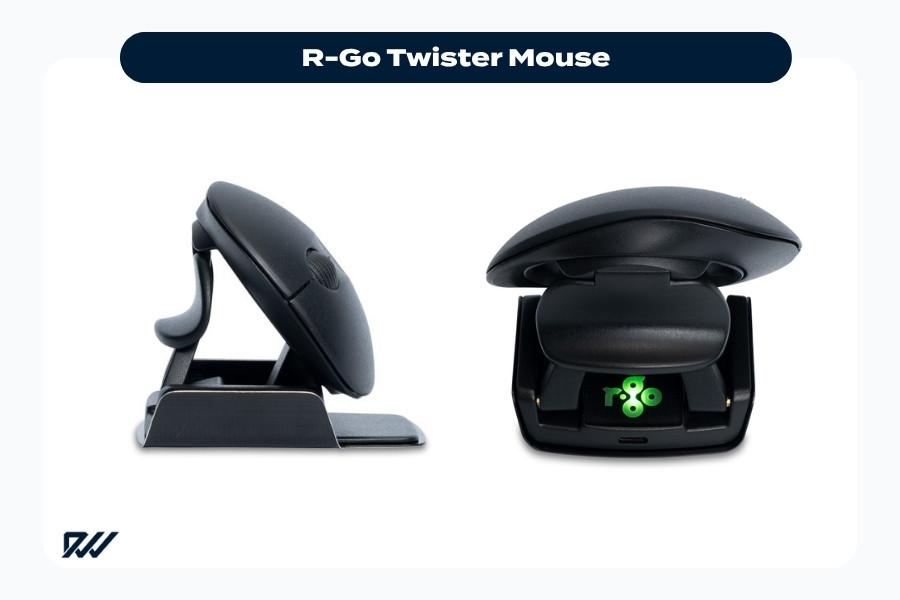
The R-Go Twister Mouse features an adjustable ergonomic design that encourages varied hand positioning and improved comfort during long work sessions.
The R-Go Twister Mouse features a unique adjustable design that allows users to alternate working positions throughout the day. This movement variation may help reduce repetitive strain associated with static hand positioning.
Its compact and portable design also makes it suitable for hybrid workers and people frequently moving between workspaces. The flexible positioning system offers a different ergonomic approach compared to traditional vertical mice.
Need help choosing the right ergonomic mouse? Speak to our team for advice on finding the right option for your needs and working setup.
Best Ergonomic Mouse for Office Work
For office environments, comfort and usability are equally important when choosing an ergonomic mouse. Many office workers spend several hours per day using a mouse, making long-term comfort essential for maintaining productivity and reducing fatigue.
Models such as the Logitech MX Master 3S and Logitech MX Vertical are popular office choices because they combine ergonomic support with practical productivity features. Wireless connectivity, programmable buttons, and rechargeable batteries can all improve the overall working experience.
Users working in shared offices or hybrid environments may also benefit from lightweight and portable ergonomic mice. Compact options such as the BakkerElkhuizen DXT3 or R-Go Twister Mouse are easier to transport while still supporting healthier hand positioning.
Ultimately, the best office mouse depends on individual working habits and comfort preferences. Finding a mouse that feels natural during long work sessions is often more important than choosing the most feature-heavy option.
Best Ergonomic Mouse for Wrist Pain and RSI
Users experiencing wrist pain or repetitive strain injuries often benefit from ergonomic mice designed to reduce forearm twisting and minimise tension. Vertical mice are particularly effective because they encourage a more neutral wrist position.
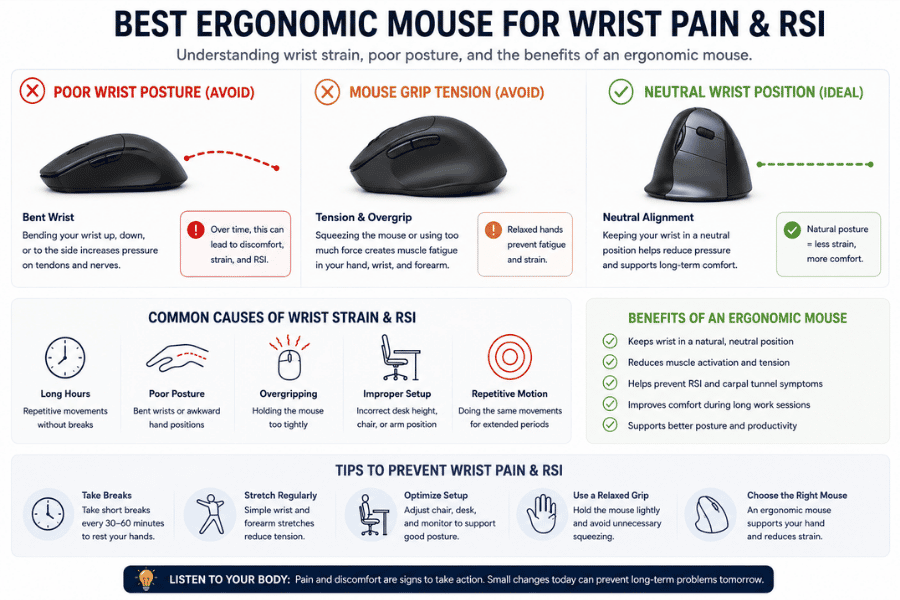
Models such as the Evoluent Vertical Mouse 4 and Logitech MX Vertical are specifically designed to support healthier wrist alignment. These designs may help reduce pressure on tendons and muscles during repetitive computer work.
Trackball mice can also be useful for users dealing with shoulder or forearm discomfort. By reducing the need for large arm movements, devices like the Logitech Ergo M575 may help improve comfort during prolonged use.
While ergonomic mice can support better posture and comfort, workstation setup also plays an important role. Proper desk height, chair support, and keyboard positioning should all be considered as part of a complete ergonomic workspace.
Best Ergonomic Mouse for Small Hands
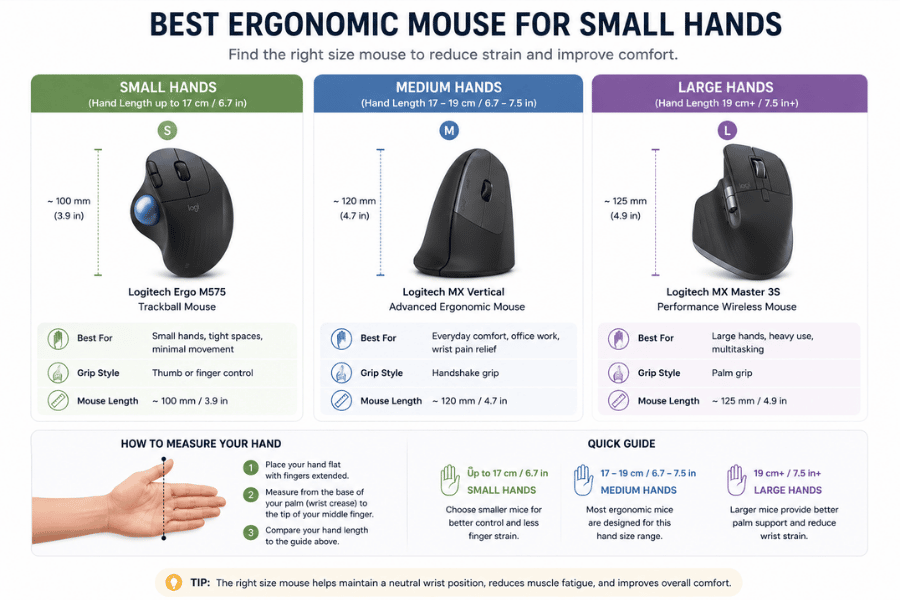
Smaller ergonomic options such as the R-Go HE Break Ergonomic Vertical Bluetooth Mouse Small Right and the BakkerElkhuizen DXT3 are designed with compact dimensions that better suit users with smaller hands. These designs help improve reachability and reduce finger tension during use.
Adjustable ergonomic mice can also provide more flexibility for different hand sizes. The Contour Unimouse, for example, allows users to customise positioning for improved comfort and support.
Choosing the correct mouse size can make a significant difference in long-term usability. A well-fitted ergonomic mouse should feel supportive without requiring excessive stretching or gripping during everyday tasks.
Wired vs Wireless Ergonomic Mice
Both wired and wireless ergonomic mice offer unique advantages depending on the user’s workspace and preferences. Wireless mice provide greater flexibility and cleaner desk setups by removing cable clutter from the working area.
Many modern wireless ergonomic mice also offer long battery life, Bluetooth compatibility, and multi-device connectivity. This makes them especially useful for hybrid workers, laptop users, and modern office environments.
Wired ergonomic mice, however, remain popular among users who prioritise uninterrupted connectivity and consistent responsiveness. Without batteries to charge or wireless signals to manage, wired models can offer a more straightforward experience.
The choice between wired and wireless often comes down to convenience, portability, and personal preference. Both options can provide excellent ergonomic support when matched to the right user and working environment.
How to Choose the Right Ergonomic Mouse for You
Choosing the best ergonomic mouse depends on several personal factors, including hand size, grip style, work habits, and comfort preferences. There is no single design that works perfectly for everyone, which is why testing different styles can be beneficial.
Users who experience wrist discomfort may prefer vertical mice that encourage a neutral forearm position. Others may find trackball mice more comfortable because they reduce shoulder and arm movement throughout the day.
Before buying an ergonomic mouse, it can help to consider:
- How many hours per day you use a mouse
- Whether you travel frequently with your setup
- Your preferred grip style
- Desk space limitations
- Existing wrist, arm, or shoulder discomfort
Investing in the right ergonomic mouse can improve both comfort and productivity over time. A well-designed mouse should feel supportive, intuitive, and comfortable during long-term daily use. Contact us today and we will help you to chose.
Are Ergonomic Mice Worth It?
For many users, ergonomic mice are absolutely worth considering, especially for those spending long hours at a computer. Improved comfort, reduced wrist strain, and better hand positioning can all contribute to a healthier working experience.
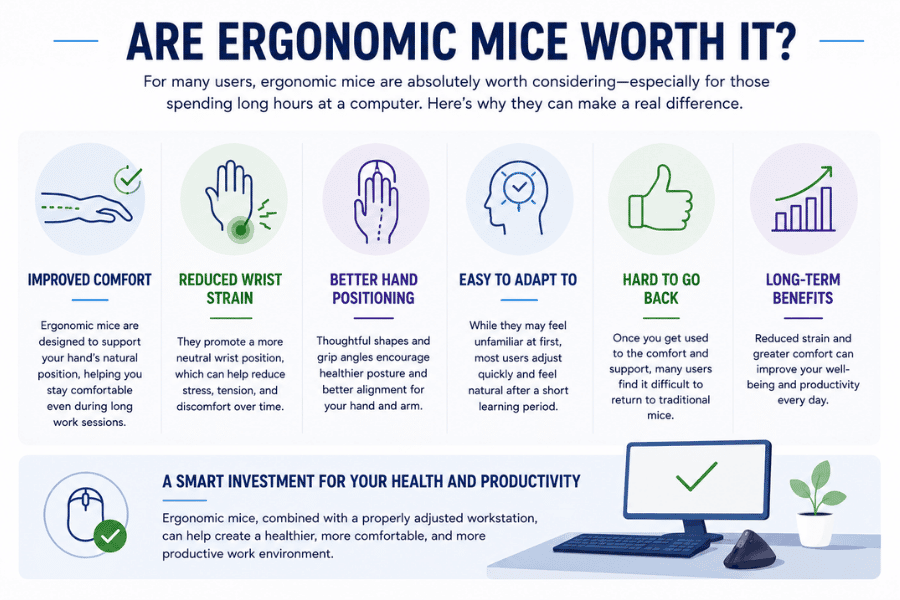
While ergonomic mice may initially feel unfamiliar compared to traditional designs, most users adapt quickly after a short adjustment period. Once accustomed to the new shape and grip style, many people find it difficult to return to standard mice.
The long-term benefits of improved comfort and reduced strain can make ergonomic mice a worthwhile investment. Combined with a properly adjusted workstation, they can play an important role in creating a healthier and more productive workspace.
Final Verdict: Which Ergonomic Mouse Should You Buy?
The best ergonomic mouse depends entirely on your individual needs, working style, and comfort preferences. Some users prioritise vertical designs for wrist support, while others prefer trackball models that reduce arm movement.
For productivity-focused users, the Logitech MX Master 3S offers an excellent balance of comfort and advanced features. Those specifically seeking wrist support may prefer options such as the Logitech MX Vertical or Evoluent Vertical Mouse 4.
Users with smaller hands, limited desk space, or unique ergonomic requirements may benefit from more specialised options like the R-Go HE Break or Contour Unimouse. Each ergonomic mouse offers different strengths depending on how and where it will be used.
Ultimately, investing in the right ergonomic mouse can improve comfort, support healthier posture, and make daily computer work more enjoyable over the long term.