What Is a Desk Converter and Why Consider One?
A desk converter, sometimes called a sit-stand desk riser, is a platform that sits on top of your existing desk and allows you to switch between sitting and standing positions throughout the day. Rather than replacing your entire desk, it offers a more flexible and cost-effective way to introduce movement into your workspace without major disruption.
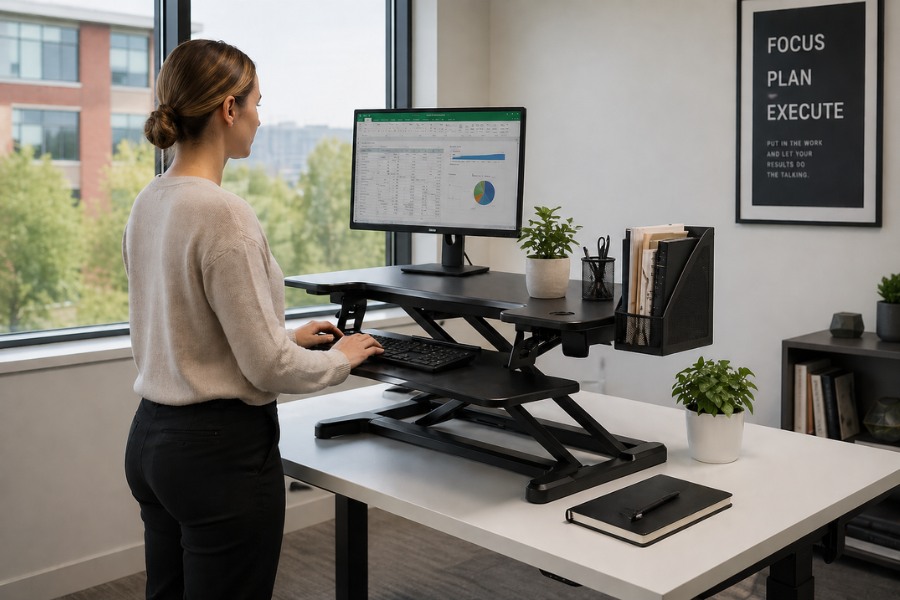
For many people, the appeal lies in its simplicity. You can raise or lower the surface in seconds, making it easy to adapt your working position depending on your comfort, task, or energy levels. This can be particularly helpful if you’re working long hours at a computer and want to avoid the stiffness that comes from staying seated for too long.
There are a few common reasons people choose a desk converter:
- They’re generally more affordable than full sit-stand desks
- No installation or minimal assembly is required
- They work well in rented offices or shared spaces
- Easy to adjust throughout the day without interrupting workflow
In short, a desk converter is a practical middle ground. It gives you many of the benefits of a standing desk without the commitment or expense of replacing your entire workstation.
Benefits of Using a Sit-Stand Desk Converter
Switching between sitting and standing isn’t just a trend, it reflects a growing awareness of how prolonged sitting can affect comfort and productivity. A desk converter makes it easier to vary your posture naturally, which can help reduce common issues like back tension, neck strain, and general fatigue.
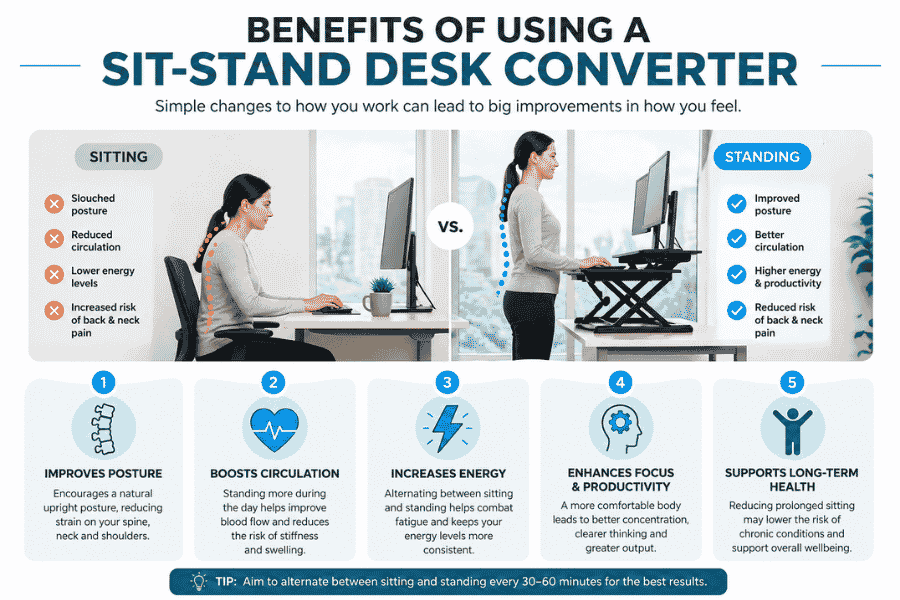
Over time, even small changes in how you work can make a noticeable difference. Standing periodically encourages better posture and can help you stay more engaged with your tasks, especially during long stretches of desk work. Many people also find that having the option to stand gives them a slight boost in focus and energy.
Some of the key benefits include:
- Improved posture by encouraging a more neutral spine position
- Reduced strain on the lower back and shoulders
- Greater flexibility to switch positions throughout the day
- Potential increase in productivity and concentration
- A simple way to introduce movement without leaving your desk
While it’s not a complete solution to every ergonomic issue, a desk converter is a straightforward step towards a more dynamic and comfortable working routine.
Top Desk Converter Picks: Our Featured Models
With so many options available, it helps to focus on a handful of well-designed models that genuinely suit different working styles and spaces. The selections below strike a thoughtful balance between practicality, build quality, and ease of use, making them reliable choices whether you’re upgrading a home office or refining a more demanding setup.
For those wanting a simple, dependable solution, the Classic range offers flexibility across sizes without overcomplicating things. At the other end, more premium models introduce smoother adjustment and refined finishes that make everyday use feel more seamless.
CLASSIC 70 Standing Desk Converter
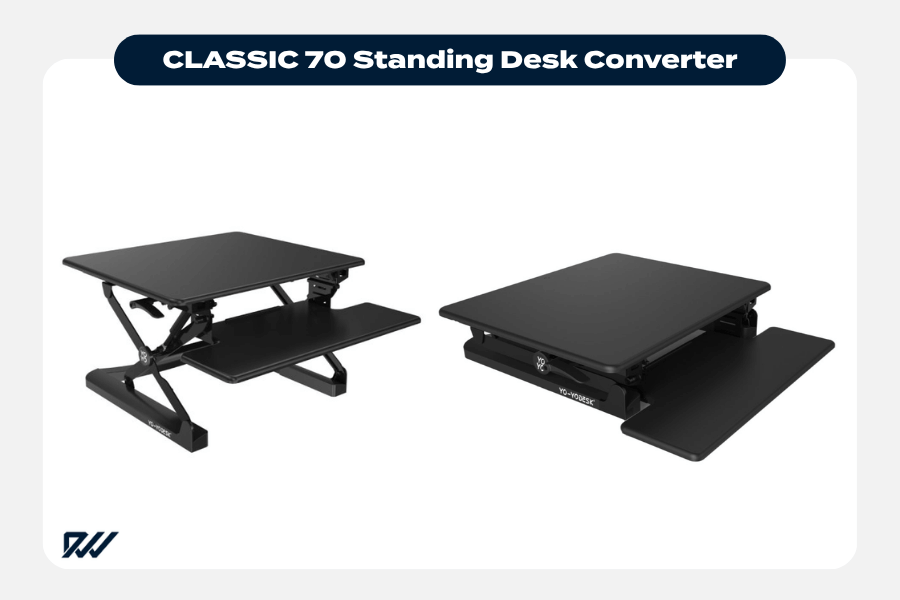
The CLASSIC 70 is a compact and practical choice, particularly suited to smaller desks or minimalist setups. It provides just enough surface area for a laptop or single monitor, along with a keyboard, without overwhelming your workspace.
Its straightforward design makes it easy to use day to day, and it’s a sensible option if you’re just starting to incorporate standing into your routine. For lighter setups and tighter spaces, it offers a balanced mix of affordability and usability.
CLASSIC 90 Standing Desk Converter
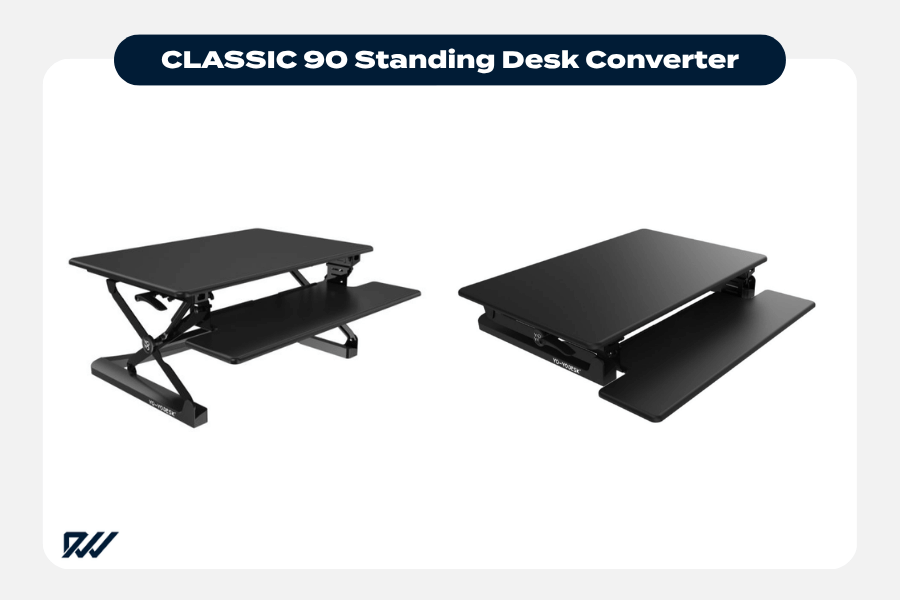
Sitting comfortably in the middle of the range, the CLASSIC 90 offers a bit more breathing room without taking up too much desk space. It works well for single monitor users who want extra surface area, or even a modest dual-screen setup if arranged carefully.
This model tends to appeal to those who want versatility. It feels more accommodating than compact options, while still maintaining a clean and manageable footprint on most desks.
CLASSIC 120 Standing Desk Converter
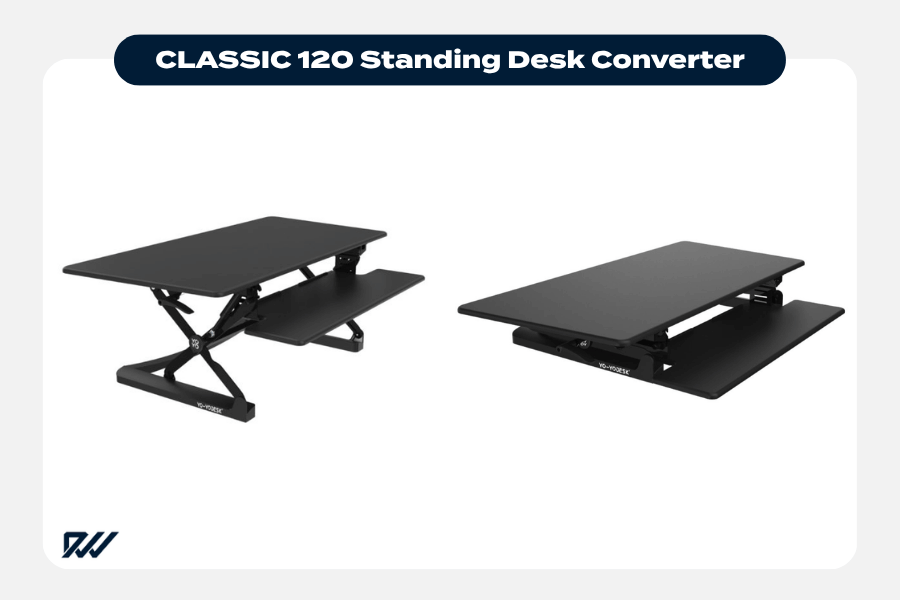
The CLASSIC 120 is the largest of the range and is designed with more demanding setups in mind. With its wider surface, it comfortably supports dual monitors and additional accessories, making it a strong choice for professional or multitasking environments.
Despite its size, it retains the same sturdy and reliable construction found across the Classic range. If you need space and stability without stepping into premium pricing, this model offers excellent value.
Ergotron WorkFit T
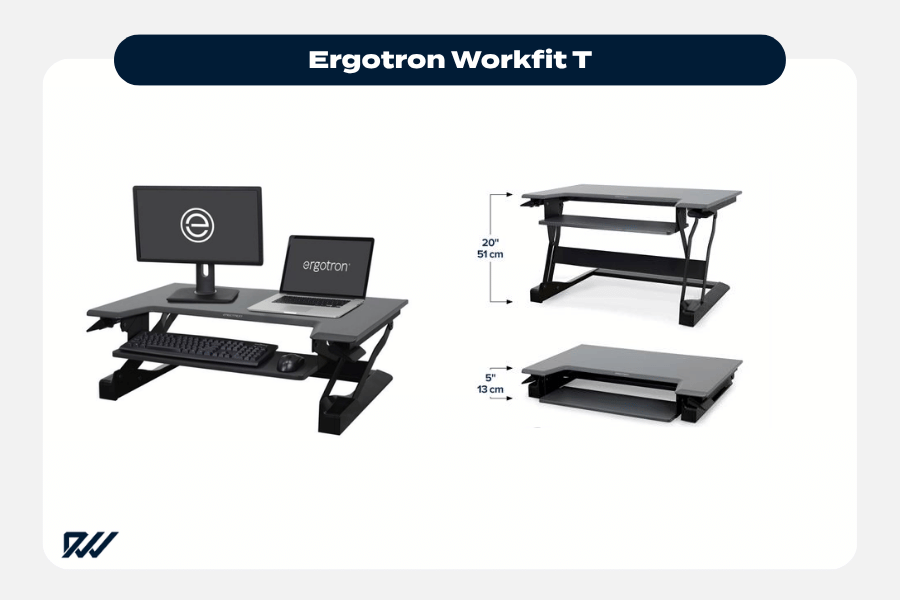
The Ergotron WorkFit T stands out for its premium build quality and smooth, responsive height adjustment. It’s designed for users who switch between sitting and standing frequently and want that movement to feel effortless.
Its stability makes it particularly well-suited to dual monitor setups, and the overall construction feels built for long-term, everyday use. For those prioritising durability and refinement, it’s a dependable investment.
Ergotron WorkFit-TL
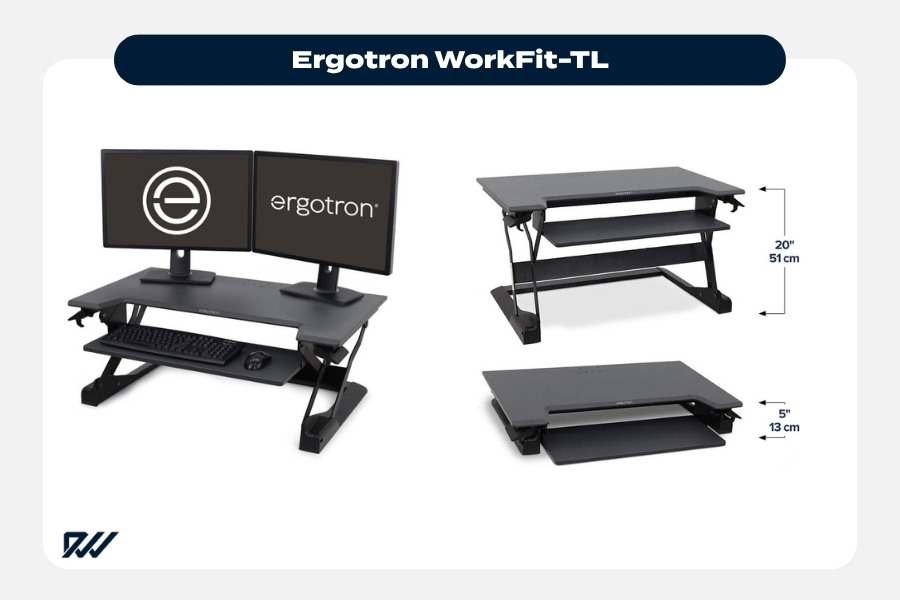
The WorkFit-TL is a well-established premium option known for its stability and ease of use. It features a large worksurface capable of supporting dual monitors and up to around 18 kg of equipment, making it ideal for more demanding setups.
Its counterbalance mechanism allows for smooth, crank-free height adjustment, which feels effortless in daily use. For those working long hours or frequently switching positions, it offers a refined and highly reliable experience.
Ergotron WorkFit-Z
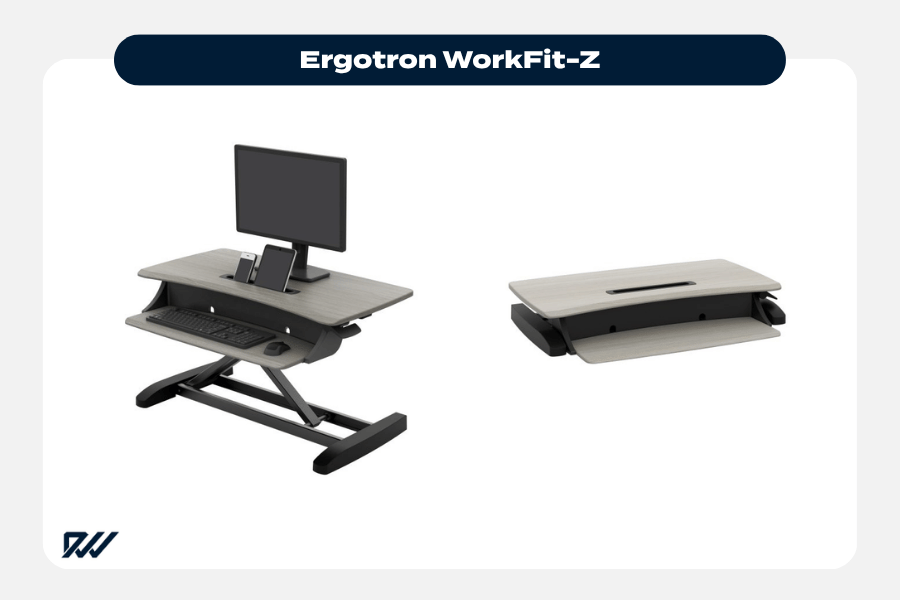
A compact, stylish converter designed specifically for small desks and lighter setups.
The WorkFit-Z Mini is designed with compact workspaces in mind. Its smaller footprint makes it ideal for tight desks or home offices where space is at a premium, while still offering solid build quality and smooth manual adjustment.
It also includes thoughtful touches like a device slot for tablets or phones, making it a practical choice for modern, flexible setups.
Fellowes Lotus LT Sit-Stand Workstation
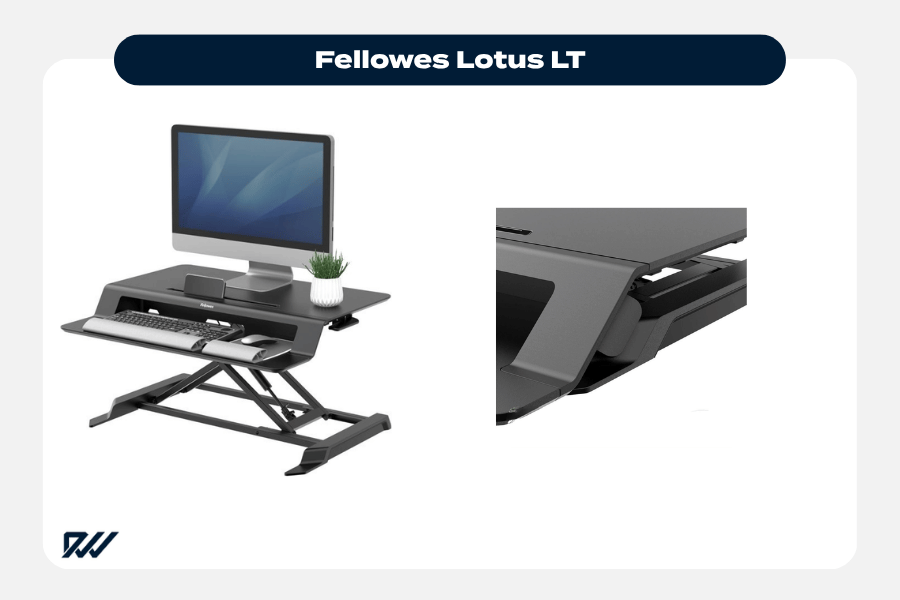
The Fellowes Lotus LT offers a slightly more refined experience compared to entry-level models, with smooth height transitions and a well-balanced frame. It’s designed to be intuitive to adjust, making it easy to move between sitting and standing without interruption.
Its clean design and practical layout make it suitable for both home and office environments. For users looking for a reliable, mid-range option that blends performance with a polished finish, it’s a very appealing choice.
Fellowes Corsivo Sit-Stand Workstation
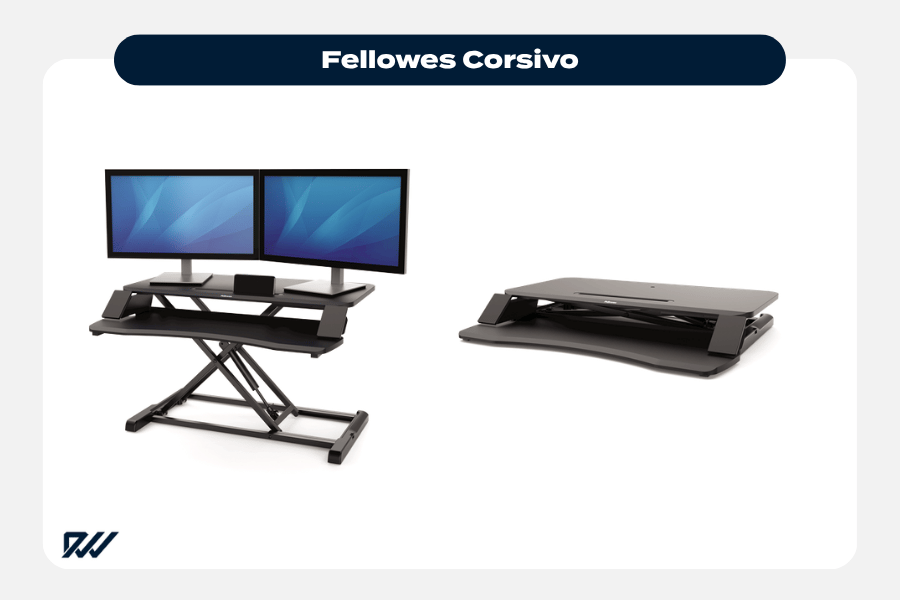
The Fellowes Corsivo offers a more streamlined and accessible design, making it a strong option for everyday use. It’s typically lighter and simpler than premium models, which makes it easy to move and integrate into existing desks.
This model suits users who want a clean, functional solution without unnecessary complexity. It’s particularly well-suited to home offices or single-monitor setups where simplicity and value are key.
Freelift Electric Standing Desk Convertes
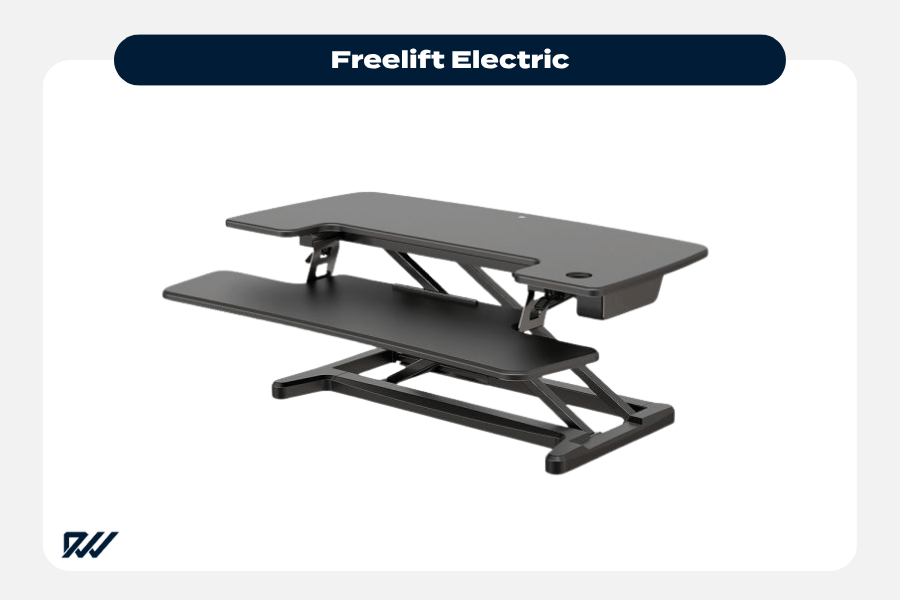
Freelift models bring convenience to the forefront with electric height adjustment. With the push of a button, you can move between positions smoothly, which makes a noticeable difference if you’re adjusting multiple times throughout the day.
They’re especially useful for heavier or more complex setups, where manual lifting can feel cumbersome. For users who value ease and efficiency, electric converters offer a more modern and effortless experience.
Opløft Sit-Stand Platform
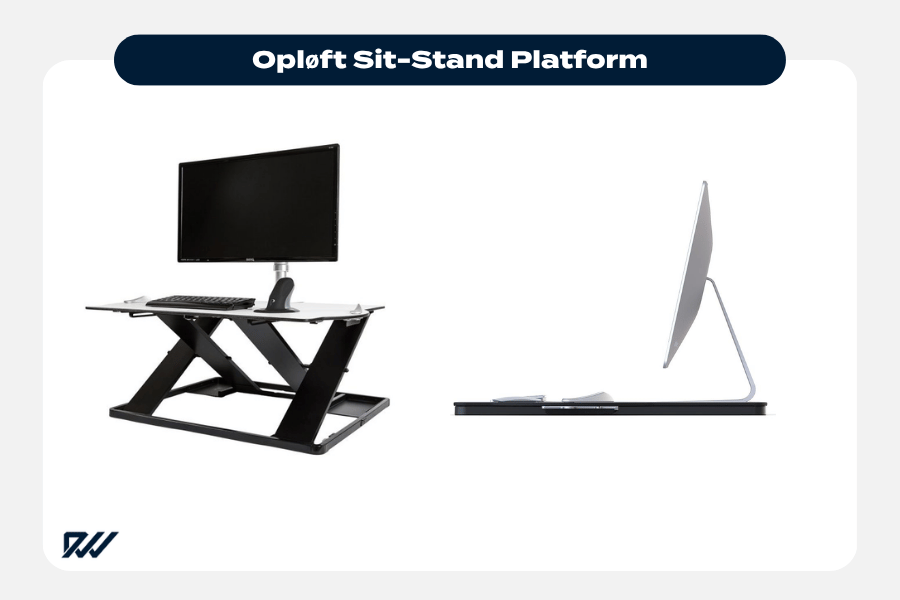
The Opløft Sit-Stand Platform offers a more design-led approach, combining a sleek aesthetic with a stable and functional structure. It fits neatly into modern workspaces and doesn’t feel overly bulky or industrial.
While it remains practical, it leans slightly more towards style without sacrificing performance. This makes it a good option for those who want their workspace to look as considered as it feels.
Mousetrapper Standfriend
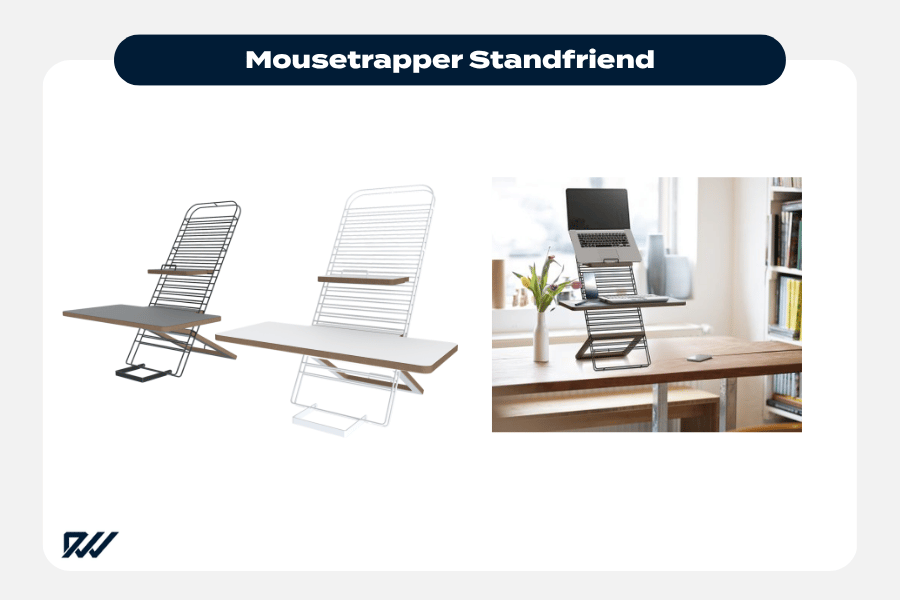
The Mousetrapper Standfriend is a compact and lightweight solution designed for simplicity. It’s ideal for laptop users or those with minimal equipment who want a quick and easy way to switch positions.
Its pared-back design makes it easy to move, store, and use without fuss. For flexible or shared workspaces, it offers a straightforward and unobtrusive option.
Each of these models brings something slightly different to the table. Whether you’re working with limited space or managing a more complex setup, there’s a desk converter here that can slot naturally into your routine and support a more dynamic way of working.
How to Choose the Best Desk Converter for Your Workspace
Choosing the right desk converter comes down to how you actually use your desk day to day. It’s easy to focus on price or appearance, but the more important factors tend to be space, equipment, and how often you plan to switch between sitting and standing.
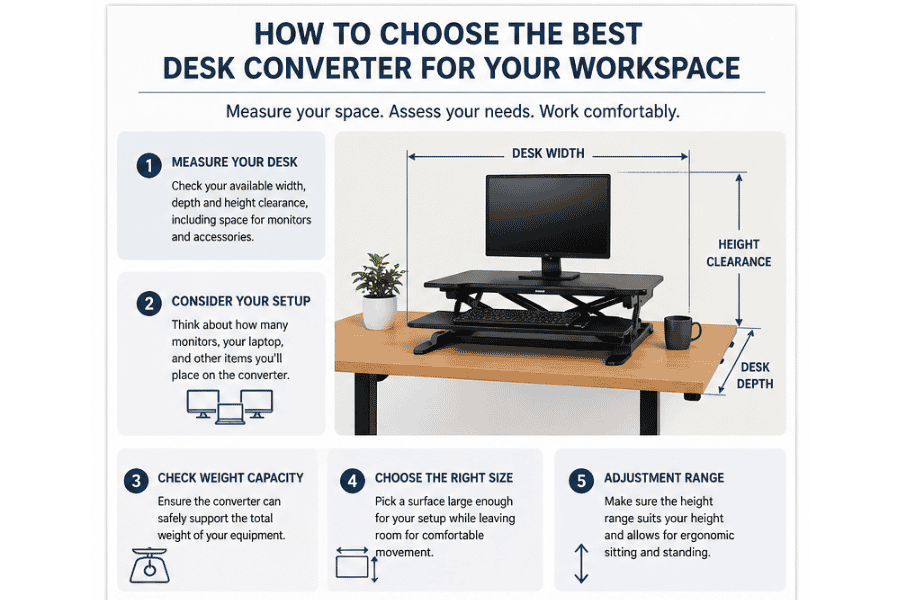
Start by thinking about your current set-up. If you use a single laptop, your needs will be very different from someone running dual monitors, a keyboard, and additional accessories. The size of your desk also plays a part, as some converters can feel quite bulky if space is limited.
A few practical considerations can help narrow things down:
- Desk size and available surface area
- Whether you use a single screen or multiple monitors
- Required weight capacity for your equipment
- Height adjustment range to suit your body
- Ease of lifting, especially if adjusting frequently
It’s worth taking a moment to measure your space and think about your workflow before making a choice. A well-matched converter should feel like a natural extension of your desk rather than something you have to work around.
Key Features to Look For in a Desk Converter
Once you’ve got a clearer idea of your needs, it becomes easier to focus on the features that really matter. Not all desk converters are built the same, and small differences in design can have a noticeable impact on comfort and usability over time.
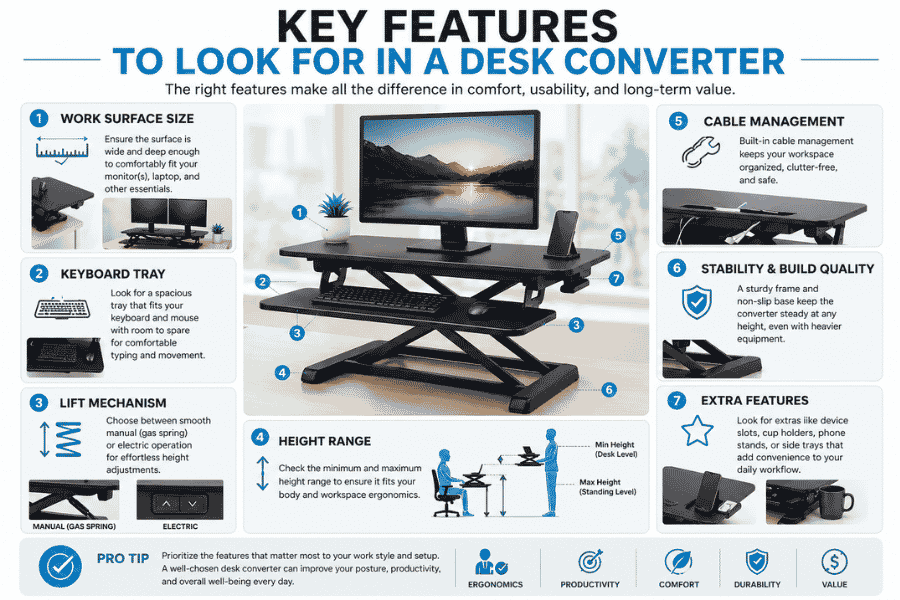
One of the most important features is how smoothly the converter adjusts. A model that feels stable and easy to raise will naturally encourage you to switch positions more often, whereas anything stiff or awkward can quickly become frustrating.
When comparing options, it’s worth paying attention to:
- Adjustment mechanism – manual lift, gas spring, or electric
- Stability – especially at full height
- Keyboard tray design – fixed or adjustable positioning
- Surface space – enough room for your set-up without feeling cramped
- Build quality – sturdier materials tend to last longer
These details might seem minor at first glance, but they make a real difference in daily use. A desk converter that feels solid, smooth, and well-designed will not only last longer, but also make it far easier to build a healthier working routine.
Manual vs Electric Desk Converters: Which Is Better?
This is one of the first decisions most people face, and there isn’t a one-size-fits-all answer. Both manual and electric desk converters have their strengths, and the right choice depends largely on how often you plan to adjust your set-up and how much convenience matters to you.
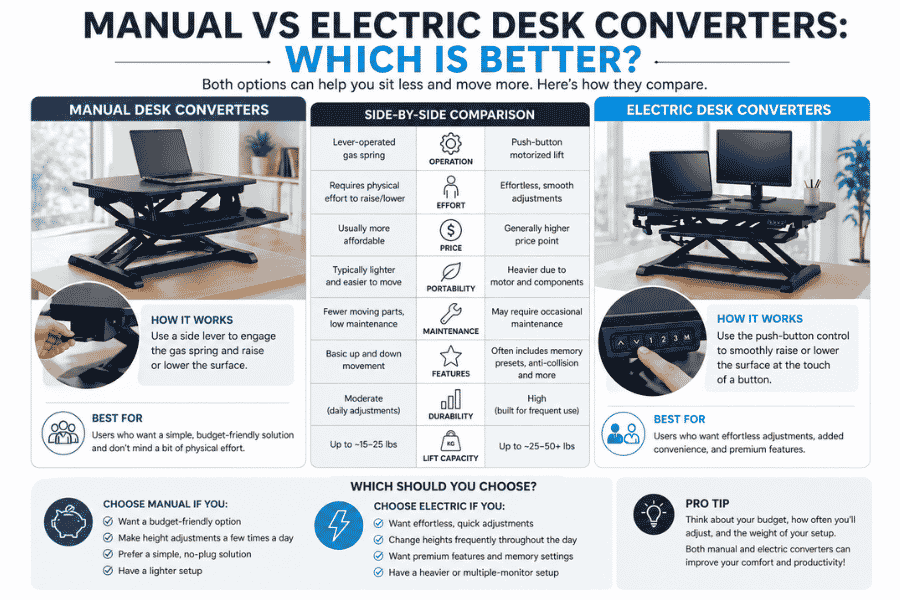
Manual converters are typically operated with a lever or gas spring mechanism. They tend to be more affordable and perfectly suitable for occasional adjustments, but they can require a bit of effort, especially if you’re lifting heavier equipment. Electric models, on the other hand, adjust at the push of a button, offering a smoother and more effortless experience, which can be appealing if you switch positions regularly.
Here’s a simple way to weigh them up:
- Manual converters
- More budget-friendly
- No need for power or cables
- Slightly more effort to adjust
- Electric converters
- Effortless height adjustment
- Ideal for frequent use
- Usually more expensive
If you see yourself moving between sitting and standing multiple times a day, an electric option may feel like a worthwhile upgrade. For lighter or less frequent use, a manual converter can still do the job comfortably.
Best Desk Converters for Small Desks and Compact Spaces
Not every workspace has room for a large, multi-tier set-up, which is where compact desk converters come into their own. These models are designed to maximise functionality without taking over your entire desk, making them a sensible choice for home offices, shared desks, or tighter layouts.
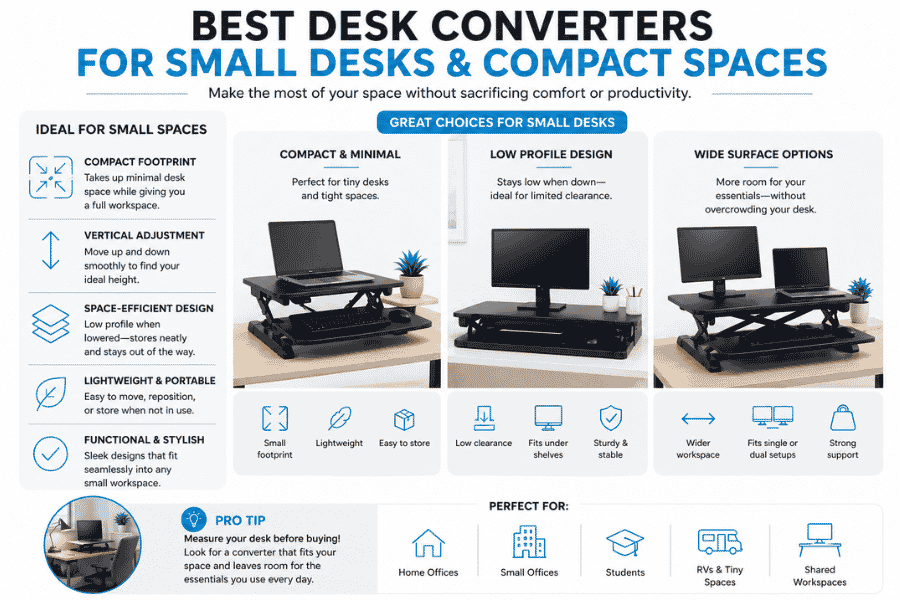
A smaller converter doesn’t necessarily mean compromising on usability. Many compact designs still provide enough space for a laptop, keyboard, and a few essentials, while maintaining a clean and uncluttered feel. The key is finding a model that balances footprint with practicality.
When working with limited space, it helps to look for:
- Slim or narrow designs that sit neatly on your desk
- Lightweight construction for easier repositioning
- Minimalist keyboard trays or integrated surfaces
- Efficient vertical lift to avoid needing extra clearance
Compact desk converters can be surprisingly versatile when chosen well. They offer a straightforward way to introduce standing into your routine without overwhelming your workspace or making it feel cramped.
Best Desk Converters for Dual Monitors and Larger Set-ups
If you’re considering upgrading from a a single to a dual-monitor setup, a standard compact converter may quickly feel limiting. Dual monitors, along with a keyboard, mouse, and possibly a laptop, require a broader and more stable platform to keep everything secure and comfortable at standing height.
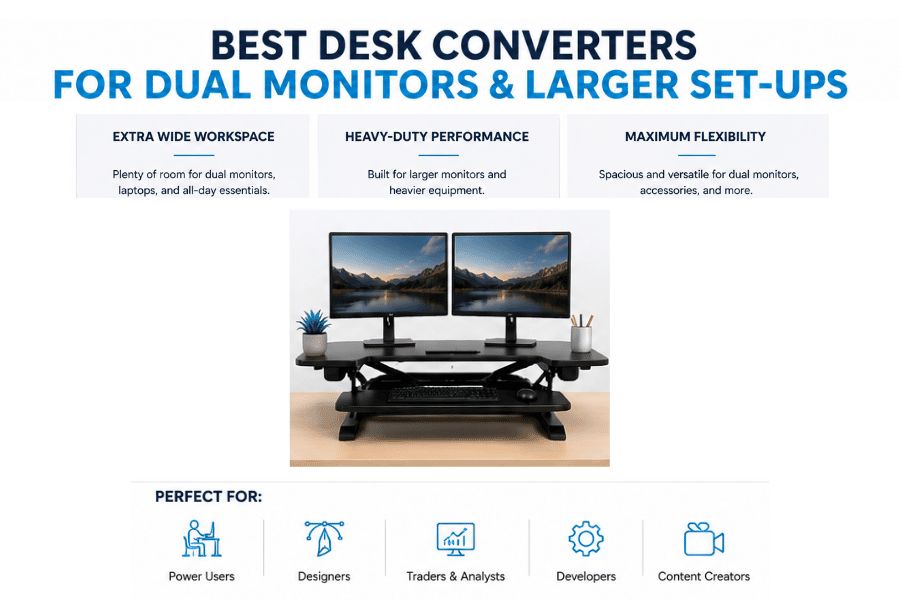
Larger desk converters are designed with this in mind. They typically offer wider surfaces, higher weight capacities, and reinforced frames to prevent wobble, especially when fully extended. This added stability becomes increasingly important when you’re working with heavier or more expensive equipment.
When choosing a converter for a larger set-up, it’s worth focusing on:
- Wider top surfaces to comfortably fit two monitors
- Higher weight capacity to support all your equipment
- Strong, stable lift mechanisms to reduce wobble
- Spacious or adjustable keyboard trays for better ergonomics
A well-suited model should allow you to transition between sitting and standing without having to rearrange your entire desk each time. The goal is to maintain a seamless workflow, even with a more complex set-up.
Comparing Popular Desk Converter Designs and Sizes
Desk converters come in a surprising range of designs, and the differences are not just aesthetic. From compact single-surface platforms to larger two-tier models with dedicated keyboard trays, each design suits a slightly different way of working. The right choice often comes down to how much equipment you use and how much space you’re willing to give up on your desk.
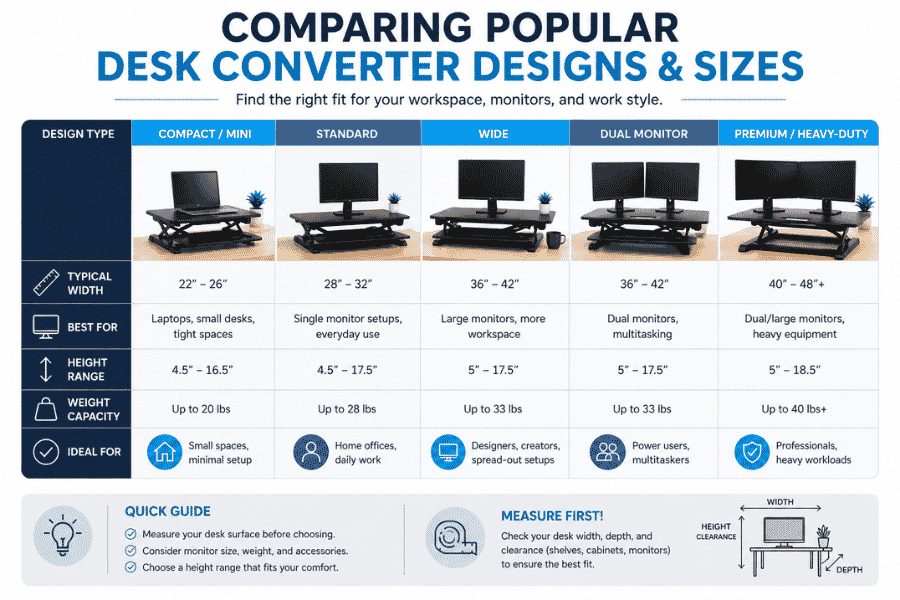
For example, minimalist platforms like the Opløft Sit-Stand Platform focus on simplicity and portability, with a slim profile that folds down neatly when not in use. These are ideal for lighter setups or shared workspaces, as they’re easy to move and store, while still offering multiple height settings and smooth adjustment . In contrast, more traditional converters such as the Ergotron WorkFit-T are built with larger surfaces and separate tiers, making them better suited to multi-monitor arrangements and heavier daily use.
When comparing designs, it helps to think in practical terms:
- Single-surface platforms – clean, minimal, and easy to store
- Two-tier converters – better ergonomics with separate keyboard positioning
- Wide formats – designed for dual monitors or larger equipment
- Compact models – ideal for smaller desks or flexible workspaces
Size also plays a bigger role than people expect. A converter that’s too small can feel restrictive, while one that’s too large may dominate your desk. Finding the right balance is what ultimately makes a set-up feel comfortable rather than cluttered.
Ergonomics Explained: Setting Up Your Desk Converter Correctly
Even the best desk converter won’t feel right if it’s not set up properly. Ergonomics is less about strict rules and more about creating a natural, comfortable working position that you can maintain without strain over long periods.
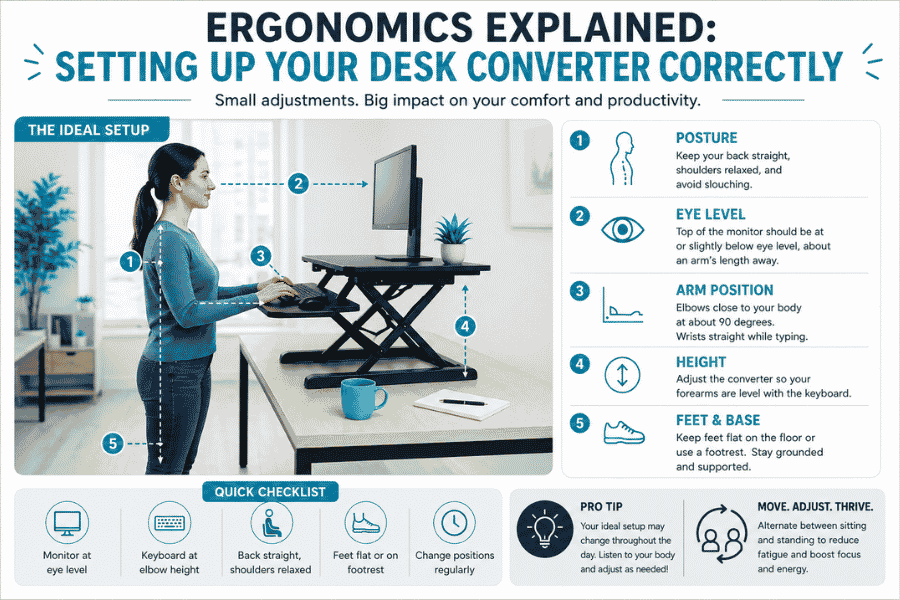
The key is alignment. Your screen should sit at roughly eye level, while your keyboard should allow your arms to rest comfortably at around a 90-degree angle. Many converters, particularly those with adjustable tiers, are designed to help you fine-tune this positioning so you’re not forced into awkward angles. Research around sit-stand workstations shows that even small adjustments in posture can improve comfort and reduce fatigue over time .
A few simple guidelines can make a noticeable difference:
- Keep your monitor at eye level to avoid neck strain
- Position your keyboard so your wrists stay neutral
- Stand with your weight evenly distributed
- Alternate between sitting and standing rather than staying in one position too long
It’s also worth giving yourself time to adjust. Standing all day isn’t the goal, rather it’s about movement and variety. A well-set-up desk converter should support that balance, making it easier to work comfortably whether you’re sitting or standing.
Desk Converter Weight Capacity and Stability Considerations
It’s easy to overlook weight limits when choosing a desk converter, but they play a crucial role in how safe and reliable your set-up feels. Every model is built to support a certain load, and exceeding that can lead to instability, uneven movement, or long-term wear that shortens the lifespan of the unit.
Stability is closely linked to weight capacity, but also to the overall design and build quality. A well-constructed converter should feel solid at both sitting and standing heights, without noticeable wobble when typing or adjusting your screens. This becomes even more important if you’re using dual monitors or heavier equipment.
When assessing stability and load capacity, keep an eye on:
- Maximum weight rating and how close your set-up comes to it
- Base design and footprint for proper balance
- Quality of the lift mechanism and frame construction
- Performance at full extension, where wobble is most likely
Choosing a model with a little extra capacity than you strictly need is often a wise choice. It not only improves stability but also gives you flexibility if your set-up evolves over time.
Style and Build Quality: Finding the Right Finish for Your Office
While functionality comes first, style and build quality shouldn’t be dismissed. A desk converter is something you’ll interact with every day, so it helps if it feels well-made and fits naturally into your workspace rather than looking like an afterthought.
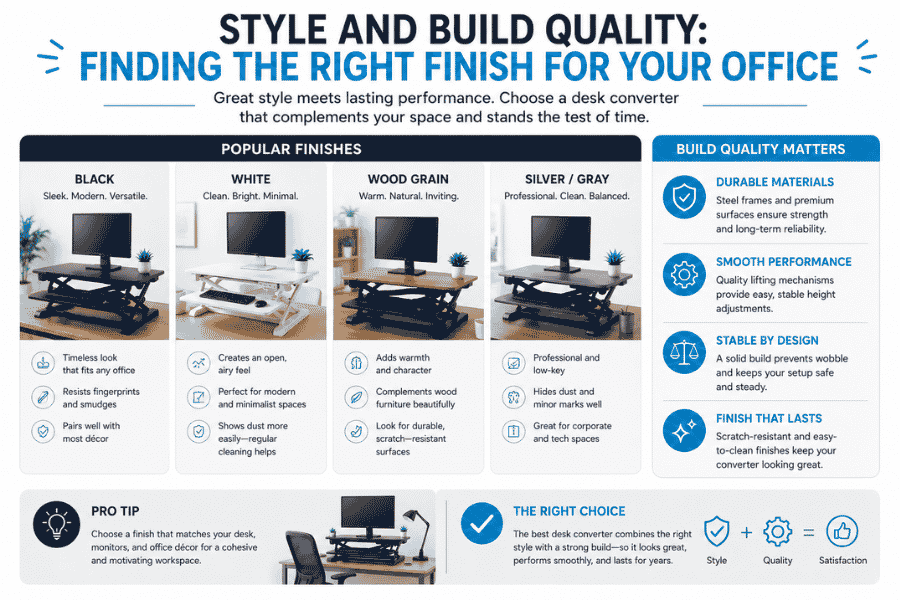
Materials and finishes can vary quite a bit between models. Some favour a clean, modern look with smooth surfaces and minimal lines, while others lean towards a more practical, industrial design. Neither is inherently better, but the choice can influence how your workspace feels overall.
A few elements worth considering include:
- Surface finish, such as matte, wood-effect, or gloss
- Frame material and overall sturdiness
- Attention to detail in joints and moving parts
- How well the design complements your existing desk and décor
A solid build not only looks better but tends to last longer and perform more consistently. Over time, those small details contribute to a smoother, more satisfying everyday experience.
Common Mistakes to Avoid When Buying a Desk Converter
With so many options available, it’s easy to make a quick decision and only realise later that something doesn’t quite fit your needs. Many of the most common issues come down to overlooking practical details rather than choosing a “bad” product.
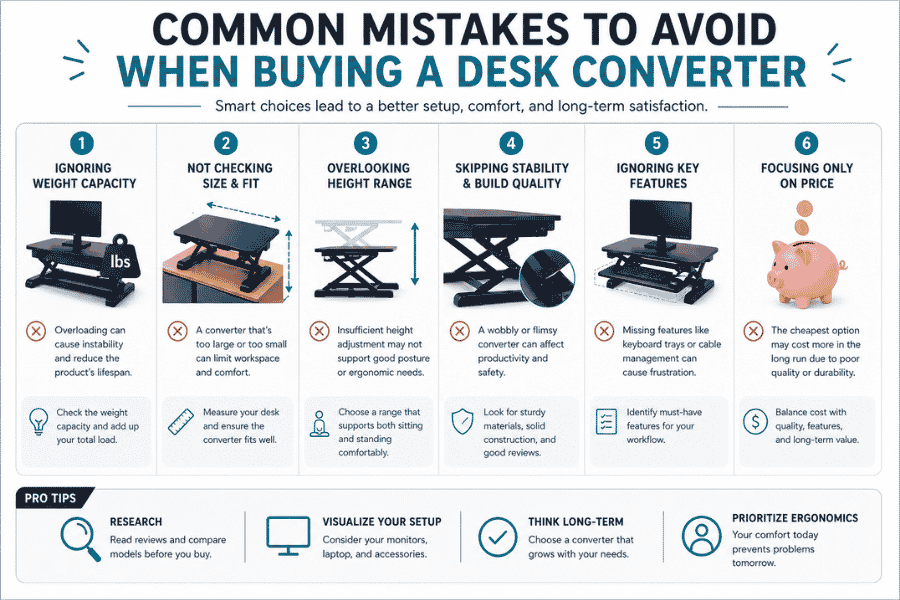
One of the biggest mistakes is underestimating how much space and support your set-up requires. A converter that looks fine online can feel cramped or unstable once it’s in use, especially if you’re working with multiple devices or limited desk space.
A few pitfalls to watch out for:
- Choosing a size that’s too small for your equipment
- Ignoring weight limits and stability concerns
- Overlooking height range and ergonomic fit
- Picking a model that’s awkward to adjust regularly
- Focusing on price alone without considering long-term use
Taking a bit of extra time to think through your needs can save a lot of frustration later. A well-chosen desk converter should feel intuitive to use and fit comfortably into your daily routine, rather than becoming something you have to work around.
Final Thoughts: Choosing the Best Desk Converter for Your Needs
Finding the best desk converter isn’t about picking the most expensive or feature-packed option, but rather choosing one that fits naturally into your workspace and routine. The right model should support your equipment comfortably, adjust with ease, and encourage you to move more throughout the day.
Whether you opt for a compact design for a smaller desk or a larger unit for a multi-monitor set-up, the key is balance. Comfort, stability, and practicality tend to matter far more in the long run than any single standout feature.
With the right choice, a desk converter can quietly improve the way you work. It becomes less about the product itself and more about how it helps you feel throughout the day, supporting a healthier and more flexible approach to your workspace.
Frequently Asked Questions
Are desk converters worth it?
For many people, yes. A desk converter offers a simple way to introduce more movement into your working day without replacing your entire desk, and that flexibility alone can make a noticeable difference in comfort over time.
Can a desk converter hold dual monitors?
Some can, but not all. You’ll need to check the weight capacity and surface size carefully, as models designed for dual monitors are typically wider and built with more robust frames to ensure stability.
How often should I switch between sitting and standing?
There’s no fixed rule, but a common approach is to alternate every 30 to 60 minutes. The goal isn’t to stand all day, but to avoid staying in one position for too long and to keep your body moving naturally.
Do desk converters require assembly?
Most arrive either fully assembled or require only minimal set-up. This is part of their appeal, as you can usually start using them straight out of the box without tools or complicated instructions.
Will a desk converter damage my existing desk?
In general, no, as long as it’s used correctly. Choosing a model with a stable base and avoiding excessive weight will help protect your desk surface, and some designs include padding to prevent marks or scratches.